Need help?
Do you have a question about the Crosley CR7019A and is the answer not in the manual?
Read and understand the entire manual before using the product. Keep instructions for future reference.
Place the unit on a flat, level, stable surface, free from vibration. Connect AC adapter.
Connect an audio device via 3.5mm cable and select AUX mode to play music.
Connect speakers to the unit using red and white plugs for right and left channels.
Turn on the unit, select FM mode, and use buttons to scan and select stations.
The platter stops automatically when the record ends if the switch is ON. Adjust if needed.
Gently pull the front edge of the needle downwards, then pull forward and out.
Position needle tip down, line up the back with the cartridge, insert at an angle, and lift until it snaps.
Do not touch stylus, clean stylus/records properly, and use a damp cloth for the cabinet.
Addresses power loss and no sound issues, suggesting checks for connections, outlets, stylus protector, and tonearm.
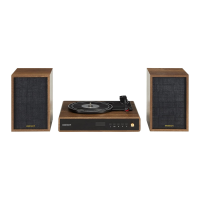
The Crosley CR7019A Aria Shelf System is a versatile audio device designed for playing vinyl records, listening to FM radio, and streaming music via Bluetooth or auxiliary input. This system combines classic turntable functionality with modern connectivity, making it suitable for various audio playback needs.
The core function of the CR7019A is to play vinyl records at multiple speeds, offering a nostalgic audio experience. It features a belt-driven turntable mechanism that supports 33 1/3, 45, and 78 RPM records. For 45 RPM records, a dedicated adapter is included. The turntable is equipped with a tonearm, a tonearm lever for gentle placement and lifting, and an auto-stop switch that can automatically stop the platter when a record finishes playing.
Beyond vinyl playback, the system includes an integrated FM radio tuner. Users can automatically search for and preset radio stations, navigating through them using skip buttons.
Bluetooth connectivity is a key modern feature, allowing users to wirelessly stream audio from compatible devices such as smartphones or tablets. The system is easily discoverable as "CROSLEY CR7019A" and provides a confirmation sound upon successful pairing. The Bluetooth version is 5.0, ensuring stable and efficient wireless connection.
For wired audio input, the CR7019A provides an Aux In jack. This enables connection to external audio devices using a 3.5mm auxiliary cable, allowing their audio to be played through the system's speakers.
The system comes with two external speakers, which connect to the main unit via dedicated speaker jacks (Red for the Right channel, White for the Left channel). This stereo setup enhances the audio experience.
User interaction is facilitated through a display screen that shows the current mode (e.g., "PHON" for phono, "bt" for Bluetooth, radio station frequency for FM). Control buttons include Power, Mode, Backward Skip, Forward Skip, and Play/Pause, along with a Volume Knob for audio adjustment.
 General
| Brand | Crosley |
|---|---|
| Model | CR7019A |
| Category | Indoor Furnishing |
| Language | English |

 To Next Page