
 Need help?
Do you have a question about the Crosscall CORE-X5 and is the answer not in the manual?
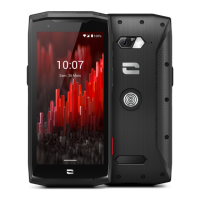
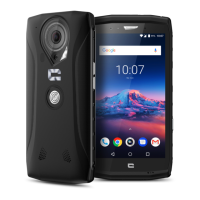
Physical layout and components of the CORE-X5 smartphone.
Key technical specifications and communication features of the phone.
Details processor, OS, build quality, and durability aspects of the device.
Focuses on design, warranty, and resistance features for professional use.
Step-by-step guide for inserting SIM and storage cards into the device.
Explains the magnetic connector for attaching accessories and data transfer.
Describes the mechanical mounting system for secure attachment to accessories.
Details tap, long press, swipe, and drag gestures for device interaction.
Explains pinch to zoom and spread gestures for navigation and viewing.
Describes Home, Back, and Open Apps button roles for system control.
How to access the list of all installed applications on the device.
How to view, manage, and delete incoming notifications.
How to access and customize quick settings for device functions.
Explains the power button, volume controls, and their primary functions.
How to configure the four programmable buttons for custom actions.
Explains the LED indicator's role in displaying notifications and battery status.
Covers dialing, call logs, international calls, and call reception methods.
How to configure advanced call settings for 4G and WIFI calls.
Managing contacts and sending/displaying text messages.
Step-by-step guide to using the camera for photos and videos.
QR code scanning and underwater photography/videography functions.
Viewing, deleting, sharing media, and using Google Lens integration.
Method for migrating data from Android devices to the new phone.
Method for restoring data from cloud backups to the new device.
Method for migrating data from iPhones to the CORE-X5.
Configuring dual SIM cards and call/data preferences.
Enabling/disabling mobile data and using the web browser.
Setting up and configuring email accounts on the device.
Customizing the main screen with widgets and app shortcuts.
Changing the phone's background and creating app shortcuts.
Adjusting sound settings, ringtones, and volume levels.
Managing app notifications and LED indicator settings.
Configuring date, time, and language settings.
Using split screen and taking screenshots for productivity.
Managing screen rotation and using double-tap to wake the screen.
Projecting screen to external displays and using with gloves.
Using NFC for payments and sharing battery power.
Feature for identifying phone during charging and leash attachment.
Using the built-in calculator for simple and complex calculations.
App for accessing phone sensors like compass, accelerometer, and GPS.
Emergency app for raising alarms and contacting help.
Connecting the emergency app to a physical button for quick activation.
How to trigger an emergency alert and test functionality.
Essential safety precautions for phone usage and potential risks.
Legal disclaimer regarding app usage and user responsibility.
Walkie-talkie app for group communication without a phone number.
Photo and video editing app for assembling, trimming, and enhancing media.
PIN, PUK codes, network errors, and power-on problems.
Solutions for touch screen responsiveness and device freezing issues.
Addressing call connection, microphone, echo, and audio quality problems.
Fixing charging problems and rapid battery drain.
Resolving camera app errors and media file playback issues.
Managing device storage and the importance of data backup.
Solutions for Bluetooth and computer connection problems.
Improving GPS accuracy and resolving navigation bar visibility.
Guidelines for using the phone in wet conditions and proper care.
Precautions regarding pacemakers and other medical devices.
Safety advice for using the phone while driving.
Safe charging practices and hearing protection advice.
Guidelines for responsible disposal and phone cleaning procedures.
Information on emergency calls and minimizing radiation exposure.
Technical data on radio frequencies and maximum power output.
Recommended accessories, software versions, and SAR values.
General advice for optimal phone experience and warranty details.
 General
| IK code | IK05 |
|---|---|
| Form factor | Bar |
| Product color | Black |
| Protection features | Drop proof, Waterproof |
| International Protection (IP) code | IP68 |
| Operating temperature (T-T) | -25 - 60 °C |
| Platform | Android |
| Operating system installed | Android 11 |
| Processor cores | 8 |
| Processor model | 665 |
| Processor family | Qualcomm Snapdragon |
| Processor frequency | - GHz |
| Body SAR (EU) | 1.521 W/kg |
| Head SAR (EU) | 1.335 W/kg |
| Extremities SAR (EU) | 3.041 W/kg |
| Screen shape | Flat |
| Display diagonal | 5.45 \ |
| Touchscreen type | Capacitive |
| Display brightness | 500 cd/m² |
| Display resolution | 1440 x 720 pixels |
| Gorilla Glass version | Gorilla Glass 3 |
| Talk time (3G) | 32 h |
| Battery capacity | 4940 mAh |
| Standby time (3G) | - h |
| Standby time (4G) | 312 h |
| 4G standard | LTE-TDD & LTE-FDD |
| 3G standards | HSPA+ |
| SIM card type | NanoSIM |
| Wi-Fi standards | 802.11a, 802.11b, 802.11g, Wi-Fi 4 (802.11n), Wi-Fi 5 (802.11ac) |
| Bluetooth version | 5.0 |
| 3G bands supported | 850, 900, 1700, 1900, 2100 MHz |
| 4G bands supported | 700, 800, 850, 900, 1500, 1800, 1900, 2100, 2300, 2600 MHz |
| SIM card capability | Dual SIM |
| Mobile network generation | 4G |
| Voice over LTE (VoLTE) supported | Yes |
| USB version | 3.2 Gen 1 (3.1 Gen 1) |
| USB connector type | USB Type-C |
| Headphone connectivity | 3.5 mm |
| AC adapter power | 10 W |
| RAM capacity | 4 GB |
| Compatible memory cards | MicroSD (TransFlash) |
| Maximum memory card size | 512 GB |
| Internal storage capacity | 64 GB |
| Flash type | LED |
| Rear camera type | Single camera |
| Rear camera resolution (numeric) | 48 MP |
| Front camera resolution (numeric) | 8 MP |
| Subscription type | - |
| Audio formats supported | AAC, AMR, MIDI, MP3, WAV |
| Video formats supported | H.264, H.265, MPEG4 |
 Weight and Dimensions
| Depth | 14.5 mm |
|---|---|
| Width | 78 mm |
| Height | 163 mm |
| Weight | 256 g |



 To Next Page