
 Need help?
Do you have a question about the Crosscall SPIDER-X1 and is the answer not in the manual?
Device adherence to regulatory requirements and declaration of conformity.
Step-by-step guide for inserting SIM cards and the battery into the device.
Detailed steps for making, answering, and managing phone calls.
 General
| Display type | TFT |
|---|---|
| Display diagonal | 1.77 \ |
| Display resolution | 128 x 160 pixels |
| Internal memory | 32 MB |
| Flash card support | Yes |
| Compatible memory cards | MicroSD (TransFlash) |
| Maximum memory card size | 16 GB |
| Rear camera resolution (numeric) | 0.3 MP |
| WAP | 2.0 |
| Data network | - |
| SIM card capability | Dual SIM |
| 2G bands (primary SIM) | 850, 900, 1800, 1900 MHz |
| Form factor | Bar |
| Personal info management (PIM) | Alarm clock, Calculator, Calendar |
| Bluetooth version | 2.1+EDR |
| Multimedia Messaging Service (MMS) | Multimedia Messaging Service (MMS) is a standard way to send messages that include multimedia content to and from a mobile phone over a cellular network |
| Ringer type | MP3 |
| Talk time (2G) | 6 h |
| Battery voltage | 3.7 V |
| Battery capacity | 1000 mAh |
| Standby time (2G) | 240 h |
| Subscription type | No subscription |
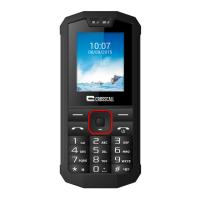
| Product color | Red |
| Body SAR (EU) | - W/kg |
| Specific absorption rate (SAR) value (EU) | 1.071 W/kg |
 Weight and Dimensions
| Depth | 16 mm |
|---|---|
| Width | 53.5 mm |
| Height | 117 mm |
| Weight | 94 g |





 To Next Page