
 Need help?
Do you have a question about the Crosscall SPIDER-X5 and is the answer not in the manual?
Please read the safety precautions carefully to ensure the correct use of your mobile phone.
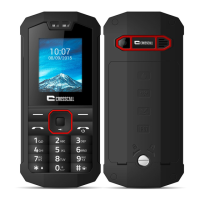
Model, dimensions, and weight of the SPIDER-X5 phone.
Organize and manage files on the phone or memory card.
Managing call history and call settings like blacklists and auto-redial.
Configuring call cost, timers, waiting, divert, and barring.
Setting phone passwords and auto keypad lock.
Erasing personal data and resetting the phone to factory defaults.
 General
| Display diagonal | 2.4 \ |
|---|---|
| Display resolution | 240 x 320 pixels |
| Type | - |
| Product color | Black |
| Built-in flashlight | Yes |
| RAM capacity | 64 MB |
| Internal memory | 128 MB |
| Memory card slot type | Dedicated slot |
| Compatible memory cards | MicroSD (TransFlash) |
| Maximum memory card size | 32 GB |
| Flash type | LED |
| Digital zoom | 6 x |
| Rear camera resolution (numeric) | 2 MP |
| Data network | HSPA+ |
| 3G bands supported | 900, 2100 MHz |
| SIM card capability | Single SIM |
| 2G bands (primary SIM) | 850, 900, 1800, 1900 MHz |
| Mobile network generation | 3G |
| Bluetooth version | 2.1+EDR |
| USB version | 2.0 |
| Headphone connectivity | 3.5 mm |
| Multimedia Messaging Service (MMS) | Multimedia Messaging Service (MMS) is a standard way to send messages that include multimedia content to and from a mobile phone over a cellular network |
| Talk time (2G) | 6 h |
| Talk time (3G) | 4.5 h |
| Battery capacity | 1350 mAh |
| Standby time (2G) | - h |
| Subscription type | No subscription |
| Body SAR (EU) | 1.6 W/kg |
| Head SAR (EU) | 1.13 W/kg |
| Extremities SAR (EU) | 3.63 W/kg |
| Form factor | Bar |
| Harmonized System (HS) code | 85171400 |
 Weight and Dimensions
| Depth | 15 mm |
|---|---|
| Width | 60 mm |
| Height | 130 mm |
| Weight | 130 g |





 To Next Page