10
Silencing Nuisance Alarms
Alarm Features and Functions
Testing the Alarm
Every alarm should be tested weekly to ensure proper operation.
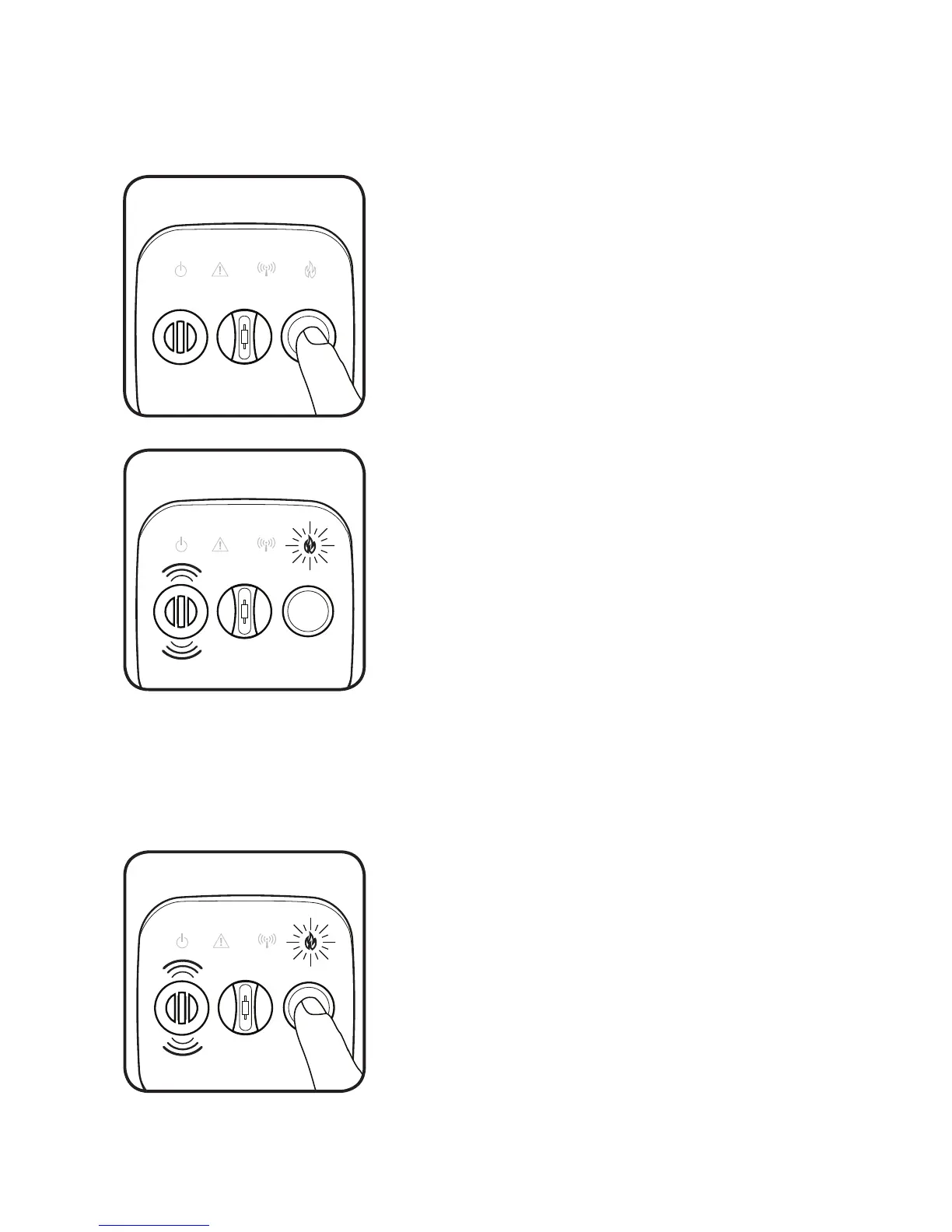
To test the alarm, press and release the button on
the front face.
The alarm will sound with 3 beeps and FIRE light
will flash rapidly.
All four icons will strobe to indicate a successful
test.
The alarm will then send out a network test
command and all other alarms on the network will
perform the steps above.
If the alarm fails, the horn will sound. Clean the
alarm (as described in this manual) and retest. If the
alarm still fails, contact the manufacturer.
The Crossfire family of alarms is equipped with a silence feature that will
decrease the sensitivity of the alarm and silence nuisance alarms.
If in the course of normal activity, cooking smoke,
steam or other gases cause the alarm to activate,
the alarm can be silenced for ten minutes by
pressing the button on the front face of the
alarm.
The silence feature will also silence any alarms
that were triggered remotely. However, the
initiating alarm must be silenced directly.
If the quantity of smoke is too great, the
alarm will not silence until the air has
cleared sufficiently.


 To Next Page