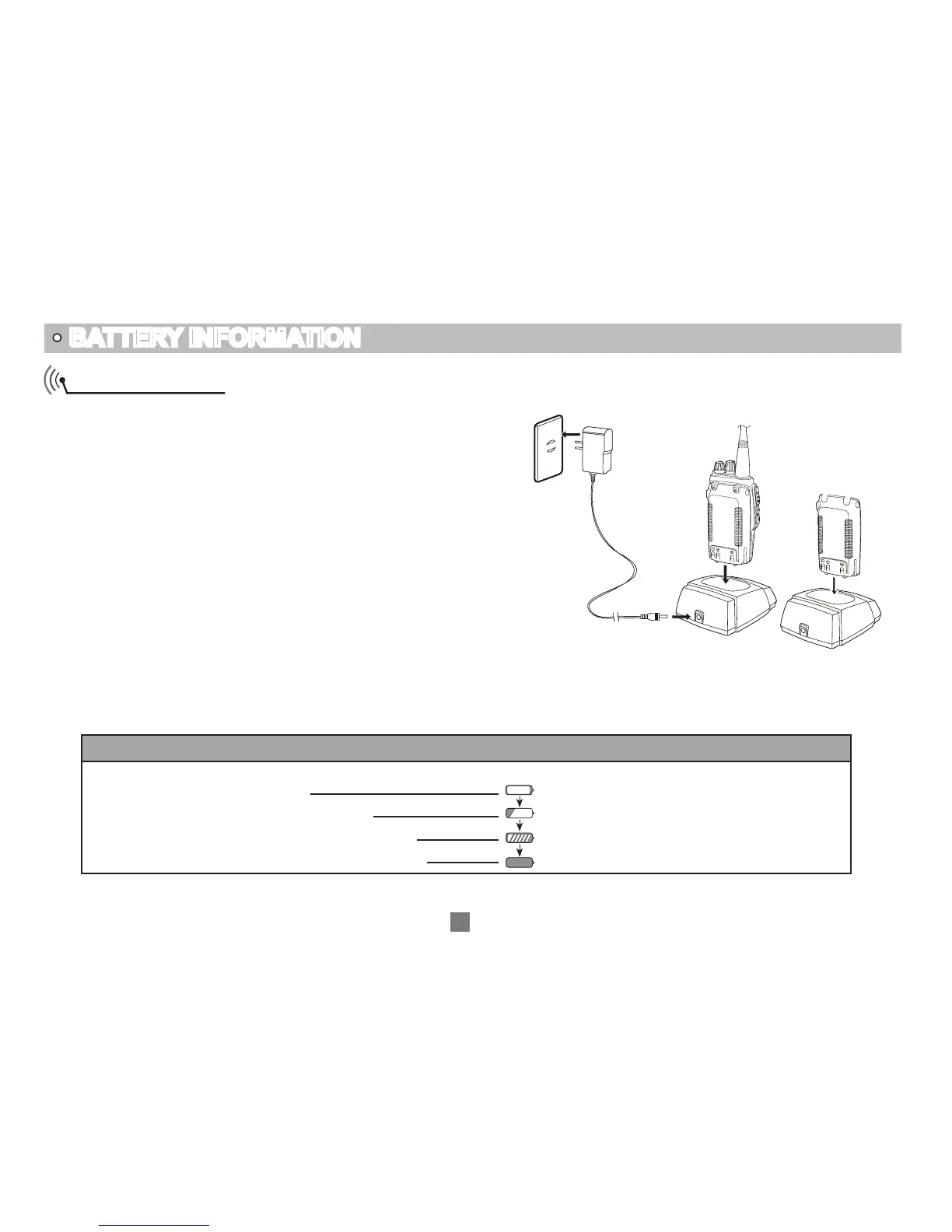
How to Charge
Plug the AC adaptor into the AC outlet, then plug the
1.
cable of AC adaptor into the DC jack, the indicator
lights orange for 1s and turns into GREEN---waits to
charge.
Slide the battery or transceiver with battery into the
2.
charger; make sure the battery terminals are in contact
with the charging terminals. LED turns into twinkling
RED---pre-charging begins.
Pre-charging for about 5 minutes, LED twinkles stop
3.
then charging begins.
It takes about 5.5 hours to fully charge the battery,
4.
when LED turns into GREEN— full charged.
BATTERY INFORMATION
Ac Input
06
Charging Process:
5.
Status LED
Standby (self-examine orange lights
1second when power on)
Pre-charging (pre-charging stage)
Charging (charge in constant currency)
Full charged (charge in constant voltage)
Green light
Red light twinkles for about 5 minutes
RED light lightens for about 5.5 hours
Green light


 To Next Page