23
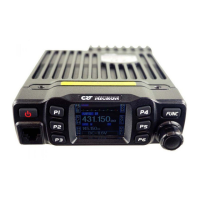
1. Hold [FUNC] key to enter SELECT MENU interface.
2. Short press [P4] key, [P6] key or turn channel knob to choose menu list. Press [P5] can
fast turn page.
3. Press [PUSH] to enter MINI KEY menu list.
4. Turn channel knob to choose wanted setting.
5. Short press [PUSH] button to choose wanted keypad group .
6. Short press [P1]~[P6] key to choose wanted self-define key. Short press [FUNC] to
conrm and exit.
1. Hold [FUNC] key to enter SELECT MENU interface.
2. Short press [P4] key, [P6] key or turn channel knob to choose menu list. Press [P5] can
fast turn page.
3. Press [PUSH] button to enter HANDY KEY menu list.
4. Short press [P4] key, [P6] key or turn channel knob to choose wanted setting.
1. Hold [FUNC] key to enter SELECT MENU interface.
2. Short press [P4] key, [P6] key or turn channel knob to choose menu list. Short press [P5]
key can fast turn page.
3. Press [PUSH] button to enter HAND KEY menu list, choose No.1 function, press [PUSH]
key to enter value setting, the menu value in LCD turns to green color.
4. Turn channel knob to choose wanted setting, the microphone keypad has OFF-31, total
32 brightness levels. OFF means turn off backlight brightness.
5. Press [PUSH] key or [P3] key to store setting and exit..
1. Enter CHAN MENU list, choose No.11 function
2. Press [PUSH] button, the menu value in LCD turns to green color.
3. Turn channel knob to choose wanted setting.
ON: TX allowed, press [PTT] to transmit
OFF: TX not allowed, only work in RX mode, press [PTT] will emit a beep.
4. Press [PUSH] button or [P3] key to store setting and exit
9.1 Main unit keypad menu setup
9.2 H-DIM Microphone keypad backlight setup
9.3 Microphone keypad backlight brightness Setup
8.11 TX OFF
9. KEYPAD MENU SETUP
RL: Signaling busy lockout, transmitting is inhibited when current
channel receives a matching carrier but dis-matching CTCSS/DCS code.
OFF: Busy channel lockout is disabled.Transmitting is allowed in any receiving status
4. Press [PUSH] button or [P3] key to store setting.


 To Next Page