DW channels
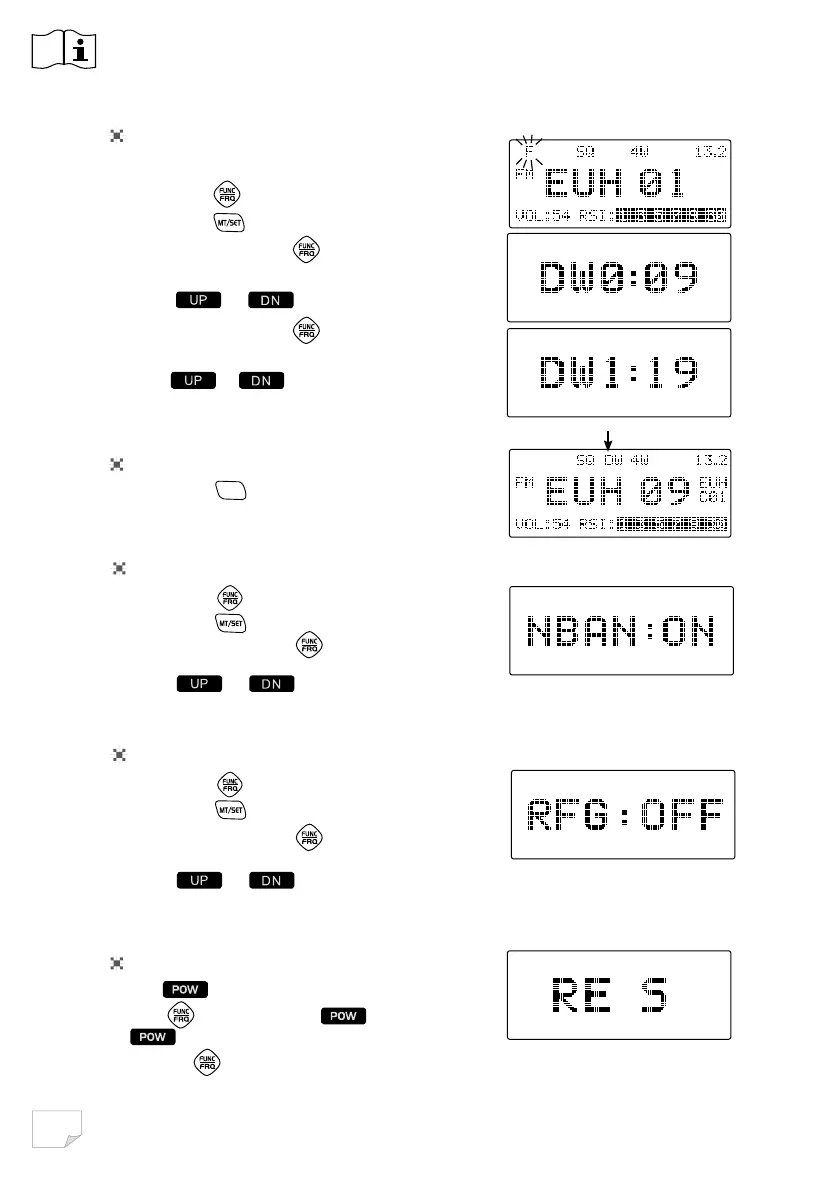
2 channels need be pre-stored for dual watch function.
1. Short Press
key),FRQDSSHDUDQGÀDVKHV
2. Short Press
key to enter Menu.
3. Repeatly short press
key until LCD displays
DW0: XX
4. Press
or to choose first DW channel
5. Repeatly short press
key until LCD displays
DW1: XX
6. Press
or to choose second DW channel.
6KRUWSUHVVDQ\RWKHUNH\WRFRQ¿UPDQGH[LW
Using DW function
1. Short press
DW/M2
key, the DW ÀDVKHV in LCD, the
UDGLRHQWHU'XDOZDWFKPRGH
Factory reset
1. Hold to Power off radio.
2. Hold
key, then press key and release
key until LCD disaplays RE S.
3. Release
, the radio recover to factory defualWDQGDXWRPDWLFDOSRZHURff.
Factory reset
1. Short press
key),FRQDSSHDUDQGÀDVKHV
2. Short Press
key to enter Menu.
3. Repeatly short press
key until LCD displays
NBAN: XX
4. Press
or to choose ON or OF
6KRUWSUHVVDQ\RWKHUNH\WRFRQ¿UPDQGH[LW
NB/ANL
function
1. Short press
key),FRQDSSHDUDQGÀDVKHV
2. Short Press
key to enter Menu.
3. Repeatly short press
key until LCD displays
RFG: XX
4. Press
or to choose RF gain level.
6KRUWSUHVVDQ\RWKHUNH\WRFRQ¿UPDQGH[LW
RF Gain
:KHQ5)*LVRQWKH/&'GLVSOD\V5)*DQGLIFKRRVHWKHVLJQDOZLOODWWHQXDWHG%P
control


 To Next Page