EasyManua.ls Logo

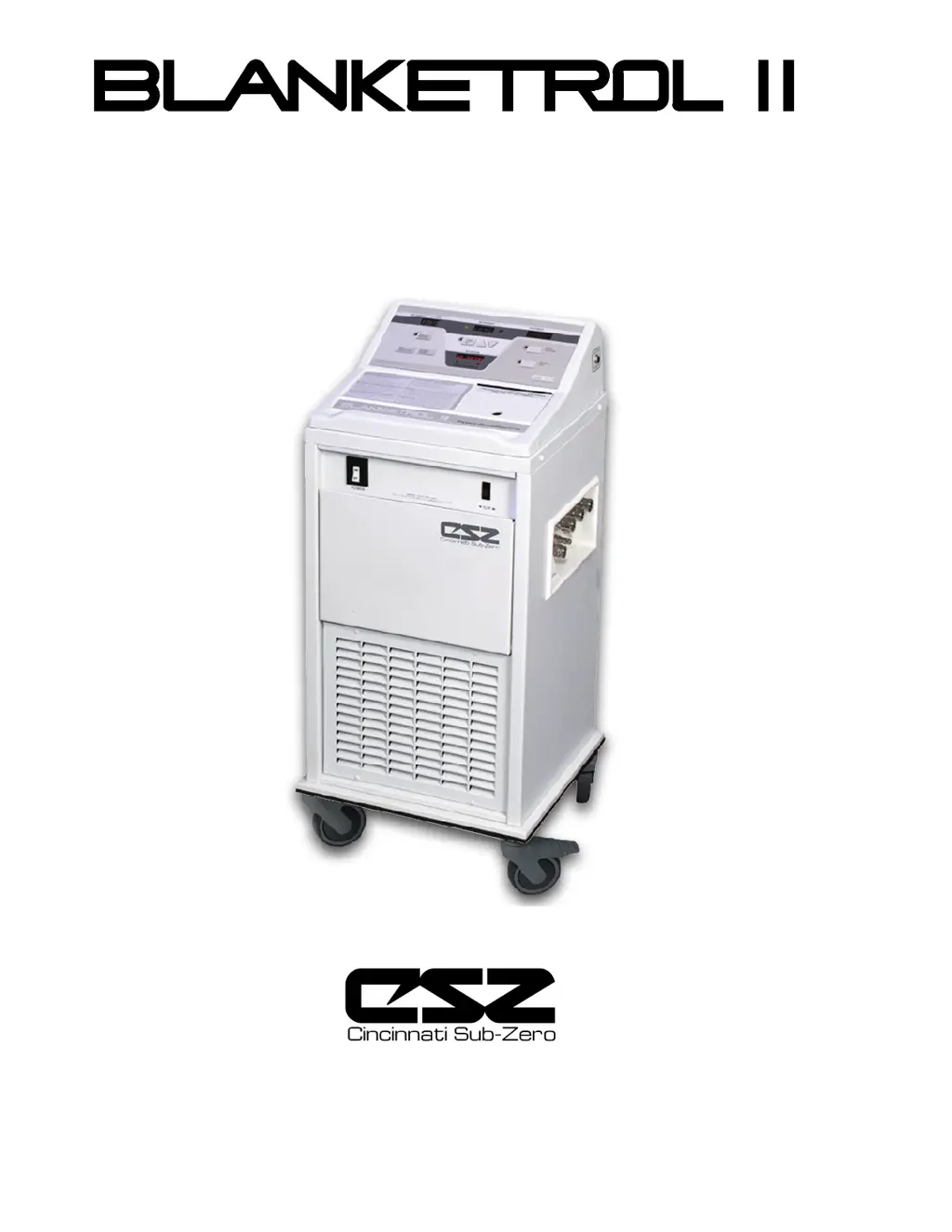
CSZ Blanketrol_ii - User Manual

CSZ Blanketrol_ii
103 pages
Print Icon
To Next Page IconTo Next Page
Loading...
I
Operation and Technical Manual
Model 222R Hyper-Hypothermia Units
Cincinnati Sub-Zero Products, Inc. 12011 Mosteller Road Cincinnati, Ohio 45241, U.S.A.
www.cszmedical.com
In Europe: CEpartner4U Esdoornlaan 13, 3951 DB Maarn.
The Netherlands

Table of Contents

Questions and Answers

  • S
    Sydney KnoxSep 23, 2025
    Why isn't the patient display lighting up in automatic mode on my CSZ Medical Equipment?
    • C
      Cindy LewisSep 23, 2025
      If the Patient display doesn't light up and the alarm doesn't sound when operating your CSZ Medical Equipment in Automatic mode, it could be due to several reasons. If the SETPOINT TEMP is out of the range of 30°C to 40°C (86°F to 104°F) and the STATUS display is flashing check SETPOINT, adjust the temperature. If the Status display flashes CK PROBE, replace the probe with a new 400 Series Probe. If the cable from the probe jack to microprocessor board is disconnected, reconnect it. If the probe jack on the side of unit is defective, replace it.
  • S
    Shelby PetersonAug 25, 2025
    What to do if patient display goes blank and CK PROBE appears on CSZ Blanketrol_ii?
    • A
      Aaron BrownAug 25, 2025
      If, when operating your CSZ Medical Equipment in Automatic mode, the Patient display goes blank, the alarm sounds, and the Status display reads CK PROBE, it could be due to several reasons. Ensure that the correct 400 Series probe is being used. Reinsert the probe into the patient. If the issue persists, the probe might be defective and needs replacement with a new 400 Series probe. Also, check if the cable from the probe jack to the microprocessor board is disconnected and reconnect it if necessary. If none of these steps resolve the issue, the probe jack on the side of the unit might be defective and require replacement.
  • T
    tiffanybarnettAug 25, 2025
    Why does my CSZ Medical Equipment show HI LIMIT and REMOVE FROM SERVICE?
    • K
      Krista JacksonAug 26, 2025
      If the Status display on your CSZ Medical Equipment flashes HI LIMIT and REMOVE FROM SERVICE, it means the back-up High Limit Safety device has been triggered, shutting down the unit because the circulating water and reservoir have reached 46°C ± 2°C (115°F ± 4°F). In this case, replace the microprocessor board and the thermal disc. Also, check if the water isn't circulating due to a clogged bypass or a malfunctioning pump. If so, turn the unit OFF and force compressed air into the male outlets.
  • K
    Kimberly DaltonAug 27, 2025
    How to troubleshoot switches that don't stay set on CSZ Blanketrol_ii?
    • J
      Judy MorrisAug 27, 2025
      If a switch on the control panel of your CSZ Medical Equipment doesn't stay set when pressed, a switch remains set when the operating mode is changed, or another switch snaps on when the TEMP SET switch is pressed, the membrane switch has likely failed. You should replace the control panel.
  • D
    Deanna HarperAug 27, 2025
    Why is my CSZ Blanketrol_ii blanket not cooling?
    • W
      wgallowayAug 27, 2025
      If the blanket on your CSZ Medical Equipment isn't cooling, first, ensure the switches are set correctly and that water is circulating properly. If the compressor is running but not cooling, check the sight glass for leaks and consider recharging the system. If the compressor isn't running, check for voltage to the compressor.
  • D
    Diana RobersonSep 13, 2025
    Why does my CSZ Blanketrol_ii Medical Equipment flash CK SET PT?
    • M
      mconleySep 13, 2025
      If your CSZ Medical Equipment momentarily blanks and then the Status display flashes CK SET PT, there may be low line voltage or power source issues. Check the line voltage, reset the Setpoint display, and resume operations.
  • W
    watkinsdonnaSep 12, 2025
    What does NRAM BAD mean on my CSZ Medical Equipment?
    • J
      Jeff BerrySep 12, 2025
      If the Status display on your CSZ Medical Equipment indicates NRAM BAD and the micro-processor board's alarm sounds, the microprocessor board is likely defective and needs to be replaced.
  • J
    James LeonardSep 12, 2025
    Why won't the Celsius/Fahrenheit indicator change on my CSZ Blanketrol_ii Medical Equipment?
    • A
      Albert HoganSep 12, 2025
      If the Celsius/Fahrenheit indicator on the control panel of your CSZ Medical Equipment doesn't change when the Celsius/Fahrenheit selector switch is pressed, the selector switch itself has likely failed and needs to be replaced.
  • M
    Melissa BeckerSep 4, 2025
    What does SENSOR and REMOVE FROM SERVICE mean on CSZ Medical Equipment?
    • J
      james32Sep 4, 2025
      If the Status display on your CSZ Medical Equipment flashes SENSOR and REMOVE FROM SERVICE, it indicates that either the water temperature sensor is defective or the power supply board is defective. Replace the water temperature sensor and/or the power supply board.
  • M
    Matthew PaulSep 2, 2025
    What does LO LIMIT and REMOVE FROM SERVICE mean on CSZ Blanketrol_ii Medical Equipment?
    • D
      Donna DuncanSep 2, 2025
      If the Status display on your CSZ Medical Equipment flashes LO LIMIT and REMOVE FROM SERVICE, it indicates that the back-up Low Limit Safety device has been triggered, shutting down the unit because the circulating water has reached 1°C ± 1°C (34°F ± 2°F). This can occur due to a defective control, a defective water temperature sensor, or a defective power board. Replace the microprocessor board, water temperature sensor, or power supply board accordingly.

Summary

Technical Help

Authorized European Representative

Contact information for European representation.

Before You Call for Service

Guidance on preparing for service calls.

In-Warranty Repair and Parts

Procedures for warranty service and parts.

Receiving Inspection

Instructions for inspecting the unit upon receipt.

Important Safety Information

General safety guidelines and warnings for operation.

Section 1. Introduction

1-0. General Safety Precautions

Essential safety measures for operating the system.

1-1. General Description of this Manual

Overview of the manual's content and purpose.

1-2. General Description of the Blanketrol II System

Overview of the system's function and components.

1-3. Clinical Applications

Medical uses and environments for the system.

1-4. Physical Description of the Blanketrol II Unit

Details on the unit's external and internal features.

1-4.1. External Features - Front View

Description of the unit's front panel and controls.

1-4.2. External Features - Right Side View

Description of the unit's right side features.

1-4.3. External Features - Rear View

Description of the unit's rear panel features.

1-4.4. Expanded Description of the Blanketrol II Control Panel

Detailed explanation of the control panel interface.

1-5. Required Accessories

List of necessary accessories for unit operation.

1-6. Functional Description of the Blanketrol II System

Explanation of how the system operates.

1-6.1. Heating System

Description of the unit's heating mechanism.

1-6.2. Cooling System

Description of the unit's cooling mechanism.

1-6.3. Circulating System

Description of the water circulation process.

1-6.4. Temperature Safety Control System

Overview of safety features for temperature control.

1-7. Specifications of the Blanketrol II Unit

Technical specifications of the unit.

1-8. Blanketrol II Certifications

Information on product certifications and compliance.

Section 2. General Preparation of the Blanketrol II System

2-1. Introduction

Overview of the preparation section.

2-2. Unpacking the Shipment

Steps for safely unpacking the unit.

2-3. First Time Set-up;System Test Routine

Procedures for initial setup and system testing.

2-4. Unit and Patient Related Precautions

Safety precautions for the unit and patient during use.

2-5. Patient Preparation and Bedside Care

Guidelines for preparing patients and bedside care.

Section 3. Operating the Blanketrol II Unit

3-1. Introduction

Overview of the operating procedures section.

3-2. Arranging the System Components

Steps for setting up the unit and its components.

3-3. Operating the Blanketrol II Unit in Automatic Control Mode

Instructions for using the automatic control mode.

3-4. Operating the Blanketrol II Unit in Manual Control Mode

Instructions for using the manual control mode.

3-6. Operating the Blanketrol II Unit in Monitor Only Mode

Instructions for using the monitor-only mode.

3-7. Concluding Hyper-Hypothermia Treatment

Steps for safely ending therapy.

3-8. Status Display Messages

Explanation of status messages and required actions.

Section 4. General Maintenance of the Blanketrol II System

4-1. Introduction

Overview of maintenance requirements.

4-1.1 Test Equipment Required

List of tools needed for maintenance.

4-2. Maintenance of the Water Reservoir

Procedures for reservoir maintenance.

4-2.1. Draining the Reservoir

Steps for draining the water reservoir.

4-2.2. Replenishing the Reservoir

Steps for refilling the water reservoir.

4-3. Maintenance of the Water Filter

Procedures for cleaning the water filter.

4-4. Maintenance of the Condenser and Grille

Instructions for cleaning the condenser and grille.

4-5. Maintenance of the Blanketrol II Exterior

Guidelines for cleaning the unit's exterior.

4.6.1 Plastipad Reusable Blanket

Specific maintenance for Plastipad blankets.

4-7. Maintenance of Reusable Thermistor Probes

Procedures for cleaning and maintaining thermistor probes.

Section 5. Field Repair;Service of the Blanketrol II Unit

5-1. Introduction

Overview of the field repair section.

5-2. Access to the Interior of the Blanketrol II Unit

Methods for accessing internal components.

5-2.1. Removing the Rear Enclosure Panel

Steps to remove the rear panel for access.

5-2.2. Replacing the Rear Enclosure Panel

Steps to replace the rear panel.

5-2.3. Removing the Top of the Unit

Steps to remove the top cover of the unit.

5-2.4 Disconnecting the Cables from the Power Supply Board

Procedure to disconnect cables from the power supply board.

5-2.5. Disconnecting the Cables from the Microprocessor Board

Procedure to disconnect cables from the microprocessor board.

5-2.6. Extending the Front Storage Drawer

How to extend the front storage drawer.

5-3. Replacement of the Heater

Step-by-step guide to replace the heater.

5-4. Replacement of the Water Filter Assembly

Steps to replace the water filter assembly.

5-5. Replacement of the Pump Housing

Procedures for replacing the pump housing.

5-6. Replacement of the Pump Motor

Steps to replace the pump motor.

5-7. Replacement of the Water Temperature Sensor

Guide for replacing the water temperature sensor.

5-8. Replacement of the Upper and;or Lower Water Manifolds

Procedures for replacing water manifolds.

5-11. Replacement or Cleaning of the Water Flow Indicator Assembly

Procedures for water flow indicator maintenance.

5-12. Replacement of the ON;OFF Power Switch

Guide for replacing the power switch.

5-13. Replacement of the Celsius;Fahrenheit Selector Switch

Steps to replace the C/F selector switch.

5-14. Replacement of a Three Pole Power Relay

Procedures for replacing power relays.

5-15. Replacement of the Water Level Sensor Assembly

Steps to replace the water level sensor.

5-16. Replacement of the Power Supply Board

Guide for replacing the power supply board.

5-17. Replacement of the Microprocessor Board and;or the Control Panel

Procedures for replacing key electronic boards.

5-18. Leakage Current

Testing procedures for electrical leakage current.

5-18.1. Arranging the Equipment

Setup for leakage current testing.

5-18.2. Taking Measurements in Normal Polarity

Procedure for taking measurements in normal polarity.

5-18.3 Taking Measurements in Reverse Polarity

Procedure for taking measurements in reverse polarity.

5-19. Refrigerant Check

Procedure for checking refrigerant levels.

5-20. Low Limit Safeties Check

Testing the low limit safety features.

5-21. High Limit Safeties Check

Testing the high limit safety features.

5-22. Troubleshooting Guide

Guide to diagnose and resolve common issues.

Section 6. Parts Information

6-1. Introduction

Overview of the parts information section.

6-2. Ordering Information for Replacement Parts

How to order replacement parts and accessories.

6-3. Recommended Replacement Parts Inventory

List of recommended spare parts to keep in stock.

6-4. Returning Parts Under Warranty

Process for returning parts for warranty claims.

6-5. Shipping Parts

Guidelines for packaging and shipping parts.

CSZ Blanketrol_ii Specifications

General IconGeneral
TypeHyper-Hypothermia System
Temperature Range5°C - 42°C (41°F - 107.6°F)
Weight31 kg
Power Requirements115V/60Hz/12A or 230V/50Hz/6A
Water Flow Rate14.3 liters per minute

Related product manuals