EasyManua.ls Logo

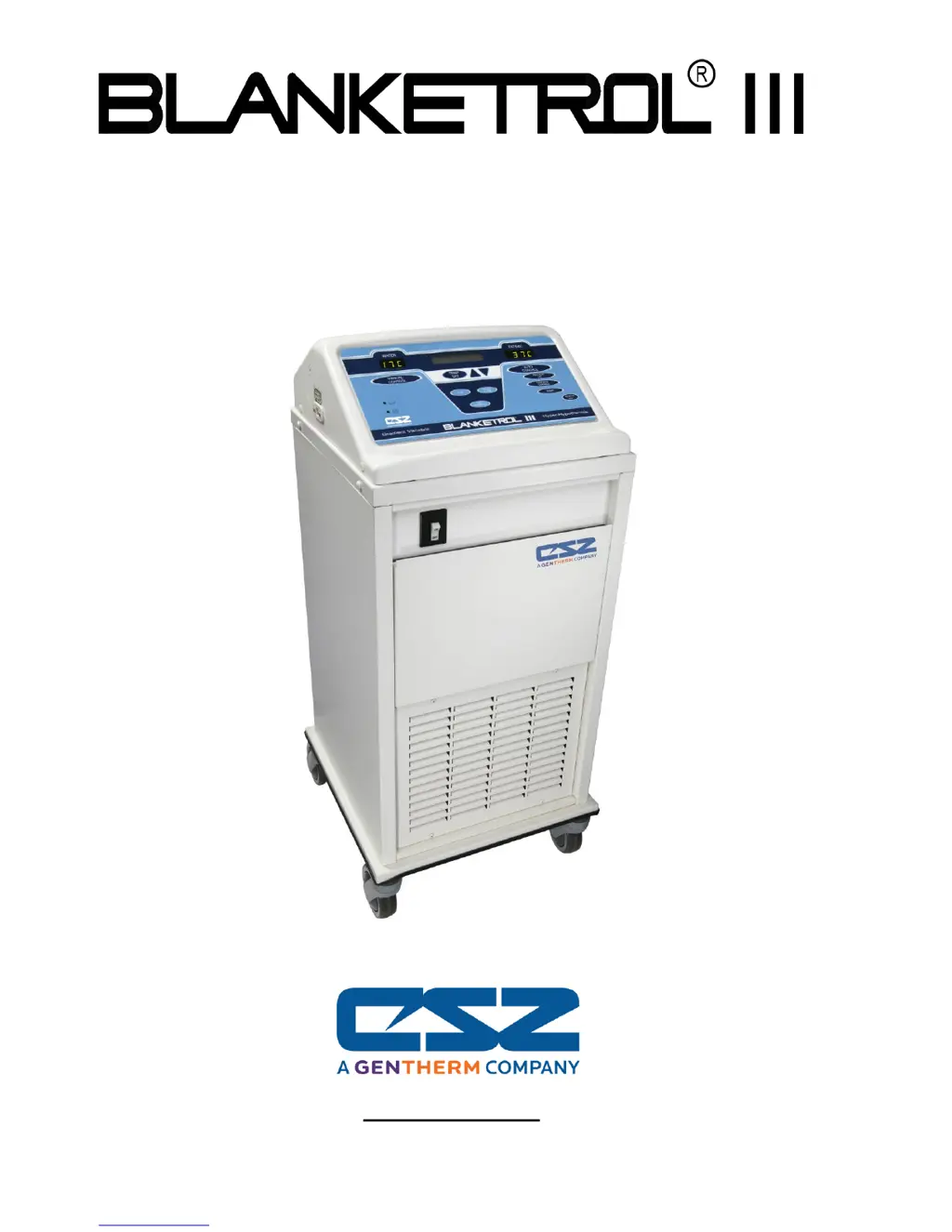
CSZ Blanketrol III 233 - User Manual

CSZ Blanketrol III 233
130 pages
Print Icon
To Next Page IconTo Next Page
Loading...
Operation and Technical Manual
Model 233 Hyper-Hypothermia System
Cincinnati Sub-Zero Products, LLC 12011 Mosteller Road Cincinnati, Ohio 45241, U.S.A.
www.cszmedical.com

Table of Contents

Questions and Answers

  • M
    Mitchell MorganSep 9, 2025
    What to do if my CSZ BLANKETROL III Medical Equipment is operating in AUTOMATIC or MANUAL MODE, and the status display flashes HIGH LIMIT REMOVE FROM SERVICE?
    • L
      leahcraigSep 9, 2025
      If the status display flashes 'HIGH LIMIT REMOVE FROM SERVICE', it means the High Limit Safety device has been triggered, shutting down the unit because the circulating water and reservoir have reached 44°C +/- 2°C (111.2°F +/- 3.6°F) due to a defective control or water not circulating due to an internal clogged by-pass. Turn the unit OFF, force compressed air in the male outlets.
  • A
    Andrea WebsterAug 25, 2025
    Why is the water not circulating in my CSZ Medical Equipment?
    • M
      marvin56Aug 25, 2025
      If the water flow indicator isn't moving, indicating a lack of water circulation, there might be several reasons. First, verify that the buttons are correctly set. A defective pump could also be the cause. Check all the fittings to ensure they are properly connected. Also, inspect the connecting hose and/or blanket for any kinks. Finally, a clogged water filter can impede water flow.
  • J
    Joseph PooleAug 25, 2025
    What to do if the CSZ Blanketrol III 233 Medical Equipment PATIENT display doesn't illuminate and alarm doesn't sound?
    • K
      Kyle KnightAug 26, 2025
      If the PATIENT display does not illuminate and no alarm sounds while operating in automatic modes, first ensure the Set Point is within the range of 30°C to 40°C (86°F to 104°F). If the Status Display is flashing 'Check Set Point', adjust the temperature accordingly. If the Status Display flashes 'CHECK PROBE' or 'BAD PROBE', the probe may be defective and should be replaced with a new 400 Series Probe. Also, check the cable from the 1/4 inch receptacle to the microprocessor board to ensure that it is connected. If the Status Display is flashing 'CHECK PROBE' or 'BAD PROBE', the 1/4 inch receptacle on the side of the unit may be defective and should be replaced.
  • R
    russellhuangSep 23, 2025
    What should I do if the buttons on my CSZ BLANKETROL III Medical Equipment are inoperable?
    • A
      Anne BeanSep 23, 2025
      If the power switch is on and the status display lights up, but the buttons are inoperable, it could be due to the 9-pin cable (J7 position on microprocessor board) between the microprocessor board and membrane control panel being disconnected. Reconnect the 9-pin connector.
  • E
    Elizabeth HernandezSep 9, 2025
    What to do if my CSZ BLANKETROL III Medical Equipment is set to operate in a control mode, but the blanket does not cool?
    • E
      Erin GlennSep 10, 2025
      If the blanket does not cool, first ensure the switches are set correctly. If the issue persists, it could be due to water not circulating or the compressor running but not cooling.
  • A
    Angela BellSep 14, 2025
    What to do if my CSZ BLANKETROL III Medical Equipment is operating in one of the three modes, the unit momentarily blanks and then the status display flashes CHECK SETPT?
    • J
      Jason BrownSep 14, 2025
      If the unit momentarily blanks and the status display flashes 'CHECK SETPT,' it suggests a low line voltage or power source issue. Check line voltage. Reset set point display and resume operations.
  • T
    Tommy LewisSep 4, 2025
    Why are the switches on my CSZ Medical Equipment not staying set?
    • J
      Jessica KiddSep 4, 2025
      If switches on the membrane control panel do not stay set, or if a switch remains set when the operating mode is changed, or if pressing the TEMP SET switch causes another switch to snap on, the membrane switch has likely failed. Replace the membrane control panel.
  • V
    Victoria CherrySep 4, 2025
    Why does my CSZ Medical Equipment flash CHECK SETPT?
    • J
      juan73Sep 4, 2025
      If the unit momentarily blanks and the Status Display flashes 'CHECK SETPT', there may be low line voltage or power source issues. Check the line voltage and reset the Set Point display to resume operations.
  • D
    davidsonmauriceSep 23, 2025
    What to do if the probe from the patient is inserted but when operating in one of the automatic modes, the PATIENT display does not light up and alarm doesn't sound on my CSZ BLANKETROL III Medical Equipment?
    • M
      Madison AllenSep 23, 2025
      If the PATIENT display doesn't light up and the alarm doesn't sound while operating in one of the automatic modes, it could be due to the set point being outside the range of 30°C to 40°C (86°F to 104°F), a defective probe, or the status display flashing 'CHECK SET POINT', 'CHECK PROBE' or 'BAD PROBE'. Go back to temp set and set desired patient temp between range of 30°C to 40°C (86°F to 104°F). Replace with a new 400 Series Probe.
  • S
    scottdavisAug 29, 2025
    What does SNAP DISC REMOVE FROM SERVICE mean on my CSZ Blanketrol III 233?
    • T
      Timothy LoveAug 29, 2025
      If the Status Display flashes 'SNAP DISC REMOVE FROM SERVICE' and the PATIENT display shows EE02, the Snap Disc high limit safety device has been triggered because the water in the reservoir has reached 46.0°C +/- 2.0°C (114.8°F +/- 3.6°F). Replace the microprocessor board and the Snap disc. Also, check the pump.

Summary

Operation and Technical Manual

Symbol Definitions

Explains the meaning of various symbols used throughout the manual.

General Safety Information

Crucial warnings and precautions for safe system operation and patient care.

Cautions and User Guidance

Additional cautions and user guidance for safe and effective system use.

Introduction to the BLANKETROL III System

System Description

Details the indications for use and general functionality of the hyper-hypothermia system.

Physical Description

Describes the external features of the unit from different views.

Membrane Control Panel

Explains the layout and functions of the unit's control panel interface.

System Components and Theory

Covers required accessories, system operation theory, heating, cooling, and safety systems.

System Preparation and Patient Handling

Unpacking and Initial Setup

Procedures for unpacking, inspecting, and arranging the system components.

System Test Routine

Steps to verify the proper functioning of the unit's controls and indicators.

Patient Preparation and Bedside Care

Essential tasks for preparing the patient and providing care during therapy.

Operating the BLANKETROL III System

Arranging System Components

Steps for setting up all necessary equipment before patient use.

Operating Modes Overview

Explains how to operate the system in Auto, Manual, Gradient, and Monitor modes.

Concluding Hyper-Hypothermia Treatment

Procedures for safely stopping the therapy and shutting down the unit.

Status Display Messages

Lists and explains the various messages displayed by the unit's status indicator.

General Maintenance Procedures

Introduction and Test Equipment

Overview of maintenance requirements and the test equipment needed.

Maintenance Checklist and Reservoir Care

A checklist of quarterly maintenance tasks including reservoir and fluid circuit care.

Filter, Condenser, and Exterior Maintenance

Procedures for cleaning the water filter, condenser, grill, and exterior of the unit.

Blanket, Probe, and Hose Maintenance

Guidelines for maintaining hyper-hypothermia blankets, probes, and hoses.

Safety Systems and Accuracy Checks

Procedures for checking low/high limit safeties and temperature accuracy.

Unit Disposal

Information on the proper disposal of the medical device.

Field Repair and Troubleshooting

Introduction to Field Service

Overview of field repair and service tasks for system components.

Accessing Unit Internals

Instructions for safely accessing the internal parts of the BLANKETROL III unit.

Heater and Filter Replacement

Procedures for replacing the heater and water filter assembly.

Pump Replacements

Steps for replacing the pump housing and pump motor.

Flow Switch and Sensor Replacements

Procedures for replacing the flow switch and water temperature sensor.

Manifold and Other Component Replacements

Guides for replacing water manifolds, compressor parts, thermal disc, etc.

Board, Panel, and Beeper Replacement

Steps for replacing microprocessor boards, control panels, and the beeper assembly.

Leakage Current Testing

Procedures for measuring electrical leakage current under various conditions.

Troubleshooting Guide

A comprehensive guide to diagnose and resolve system problems by observation.

Parts Information and System Diagrams

Ordering and Inventory

Details on how to order replacement parts and recommended inventory.

Internal Views and Diagrams

Exploded views, wiring diagrams, and flow diagrams of the BLANKETROL III system.

System Accessories and Probes

Lists approved blankets, pads, hoses, kits, and temperature probes.

Specifications and Certifications

Physical and Safety Features

Details on unit dimensions, weight, construction, and safety system parameters.

Control System and Environment

Information on the control system, operating environment, and warranty.

Electromagnetic Compliance

Manufacturer's declarations regarding electromagnetic emissions and immunity standards.

RF Separation Distances

Recommended distances for RF equipment to ensure electromagnetic compatibility.

CSZ Blanketrol III 233 Specifications

General IconGeneral
BrandCSZ
ModelBlanketrol III 233
CategoryMedical Equipment
LanguageEnglish

Related product manuals