EN
EN • 5
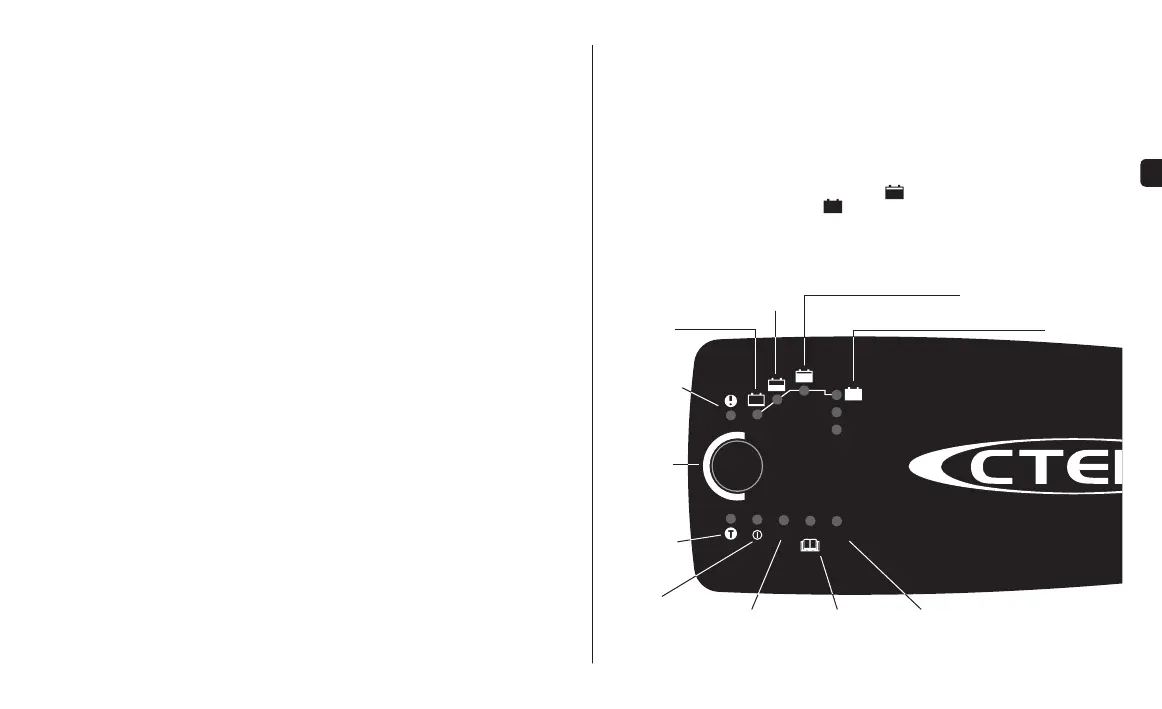
SUPPLYNORMAL RECOND
RECOND
SUPPLY
MODE
ABSORPTION, READY TO USE
ANALYSE
NORMAL
BATTERY
PROGRAM
ERROR LAMP
RECOND
PROGRAM
SUPPLY
PROGRAM
POWER
LAMP
HOW TO CHARGE
1. Connect the charger to the battery.
2. Connect the charger to the wall socket. The power lamp will indicate that the mains
cable is connected to the wall socket. The error lamp will indicate if the battery clamps
are incorrectly connected. The reverse polarity protection will ensure that the battery or
charger will not be damaged.
3. Press the MODE-button to select charging program.
4. Follow the indication lamps through the charging process.
The battery is ready to start the engine when
is lit.
The battery is fully charged when is lit.
5. Stop charging at any time by disconnecting the mains cable from the wall socket.
MODE-
BUTTON
DESULPHATION
SOFT START
BULK
FLOAT, FULLY CHARGED
PULSE, MAINTENANCE CHARGING
TEMPERATURE
SENSOR
INDICATOR



 To Next Page