QUICK FUNCTION GUIDE
7
www.cuckooaustralia.com.au
Panel Buttons
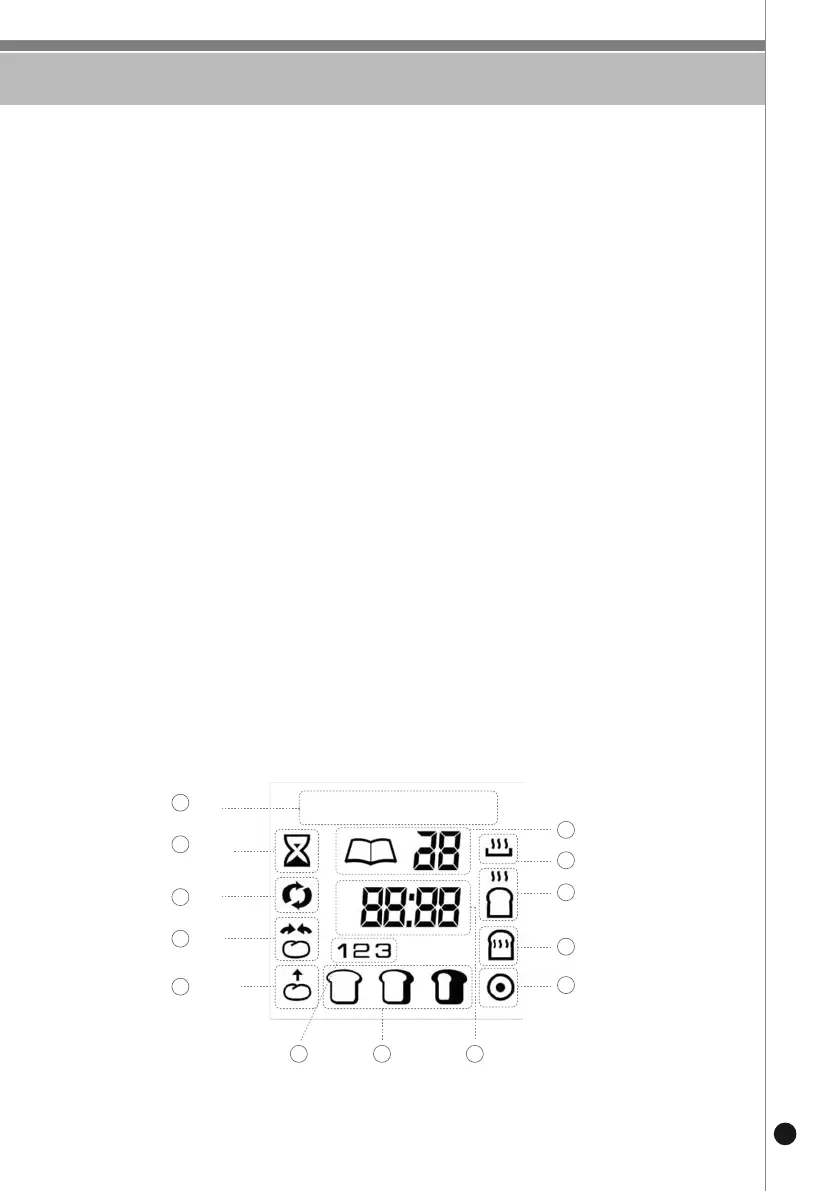
Display Icons
• Menu: Press this button to cycle through and choose from the 15 menu options above.
The number of the currently selected menu function will be shown on the LCD display.
• Weight: Press this button to cycle through and choose your desired loaf size (500g, 750g or
1000g) Note the weight can only be customized with menu options 1-7.
• Color: Press this button to cycle through and choose your desired crust color (light, medium, or
dark). Note the crust color can only be customized with menu options 1-7.
• Time+/Time-: Use these buttons to adjust the amount of delay time you’d like to be added to
a function or to adjust the time while using the Home Made function.
• Bake: Will manually begin preheating the bread maker to then bake your custom Home
Made loaf.
• Mix: Will manually begin mixing your dough or batter, and can also be used to mix
homemade ice cream.
• Start/Pause/Stop: Press once to initiate/resume the selected function, press and hold to
pause the current function, or press twice to stop the function or phase
from continuing.
• Home Made: A fully custom option where you’ll be able to control the amount of time each
baking phase will last, when the baking/mixing stage should begin, the loaf
size, the crust color, and the optional preset timer.


 To Next Page