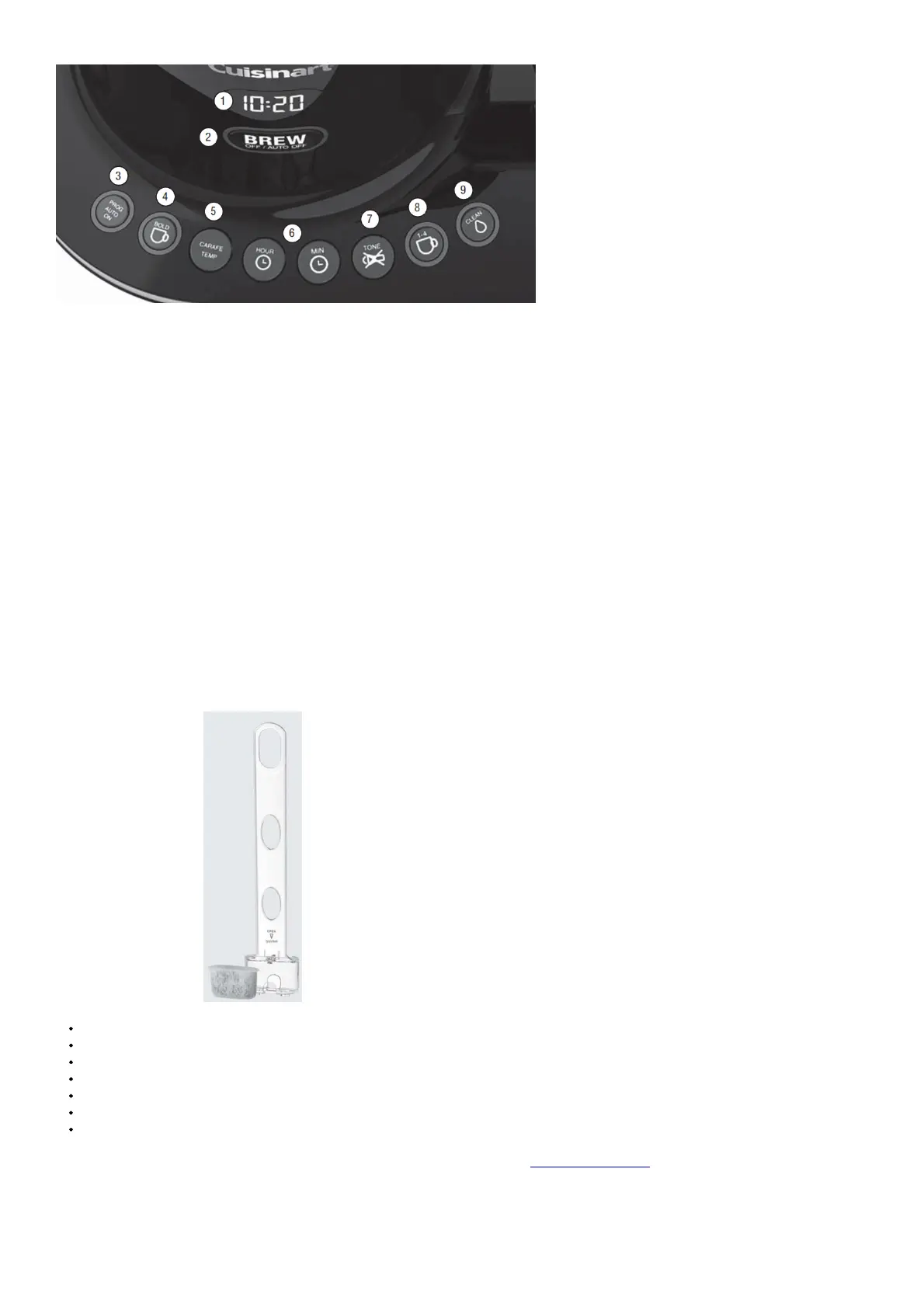
Detailed programming and use instructions are on pages 7 and 8.
1. Backlit Display Displays time of day, Auto On and Auto Off times.
A. Low, Medium and High (L,M,H) warming plate indicators.
B. Ready Tone Off icon appears when Ready Tone is off.
2. Brew/Off & Auto Off Button Turns coffeemaker on and off. Use the Auto Off feature to program the time you want the coffeemaker to shut
off from 0 to 4 hours after brew cycle is finished.
3. Prog/Auto On Button Lets you program coffeemaker to automatically begin brewing up to 24 hours in advance.
4. Bold Flavor Strength Button Lets you choose Bold or Regular coffee flavor; white indicator appears when Bold is selected.
5. Carafe Temperature Button Adjusts warming plate temperature to Low, Medium or High to keep freshly brewed coffee at the temperature
you prefer.
6. Hour and Minute Buttons Use to set hours and minutes for time of day, Auto On and Auto Off times.
7. Ready Tone Button Lets you turn an audible Brew Cycle Finished alert on or off.
8. 14 Cup Button Adjusts brew process to maximize coffee flavor when brewing fewer than 5 cups. White indicator appears when function is
selected.
9. Clean Button Red indicator appears when it is time to decalcify your coffeemaker.
BEFORE BREWING YOUR FIRST POT OF COFFEE
Rinsing your coffeemaker: During the manufacturing process, dust can get trapped in the unit. We recommend flushing out the system before
brewing your first pot of coffee. Simply fill the reservoir, power on the unit, and follow steps 1, 3 and 5 on page 8 under MAKING COFFEE. Do
not add coffee!
Charcoal Water Filter
Your coffeemaker comes with a charcoal water filter that eliminates chlorine, bad tastes and odors from tap water.
Inserting the Water Filter
Remove the filter from polybag and soak it, fully immersed, in cold tap water for 15 minutes.
Lift the water filter holder out of the water reservoir.
Press down on the filter compartment and pull toward you to open.
Place filter into the holder and snap it closed. Be careful improper placement can tear the filter skin.
Flush filter by running cold tap water through holes in bottom of compartment for 10 seconds.
Allow the filter to drain completely.
Slide the water filter holder back into the channel in the water reservoir, pushing it down to the base of the unit.
NOTE: We recommend changing the water filter every 60 days or after 60 uses, and more often if you have hard water. Replacement
filters can be purchased in stores, by calling Cuisinart Customer Service, or at www.cuisinart.com
PROGRAMMING YOUR COFFEEMAKER
SETTING THE CLOCK
When the coffeemaker is plugged in, 12:00 will flash in the display for 10 seconds, indicating the unit is in Clock Set mode. If 12:00 stops




 To Next Page