QUICK REFERENCE GUIDE
SETUP AND USE
2.
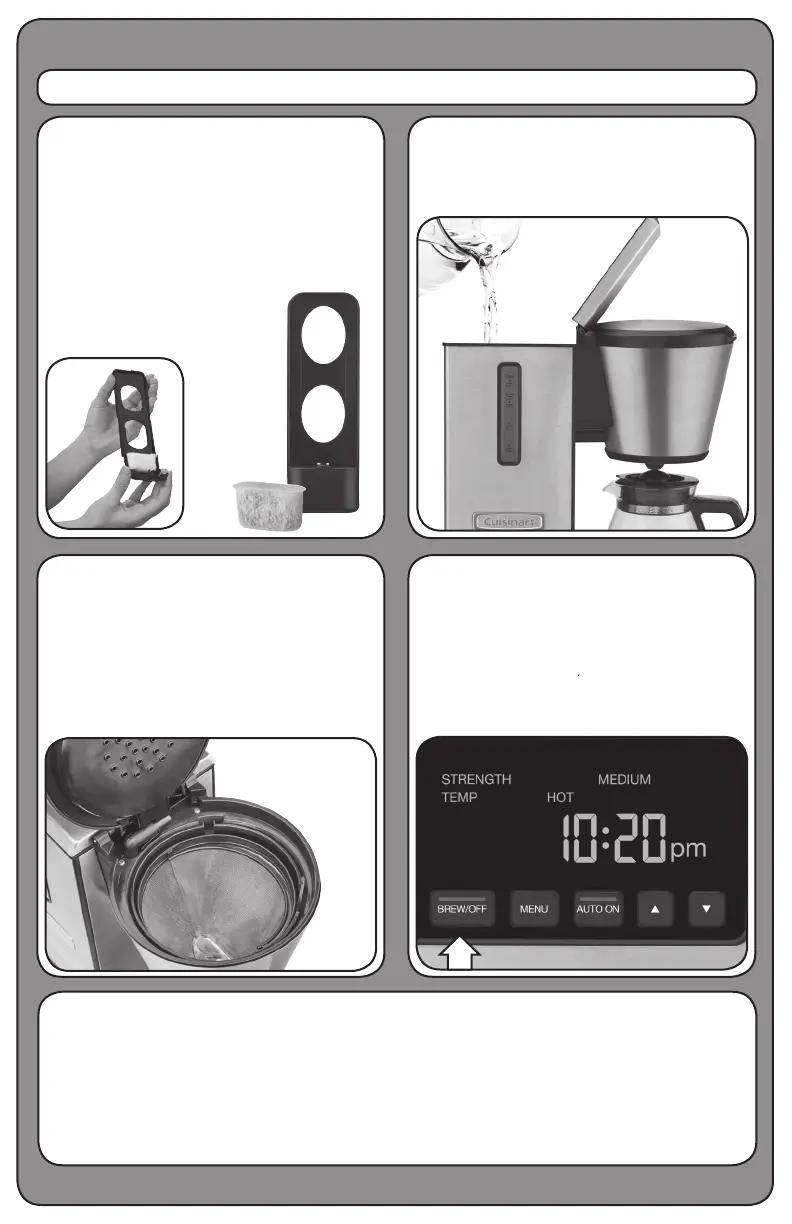
Pour desired amount of water into the
water reservoir. A water level indicator
is located on the front of the unit.
4.
Select BREW/OFF to start the one-time
rinse cycle. Once complete, your unit is
ready to brew coffee. Follow instructions
on page. 9 of instruction booklet to set
preferences and brew your first pot.
3.
Insert the permanent stainless steel laser-
etched filter into the filter basket holder.
Close the lid.
Note: Check to make sure the filter
basket is securely in place and lid is
completely closed.
Fully immerse the charcoal water filter
in cold tap water and soak for 15 minutes.
Flush filter by running cold tap water through
holes in bottom of compartment for 10
seconds (see complete instructions on
page 8 of your instruction booklet). Insert
the filter into the water filter holder. Open
the water reservoir and place filter holder
into the unit.
1.
IMPORTANT!
Do not throw away. Read before operating your new coffee brewer.
Keep for future reference.
These helpful hints are intended to be a supplement to the instruction booklet. In order to ensure
proper operation and optimum performance, please read the entire instruction booklet.
Please see reverse side for programming instructions.




 To Next Page