About this guide | JetScan
®
150 currency scanner | 3
About this guide
The JetScan
®
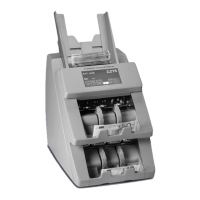
150 currency scanner processes U.S. and international banknotes.
The machine features:
• A fully functioning pocket and a reject pocket to promote a non-stop processing
environment.
• Selectable operating modes which include the ability to detect stranger documents and
target denominations.
• Counterfeit detection.
• Facing and orientation functions.
• Congurable strap limits.
• Cumulative counting.
• A setting for recounting documents without impacting totals.
For information on options and device conguration, contact a Cummins Allison
representative.
Table of contents
Safety information, power specications .................................................................................. 2
About this guide ......................................................................................................................... 3
Machine diagram ....................................................................................................................... 4
Getting started ........................................................................................................................... 7
Stopping conditions and recovery steps.................................................................................14
Daily cleaning procedures .......................................................................................................16
ECB certication software version
To verify European Central Bank (ECB) certication software version:
1. Press CRNCY on the main screen.
2. Press EUR. (EUR currency pattern is an option.)
3. Revision level appears above EXIT.


 To Next Page
 Loading...