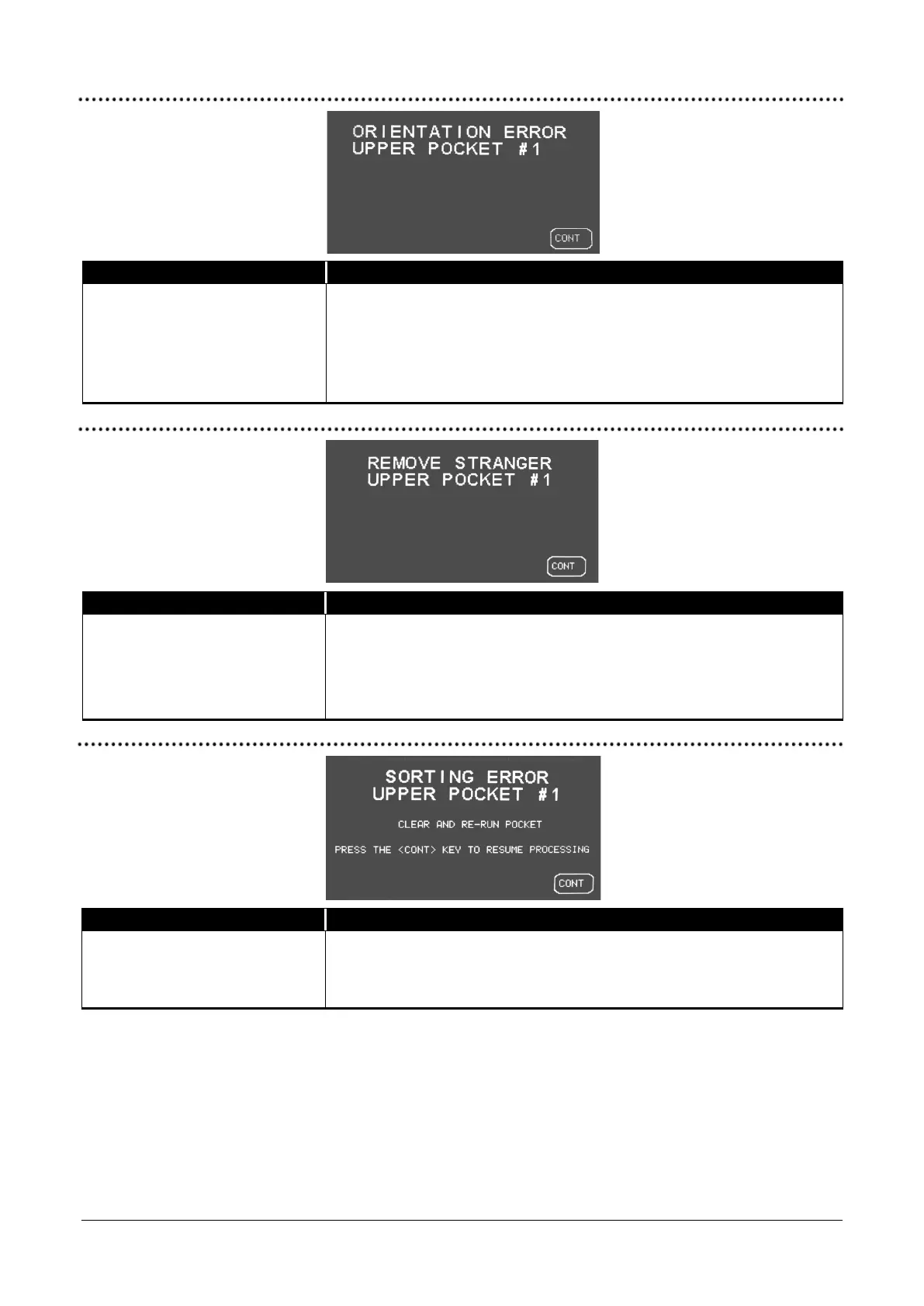
If Universal JetScan is configured
in
to stop on non-oriented
notes, it will stop and display
“ORIENTATION ERROR” when a
non-oriented note is processed.
Remove the top note in the pocket indicated on the screen, correct its
orientation, and put it back in the same pocket. Then press
. This
note will be added to the appropriate batch (strap), sub-batch, batch and
day totals.
Universal JetScan has identified a
note that is different than those
being processed.
Remove the top note from the pocket indicated on the screen. Press CONT
to continue.
If stranger record is
in
, then the value of the stranger note is
added to the denomination’s batch (strap), sub-batch, batch and day totals.
Universal JetScan has identified a
sorting error in the pocket
indicated on the screen.
Remove all notes from the pocket indicated on the screen and place them
in the hopper. Then press
.
© 2014 Cummins-Allison Corp.


 To Next Page