Troubleshooting
Steering fault
The warning lamp lights up or ashes red.
There is a fault in the electromechanical steer-
ing or the electronic steering column lock.
•
Stop driving! Seek specialist assistance.
•
If the warning lamp lights up red, the steer-
ing may be sti because the power steering is
not working.
•
If the warning lamp ashes red, the steering
column cannot be unlocked.
•
Do not allow the vehicle to be towed on its
own wheels.
Steering fault
The control lamp lights up or ashes yellow.
The steering is stier or reacts more sensitively
than usual.
The control lamp lights up and remains lit:
•
Switch the drive system back on and drive
slowly for a short distance.
•
Contact a specialist workshop if the control
lamp remains on.
The control lamp ashes:
•
Turn the steering wheel slightly from one
side to the other.
•
Turn o the ignition and turn it on again.
•
Please note the warnings displayed in the
Digital Cockpit.
•
If the control lamp continues ashing after
the ignition has been switched on, do not con-
tinue driving. Seek specialist assistance.
Drive Proles
Introduction
The driver can use the drive proles to adapt
various features of the vehicle's systems to the
current driving situation, the desired driving
comfort and an economical driving style. Some
of the systems that can be adapted are the
suspension, steering, drive system and air con-
ditioning.
Depending on the vehicle’s equipment, vari-
ous drive proles can be selected. The degree
of inuence of the vehicle's systems on the dif-
ferent drive proles depends on the vehicle’s
equipment.
Vehicles with adaptive suspension (DCC)
When driving, the adaptive suspension (DCC)
continuously adapts the suspension to the
terrain and the driving situation in question.
When doing so, the DCC also takes into ac-
count the vehicle's conguration in the selec-
ted drive prole.
Selecting a driving prole
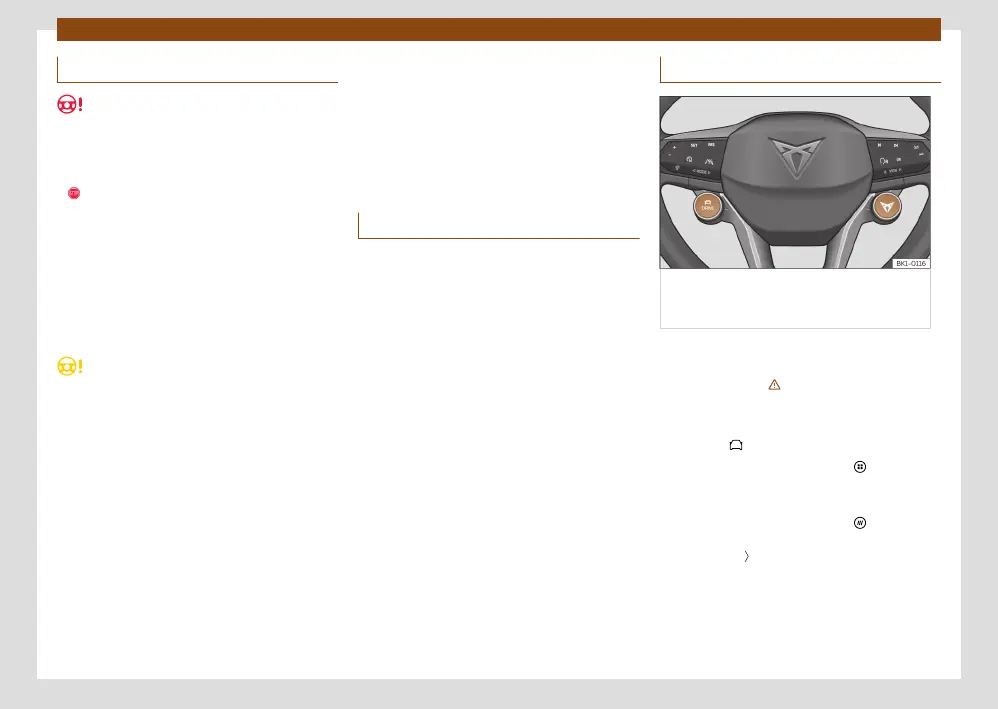
Fig. 120 Multifunction steering wheel:
DRIVE and CUPRA buttons for selecting and
changing the driving prole.
The drive prole can be selected when the ig-
nition is switched on and the vehicle is station-
ary or moving ››› .
Selecting a driving prole
•
Press the > Drive Prole function button.
•
OR: Press the function button > Vehicle
settings > Drive Prole to display the availa-
ble proles.
•
OR: Press the function button , slide your
nger horizontally across the screen to Drive
Prole. Press to change the driving prole or
double press on the icon to show the available
proles.
•
OR: With the Infotainment System turned
o, by pressing on the Drive Prole icon, the
available driving proles will be displayed.



 To Next Page