INSTALLATION
Getting Started
Amplier Placement
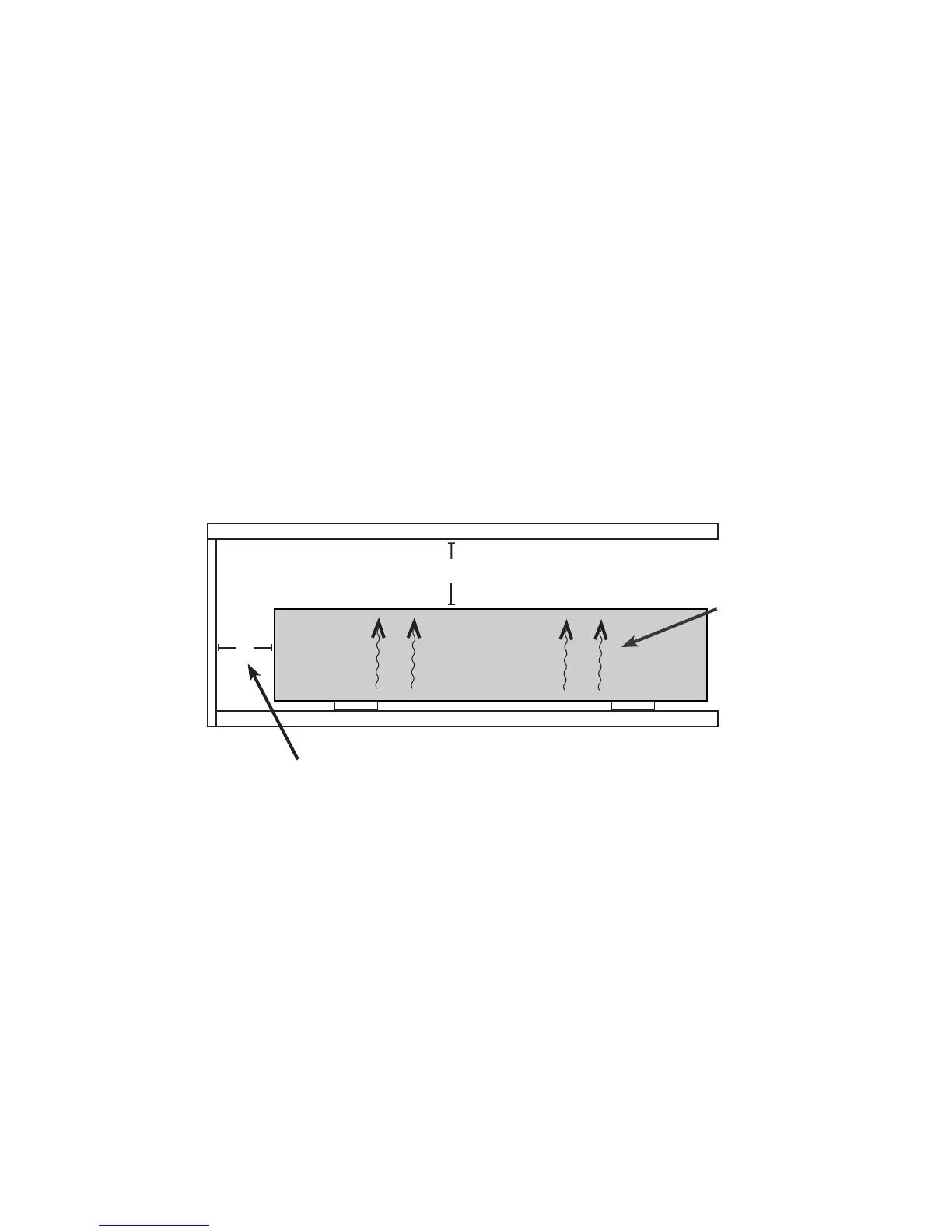
Current Audio amplifiers require plenty of free air space for safe and proper operation. The following
diagram indicates the minimum amount of free air space to provide the proper ventilation and heat
exchange. Anything less than this will shorten the life of the equipment and may cause the amp to shut
down.
Position the amp with all feet on a solid level surface in a well ventilated area. Do not place the unit on
carpet. There are ventilation slots at the bottom that create a natural cooling flow as the heat rises. If
installing in a rack or a cabinet it may be necessary to add a powered fan to provide cooling air flow.
Do not block the ventilation slots. Do not place on carpet or fabric. Do not place near a heat source. In
order to prevent corrosion or electric shock do not place in wet or humid locations.
Making Connections
Caution: All connections and switching should be done with the AC power switched OFF. The final
connection should be the IEC power cord.
Inputs
The inputs on the back of the amplifier are gold plated RCA connectors. Interconnect cables of equal
gold plated quality that are low impedance and shielded should be used to insure a positive continuous
tight connection between equipment. This will insure the total audio quality.
NO CARPET
4” of Air Space for ventilation
and cable management.
5” Of free air space at top.
AMP 1270/870
Natural convection
air flow.
4”
Allow at least 2” of free air space on
both the left and right sides of the amp.
www.currentaudio.com
1890 Cordell Court, Suite 105., El Cajon, CA 92020 • 866-927-7181
©2014 Current Audio - All Rights Reserved.
Rev. 01, 04/14
6
www.currentaudio.com
1890 Cordell Court, Suite 105., El Cajon, CA 92020 • 866-927-7181
©2014 Current Audio - All Rights Reserved.
Rev. 01, 04/14
6


 To Next Page