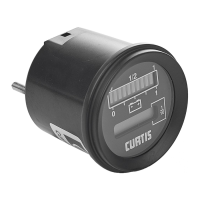
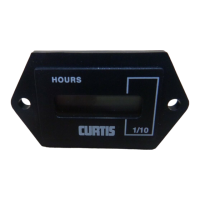
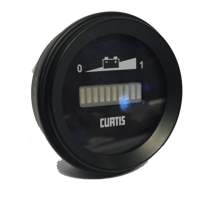
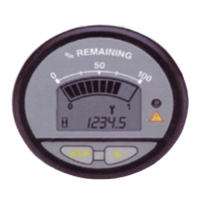
The Curtis enGage II 3003R-67X-0001 is a programmable maintenance monitor designed to track and display essential operational data for various applications. This device functions as a voltmeter with an LCD panel display, providing real-time information on voltage, maintenance hours, and time-of-day.
Function Description
The primary function of the enGage II is to monitor and display critical operational parameters. It acts as a voltmeter, capable of measuring voltages within a specified range. Beyond simple voltage display, it incorporates a programmable maintenance monitor that tracks accumulated operating hours and can signal when maintenance is due. The device features a 10-segment bar display for visual representation of remaining percentage or level, alongside a 5-digit numeric display for precise readings of voltage, hour meter, and time-of-day.
The enGage II is designed to be user-configurable, allowing adjustments to the time-of-day clock and maintenance interval. This programmability ensures that the device can be tailored to specific application requirements and maintenance schedules. An integrated MOSFET output (0.5A open drain type, internally tied to V-) can be used to trigger external warning devices (audio, visual, horn) when a predefined condition, such as a maintenance interval being reached, occurs.
Important Technical Specifications
- Operating Voltage Range: 12V-48VDC nominal voltage, +/- 25%. This broad range makes it suitable for a variety of battery-powered or low-voltage systems.
- Operating Current Range: Nominal 14 mA, maximum 20 mA (with key switch in "on" position). This indicates a low power consumption, ideal for continuous monitoring applications.
- Display: LCD with a 10-segment bar and a 5-digit numeric display (5mm high), offering clear visibility of data.
- Hour Meter Range: 9,999.9 Maintenance Hours.
- Resolution: 99,999 Total Hours.
- Panel Cutout: 52 mm / 2 1/16" diameter, designed for standard SAE round cutouts, ensuring easy integration into existing dashboards or control panels.
- Shock Resistance: SAE J 1378 Amplitude, 44-55 g, half sine, 9-13 ms duration, indicating robustness in demanding environments.
- Vibration Resistance: SAE J 1378 Double amplitude of 1.53mm with frequency sweep for 10-80-10 Hz (20 g max) at 1 minute intervals, further highlighting its durability.
- Storage Temperature: -50°C to +90°C.
- Operating Temperature: -40°C to +85°C.
- Humidity: 95% RH (non-condensing).
- IP Rating: 65 Front & Rear with AMP connector installed, providing protection against dust and water ingress.
- MOSFET Output: 0.5A open drain type, capable of driving warning devices. Maximum current draw on the warning device is 0.5 Amps.
- Mating Connector: 8-pin AMP, P/N 794821-1 with UL rating 94V-0. Interface seal, P/N 794772-0. Wire seal 794758-1, Pins P/N770904-X for #18-24 AWG.
- Materials: Case-polycarbonate, lens-clear polymethylmethacrylate (PMMA) cover, overlay and mounting bracket-polycarbonate, ensuring durability and clear display.
- Mounting Panel Thickness: Designed for a mounting panel thickness of 0.8mm-6.4mm.
Usage Features
The enGage II is designed for straightforward installation and operation. It mounts into a standard SAE round cutout, and its serrated barrel, combined with the provided mounting bracket, ensures a secure and trouble-free installation. The bracket is designed to remain secured to the gauge once properly installed, preventing accidental removal.
The device's functionality is controlled via two panel buttons: a left button and a right button.
- Left Button (LMB): Used to enter selections, advance to the next configurable item during setup, and sequentially toggle between display functions (time-of-day clock, maintenance hours) during normal operation. Pressing and holding the left button for three seconds also allows exiting the configuration mode.
- Right Button (RMB): Primarily used to increment values during configuration, such as setting hours or minutes for the time-of-day clock, or adjusting the maintenance interval.
The display includes several intuitive icons:
- Hourglass Icon: Indicates that the hour meter is displayed. It flashes during hour meter accumulation.
- Wrench Icon: Indicates that the maintenance hour meter is displayed. It flashes when the maintenance interval is reached, signaling that service is due.
- Colon: Flashes to indicate that the time-of-day clock is displayed and counting up.
- Decimal Point: Indicates 1/10 of an hour on the maintenance hour meter.
- Percent: Indicates the remaining percentage of an interval or level.
The device features a "Key switch (+)" input (Pin #6) which, when V+ is applied, operates the gauge display. A "Setup Enable (+)" input (Pin #2) allows the gauge to be programmed via the panel buttons when V+ is applied. An "Hour Meter Enable (+)" input (Pin #3) ensures that time accumulation occurs when the key switch is on.
Maintenance Features
While the enGage II 3000 Series itself is not serviceable, it provides robust features for monitoring and managing the maintenance of the equipment it is installed on.
- Programmable Maintenance Interval: Users can set a maintenance interval between 1 and 9,999 hours in 1-hour increments. When this interval is reached, the wrench icon on the display flashes, providing a visual alert that maintenance is due.
- Resetting Maintenance Hour Meter: The maintenance hour meter can be reset to the preset maintenance period. This is done by displaying the maintenance hour meter function (wrench icon illuminated), then pressing and holding both the right and left buttons until the display flashes. The right button should be released first. This reset function can be performed at any time, regardless of the actual maintenance status.
- Configuration Mode: The gauge offers a configuration mode to set the time-of-day clock and maintenance interval. This mode is accessible by applying V+ to the setup enable pin and pressing and holding the left button. The gauge will revert to previously stored settings if incomplete data is entered or if there is no input for 30 seconds.
- Troubleshooting: The manual provides a basic troubleshooting guide for common issues. For example, if the maintenance monitor will not reset, the possible cause is that the resetting procedure is not being followed. If it will not/cannot configure the maintenance interval, the possible cause is no power to the setup enable pin.
The enGage II is designed for reliability and ease of use, providing essential monitoring and maintenance alerts to ensure the longevity and optimal performance of the equipment it serves.


 To Next Page
 General