
 Need help?
Do you have a question about the CyberPower CSP606U42A and is the answer not in the manual?
Details on the ON/OFF switch, surge protection indicator, outlets, USB ports, plug type, and safe-fail protection.
Instructions to reduce electric shock risk, including usage in dry locations and avoiding daisy-chaining.
Guidance on addressing tripped circuit breakers and non-illuminated surge protection indicators.
Information for contacting CyberPower for installation or product questions.
Explains what the limited warranty covers, including connected equipment guarantee limitations.
Details on how to make a claim and register the product for notifications.
Provides contact details for CyberPower Systems and their operational hours.
Lists regulatory compliance and approvals for the product.
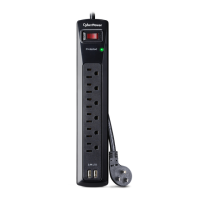
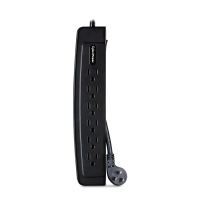
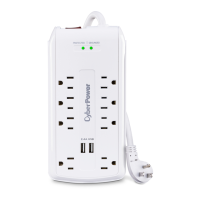
The CyberPower CSP606U42A is an 8-outlet surge protector designed to safeguard your electronic equipment from power surges and spikes. It features six standard AC outlets and two USB charging ports, making it suitable for a variety of devices. The surge protector incorporates several features to ensure both protection and ease of use.
The primary function of the CSP606U42A is to provide surge protection for connected electronic devices. When a power surge or spike occurs, the internal protection circuitry is designed to absorb the excess voltage, preventing it from reaching and potentially damaging your sensitive equipment. The device also includes an ON/OFF Reset Switch Breaker, which controls power to all outlets and acts as a 15 A circuit breaker. If an overload condition occurs, the breaker will automatically trip, cutting power to the outlets to prevent damage. Once the overload condition is resolved, the switch can be reset to resume operation.
In addition to AC outlets, the surge protector offers two USB charging ports. These ports allow you to connect and charge up to two USB-powered devices, such as smartphones, tablets, or other gadgets. It's important to note that these USB outlets are solely for charging and do not function as a USB hub; they do not transfer data.
The CSP606U42A incorporates a "Safe-fail Protection" mechanism. This means that if the surge protector can no longer provide adequate surge protection due to a significant power event, it will disconnect power to the connected equipment. This ensures that your devices are not inadvertently exposed to unprotected power, even if the surge protection component has reached the end of its useful life.
The surge protector is designed for straightforward use. To begin, simply plug the low-profile right-angle plug into a properly grounded electrical outlet. The right-angle design helps to keep the cord close to the wall, reducing clutter and making it suitable for use in tight spaces. Once plugged in, you can connect your AC-powered devices to the six standard grounded outlets and your USB devices to the two USB charging ports.
A "Surge Protected Indicator" light is prominently featured on the device. This indicator illuminates when the surge protection feature is actively working properly. This provides a visual confirmation that your connected equipment is receiving protection. If this indicator light does not illuminate, it signals that the surge protection functionality is no longer active, and the unit should be replaced to ensure continued protection.
The ON/OFF Reset Switch Breaker serves as a convenient master control for all connected devices. You can use it to easily power on or off all equipment connected to the surge protector. In the event of an overload, the automatic tripping of the breaker prevents damage to both the surge protector and your connected devices. Resetting it is as simple as switching it back to the ON position after addressing the overload.
For optimal performance and safety, it is crucial to adhere to specific usage guidelines. The device is intended for use in dry, indoor locations only. It should not be plugged into another relocatable power tap, nor should surge protectors be "daisy-chained." The CSP606U42A is not designed for use with aquarium equipment or for medical or life support equipment. Proper grounding is essential, and the device should not be installed if properly grounded outlets are unavailable. Furthermore, there are specific wire length requirements between the electrical outlet and the electrical service panel to ensure effective operation.
While the CyberPower CSP606U42A is largely a "set it and forget it" device, there are a few aspects related to its maintenance and longevity. The "Surge Protected Indicator" light acts as a key maintenance feature. If this light goes out, it's a clear signal that the surge protection components have been compromised, likely due to a power surge or spike exceeding its specified limits. In such a scenario, the surge protector has fulfilled its duty by protecting your connected equipment, but it will no longer offer future surge protection. At this point, the device should be replaced to maintain the safety of your electronics.
Troubleshooting is generally straightforward. If the ON/OFF switch is in the OFF position, it indicates that the 15 Amp circuit breaker has likely tripped. To resolve this, you should examine your connected equipment to identify and remove any device that might be causing an overload. Once the overload condition is cleared, you can reset the ON/OFF switch to restore power.
The safe-fail protection mechanism is also a maintenance-related feature, though it's more about the device's end-of-life for surge protection. When this internal protection disconnects the surge protective component, the device will continue to supply unprotected power to the load. If continuous surge protection is critical for your application, you must replace the device as per the manufacturer's instructions when this occurs.
To ensure the longevity and proper functioning of the surge protector, it is important to avoid misuse, modification, or operation outside of its environmental limits. This includes preventing damage during transit or storage, and ensuring it is not used with items not designed or intended for use with surge protectors, such as laser printers, appliances, aquariums, or medical/life support devices. Always ensure that the product and connected equipment are connected to properly wired and grounded outlets, adhering to all electrical and safety codes. The product must be plugged directly into the power source, and "daisy-chaining" with extension cords or other surge suppressors should be avoided. Adhering to these guidelines will help maximize the lifespan and effectiveness of the surge protector.
 General
| Type | Surge Protector |
|---|---|
| Outlets | 6 |
| USB Ports | 2 |
| USB Charging Ports | 2 |
| Voltage Rating | 120V |
| Plug Type | NEMA 5-15P |
| Warranty | Lifetime |


 To Next Page