EasyManua.ls Logo

CyberPower ST425 - User Manual

CyberPower ST425
7 pages
Print Icon
To Next Page IconTo Next Page
Loading...
YOUR ULTIMATE ALLY IN POWER
Cyber Power Systems (USA), Inc.
4241 12th Avenue East, Suite 400 | Shakopee, MN 55379 | CyberPowerSystems.com
STANDBY UPS SERIES
ST425 / ST625U / ST900U
USER MANUAL
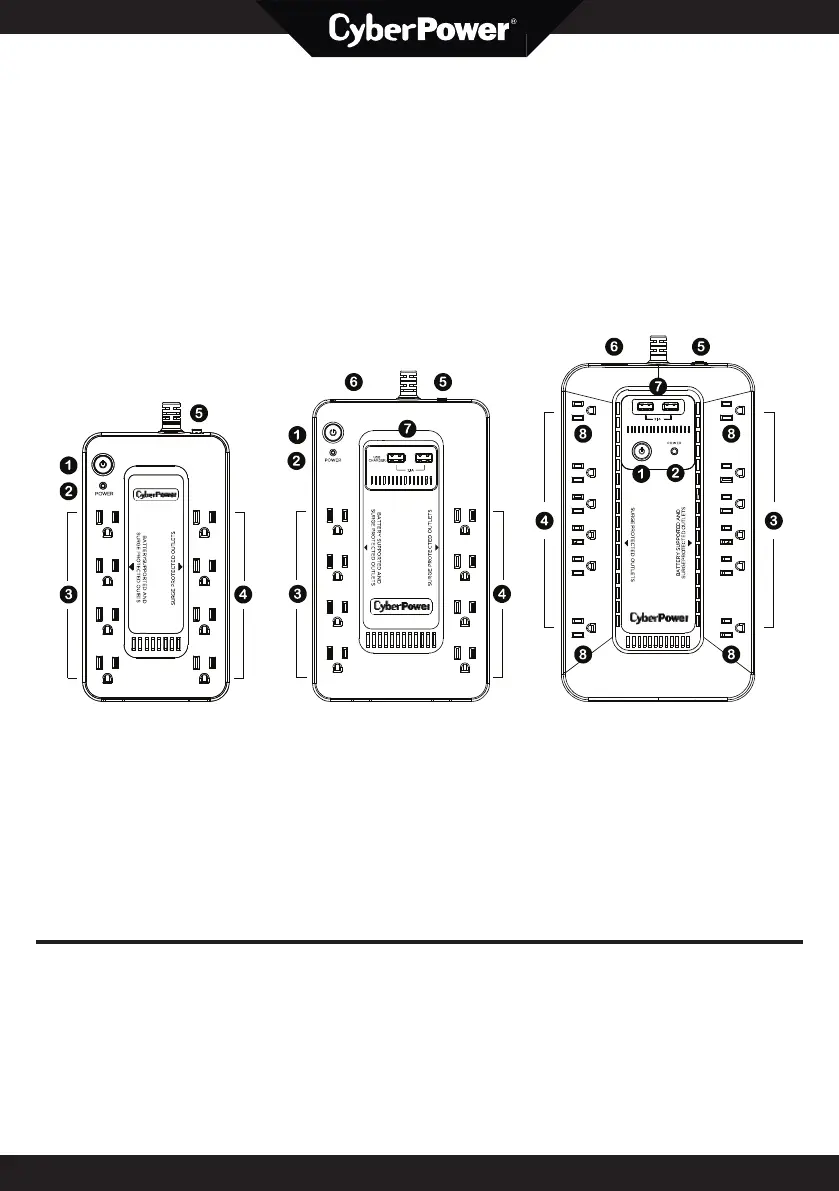
FEATURES
1. Power On Switch
2. Power On Indicator (green)
3. Battery and Surge Protected Outlets
4. Full-Time Surge Protection Outlets
5. Circuit Breaker
6. USB Port to PC (except for ST425)
7. USB Charging ports (except for ST425)
8. Widely-Spaced Outlets
S
S
T
T
4
4
2
2
5
5
S
S
T
T
6
6
2
2
5
5
U
U
S
S
T
T
9
9
0
0
0
0

Questions and Answers

  • B
    Blake DaviesJul 29, 2025
    Why CyberPower UPS doesn't turn on?
    • M
      Michael McgrathJul 29, 2025
      There could be several reasons why your CyberPower UPS isn't turning on: * The on/off switch might be preventing damage from rapid cycling. Turn the UPS off, wait 10 seconds, and then turn it back on. * The unit might not be connected to a 120V 60Hz outlet; ensure it is properly connected. * The frequency may be beyond the acceptable range of 47-63Hz. Turn the UPS off and verify the frequency range is within 47-63Hz, or try turning it on in battery mode.
  • D
    Deborah VanceAug 4, 2025
    What to do if CyberPower ST425 UPS indicates an overload?
    • R
      Ryan FloydAug 4, 2025
      If your CyberPower UPS shows an overload because the connected equipment exceeds the battery outlets' rating, turn the UPS off. Then, unplug some equipment from the battery outlets. Reset the circuit breaker, and turn the unit back on.
  • S
    Sara JacksonAug 12, 2025
    How to fix inactive PowerPanel Personal for CyberPower UPS?
    • D
      Daniel MasonAug 12, 2025
      If PowerPanel® Personal is inactive (all icons are gray) for your CyberPower UPS, check the following: * Ensure the USB cable is properly connected to both the UPS unit and an open USB port on the back of the computer. * Try a different USB port, as the current one may be faulty. * If the unit isn't providing battery power, shut down your computer, turn the UPS off, wait 10 seconds, and turn the UPS back on to reset it.
  • T
    Todd LutzAug 20, 2025
    What to do if CyberPower ST425 UPS surge protection outlets stop working?
    • S
      Sarah JonesAug 20, 2025
      If the full-time surge protection outlets on your CyberPower UPS stop providing power, it's possible the circuit breaker has tripped due to an overload. To resolve this, turn the UPS off and unplug at least one piece of equipment. Reset the circuit breaker by depressing the button, and then turn the UPS back on.

Summary

Important Safety Warnings

Installing Your UPS System

Unpacking

Check the contents of the UPS package upon receipt.

Determine Power Requirements

Ensure connected equipment does not exceed UPS rated capacity to prevent overload.

Hardware Installation Guide

Steps for connecting equipment to UPS outlets and proper placement.

Basic Operation

Power On Switch

Instructions for turning the UPS unit on and off, including alarm settings.

Power On Indicator

Explanation of the green LED indicator status during normal operation.

Battery and Surge Protected Outlets

Details on outlets providing battery backup and surge protection.

Full-Time Surge Protection Outlets

Information about outlets offering continuous surge suppression.

Circuit Breaker

Location and function of the circuit breaker for overload protection.

USB Port to PC

Describes the USB port for PC communication and status monitoring.

USB Charging Ports

Details on the USB ports providing 5V 2.1A power output for charging.

Widely-Spaced Outlets

Highlights the design of outlets to accommodate bulky adapters without blocking.

CyberPower GreenPower UPS Technology

FCC Compliance Statement

Limited Warranty and Connected Equipment Guarantee

Where Can I Get More Information?

CyberPower ST425 Specifications

General IconGeneral
WaveformPseudo sine
Output power260 W
UPS topologyStandby (Offline)
Input frequency47/63 Hz
Output frequency50/60 Hz
Audible alarm modesAlarm when on battery, Fault, Low battery alarm, Overload alarm
Surge energy rating890 J
Output power capacity0.425 kVA
Socket circuit breakerYes
Power protection featuresOverload
Input operation voltage (max)140 V
Input operation voltage (min)96 V
Output operation voltage (max)120 V
Transfer time (Line Mode to Battery Mode)8 ms
Power plugNEMA 5-15P
AC outlet typesNEMA 5-15R
AC outlets quantity8 AC outlet(s)
SafetyUL1778, cUL, FCC DOC B, CEC
Form factorCompact
Cable length1.5 m
Product colorBlack
LED indicatorsPower
Battery voltage12 V
Battery capacity2.9 Ah
Battery technologySealed Lead Acid (VRLA)
Battery recharge time8 h
Number of batteries supported1
Typical backup time at full load1.5 min
Typical backup time at half load6 min
Operating altitude0 - 3000 m
Non-operating altitude0 - 15000 m
Storage temperature (T-T)-15 - 45 °C
Operating temperature (T-T)0 - 40 °C
Operating relative humidity (H-H)0 - 95 %
Sustainability certificatesRoHS, ENERGY STAR
Weight and Dimensions IconWeight and Dimensions
Depth81 mm
Width210 mm
Height114 mm
Weight1723 g

Related product manuals