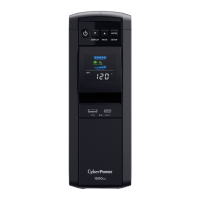
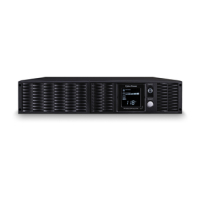
The CyberPower CST1500S is a PFC Sinewave UPS (Uninterruptible Power Supply) designed to provide power protection, operation, and performance for connected equipment. It features advanced energy-saving patented bypass technology, known as GreenPower UPS™, which reduces energy costs by up to 75% compared to conventional UPS models by bypassing the transformer when utility power is normal. This also decreases waste heat, uses less energy, and reduces energy costs. The unit is manufactured in accordance with the Restriction on Hazardous Substances (RoHS) directive, making it environmentally friendly.
Function Description:
The CST1500S provides complete power protection from inconsistent utility power. It features 1030 Joules of surge protection and offers long-lasting battery backup during power outages with maintenance-free batteries. The UPS ensures consistent power to your computer system and includes software that automatically saves open files and shuts down your computer system during a utility power loss. It also incorporates Automatic Voltage Regulation (AVR) to stabilize inconsistent utility power voltage to safe nominal levels (110/120 volts), automatically increasing low utility power and decreasing high utility power to a consistent and safe output voltage.
Important Technical Specifications:
- Model: CST1500S
- Capacity: 1500VA / 900W
- Nominal Input Voltage: 120 Volts
- Input Frequency: 60 Hz +/- 3 Hz
- On-Battery Output Voltage: 120 VAC +/- 5%
- Max. Load for UPS Outlets (5 Outlets): 1500 VA / 900 W
- Max. Load for Full-Time Surge Protection Outlets: 12 Amps
- On-Battery Output Wave Form: Adaptive Sinewave
- Operating Temperature: +32°F to 104°F / 0°C to 40°C
- Operating Relative Humidity: 0 to 95% non-condensing
- Size (W x H x D): 14.2 in., 3.9 in., 10.4 in. (361 mm, 99mm, 264 mm)
- Net Weight: 24.7 lbs / 11.2 kg
- Battery Type: CyberPower / RB1280X2B (Sealed Maintenance Free Lead Acid Battery)
- Typical Battery Recharge Time: 8 hours from total discharge under 100% load
- Typical Battery Life: 3 to 6 years, depending on number of discharge/recharge cycles
- Safety Approvals: UL1778, CSA C22.2 No 107.3, FCC/DoC Class B
Usage Features:
The CST1500S is equipped with several user-friendly features:
- Power Switch: Master on/off switch for equipment connected to battery power supplied outlets.
- Power On Indicator: LED illuminates when utility power is normal and UPS outlets are providing power.
- LCD Module Display: High-resolution intelligent LCD displays UPS information using icons and messages, including Input Voltage, Output Voltage, and Estimated Run Time. It also shows LOAD Capacity, BATTERY Capacity, and indicates FAULT, OVERLOAD, SCHEDULE, and MUTE status.
- Display Switch: Toggles LCD display contents (Input Voltage, Output Voltage, Estimated Run Time) and can turn the LCD display on or off.
- Silence Alarm Switch: Toggles display functions and can silence the buzzer when running on battery.
- Control Switch: Initiates a Self Test of the battery when pressed for 3 seconds in AC/Utility Power Mode.
- USB Charging Ports: Provides DC 5V 2.1A power output for charging devices.
- Battery and Surge Protected Outlets: Five outlets for connected equipment to ensure uninterrupted operation during power failure. These outlets should not be used for laser printers, paper shredders, copiers, space heaters, vacuum cleaners, sump pumps, or other large electrical devices to avoid overload and damage.
- Full-Time Surge Protection Outlets: Five additional outlets offering surge suppression.
- Circuit Breaker: Located on the back, provides overload and fault protection.
- Serial / USB Ports to PC: Allows communication between the UPS and a computer for monitoring and control via PowerPanel® software.
- Communication Protection Ports (RJ45): Bi-directional ports protecting 10/100/1000 Ethernet connections.
- Wiring Fault Indicator (red): Illuminates to warn of wiring problems like bad ground, missing ground, or reversed wiring.
- Coax / Cable / DSS Surge Protection: Ports to protect cable modems, CATV converters, or DSS receivers.
- Widely-Spaced Outlets: Two outlets designed to accommodate AC power adapter blocks without blocking adjacent outlets.
- Active PFC Support: Supports High Efficiency power supplies with Active Power Factor Correction, improving power delivery efficiency.
- Auto-Charge Feature: The battery automatically charges when the UPS is plugged into an AC outlet, whether the UPS is turned on or off.
- Safety Feature: Requires connection to AC power for the first power-up to ensure proper system initialization after shipment.
Maintenance Features:
- Battery Replacement: Batteries are located in an OPERATOR ACCESS AREA. Replacement requires specific CyberPower / RB1280X2B batteries. Users are advised to remove conductive jewelry and use insulated tools during replacement. Both batteries should be replaced at the same time for maximum life span.
- Battery Recharge: After replacement or extended storage, the UPS should be recharged for 8 to 16 hours to fully charge the battery.
- Storage: For extended storage, the UPS should be covered with a fully charged battery and recharged every three months to ensure optimal battery life.
- Troubleshooting: The manual provides a troubleshooting guide for common issues such as circuit breaker trips, unexpected runtime, failure to turn on, and inactive PowerPanel® software, with possible causes and solutions.
- Product Registration: Users are encouraged to register their product at www.CyberPowerSystems.com/registration to ensure warranty, confirm ownership, and receive free technical support.
- Disposal and Recycling: CyberPower Systems encourages environmentally sound methods for disposal and recycling of UPS products and batteries in accordance with local regulations. Batteries are considered HAZARDOUS WASTE.



 To Next Page
 General