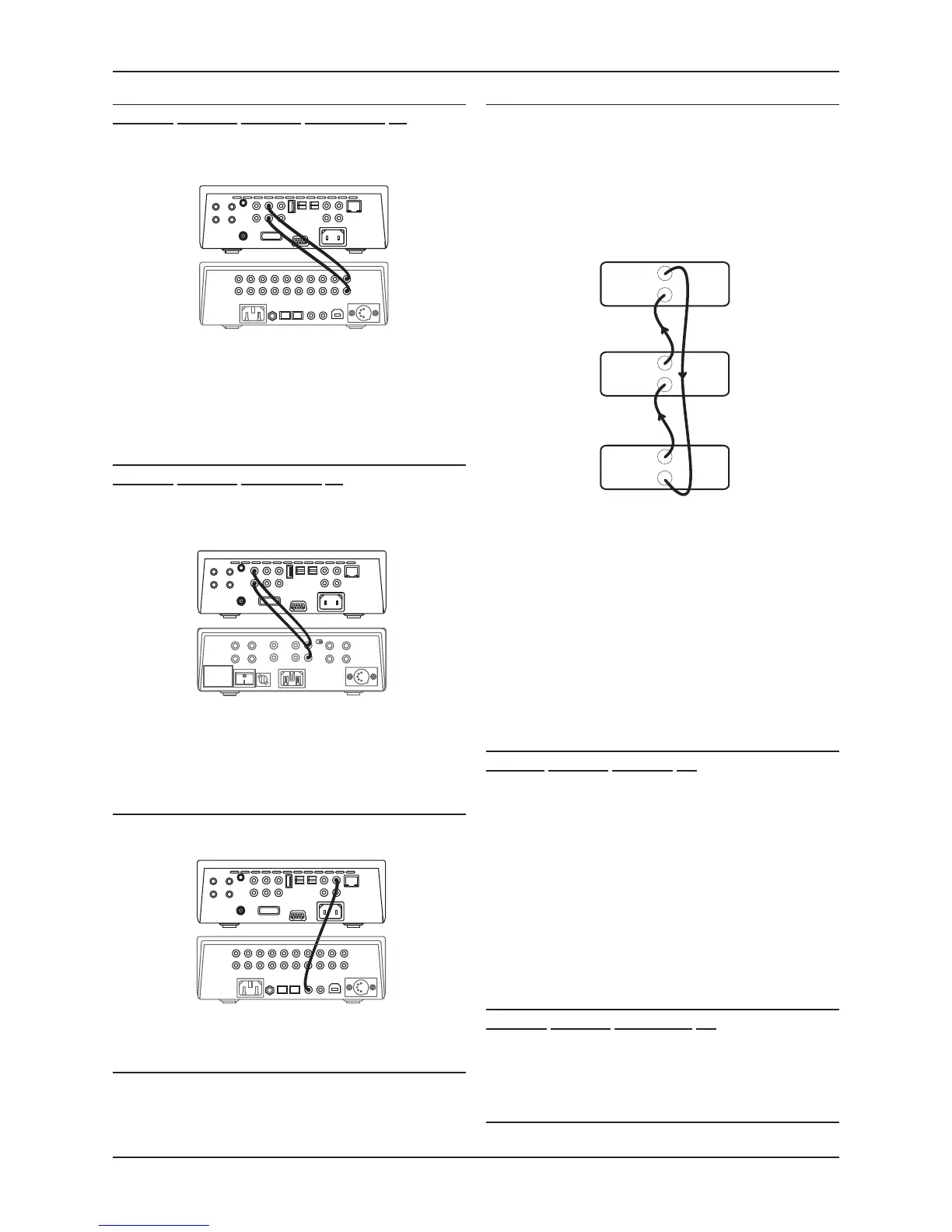
Connecting the fixed analogue outputs to an amplifier
(Streamline
2
, Stream Xa
2
, Stream XP
2
and Stream XP
2
Qx)
The Streamline
2
, Stream Xa
2
, Stream XP
2
and Stream XP
2
Qx may be
connected to the analogue inputs of an integrated or pre-amplifier.
Connecting to an integrated or pre-amplifier with volume control
If you are connecting the Streamline
2
to an amplifier (or preamplifier) with
volume control, use a suitable audio interconnect to connect the Fixed
Out sockets to a spare analogue input of the amplifier.
NOTE: The Stream Xa
2
features dual fixed outputs labelled OUT1 and
OUT2. Either or both of these may be connected to an integrated or pre-
amplifier input.
Connecting directly to a power amplifier
(Streamline
2
, Stream XP
2
and Stream XP
2
Qx)
The preamp outputs of a Streamline
2
, Stream XP
2
and Stream XP
2
Qx may
be connected directly to the inputs of a power amplifier.
Connecting directly to a power amplifier
If you are connecting the Streamline
2
directly to a power amplifier, use a
suitable audio interconnect to connect the Pre Out sockets to the power
amplifier inputs.
NOTE: The Stream Xa
2
does not include a preamplifier output so must not
be connected directly to a power amplifier.
Connecting the digital output to an amplifier
If you own an amplifier or pre-amplifier with digital inputs, you may prefer
to connect the Streamline
2
to the amplifier digitally.
Using a suitable digital phono interconnect, connect from the DIG OUT
connector to a free digital input of the amplifier.
Connecting to an AV system
The Streamline
2
should be connected as a digital source component of an
AV system. Follow the instructions in the previous section to connect the
digital output of the Streamline
2
to a digital input of the AV system.
MC-BUS System
Connecting the MC-BUS sockets in an MC-BUS system provides unified
system control. An MC-BUS loop is established by connecting single
phono cables from the MC-BUS output of one unit to the MC-BUS input
of another in a daisy-chain. Complete the loop by returning the MC-
BUS output of the final component to the MC-BUS input of the first. The
diagram below shows MC-BUS wiring of a typical system that includes
a Streamline
2
(used as the system amplifier), and a Cyrus CD player and
tuner that are connected as digital sources to the Streamline
2
.
The MC-BUS response of a Streamline
2
, Stream XP
2
or Stream XP
2
Qx
may be configured through the setup menu (see page 11) to best match
the other Cyrus components you own.
If the Streamline
2
is used as an amplifier
(Streamline
2
, Stream XP
2
and Stream XP
2
Qx)
If the Streamline
2
is the system amplifier, its MC-BUS response can be
set to switch connected Cyrus CD players, DAB tuners, DVD players
etc. to and from Standby (when they are connected to an input named
accordingly (CD, DAB, DVD etc.).
If the Streamline
2
is used as a source
If the Streamline
2
is connected as a source of an amplifier, its MC-
BUS response can be set so that the system amplifier will switch the
Streamline
2
to and from Standby.
External Power Supply - PSX-R
(Stream Xa
2
, Stream XP
2
,
Stream XP
2
Qx)
The PSX-R is a unique DC power supply which will upgrade the sonic
performance of your Stream XP
2
. When a Stream XP
2
/ PSX-R combination
is installed, analogue and signal related sections of the circuit are
powered from this clean, stable power source while other requirements
are supplied internally. This ensures complete isolation of control circuits
and sensitive analogue sections reducing AC mains-borne noise and
power supply ripple.
To connect the PSX-R to the unit, disconnect both components from the
mains, then plug the connector on the umbilical cord of the PSX-R into
the Multi-Pole socket on the rear of the Stream XP
2
. You will need a mains
supply for both units.
NOTE: Connection of a PSX-R is detected automatically, so no internal
adjustments are required.
Connecting Headphones
(Streamline
2
, Stream XP
2
and
Stream XP
2
Qx)
The headphones socket is a standard 3.5mm stereo jack socket for
connection to a pair of headphones. Headphones may be permanently
connected to the unit and selected when required with the front panel
switch.
RS232 Connection
This connection is reserved for future use.


 To Next Page