Need help?
Do you have a question about the D-D The Aquarium Solution KH Manager and is the answer not in the manual?
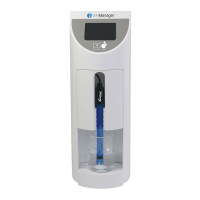
The KH Manager is a specialized, app-controlled, stand-alone device designed to automatically sample, test, and maintain the KH level of aquarium water. Developed in partnership between D-D and Kamoer, it combines Kamoer's expertise in high-precision medical-grade dosing equipment with D-D's knowledge of alkalinity control in reef aquariums.
The primary function of the KH Manager is to provide fully automated KH testing and solution dosing. It can perform between 1 and 24 tests per day, with user-defined testing frequencies (daily, every 'X' days, or specific days). Users can set a target KH level, as well as minimum and maximum pH and KH levels, which trigger alerts if test results fall outside these desired parameters. The device also supports automatic re-testing in cases of abnormal high/low readings to ensure accuracy.
For maintaining KH levels, the KH Manager features a dedicated stepper motor-driven pump for automatically adding KH buffer solution based on test results. There are two main dosing modes: 'Auto Add' and 'Custom Plans'. In 'Auto Add' mode, after each KH test, the machine calculates the necessary amount of KH buffer solution to raise the aquarium's KH to the set point. If the result is at or above the set point, no buffer is added. This mode allows for setting a 'Total Add Cap' to limit the maximum amount of buffer dosed after a single test, preventing rapid changes and allowing for gradual correction. A 'Single Add Cap' can also be set to break down larger doses into smaller amounts, reducing the risk of precipitation. The 'Add KH Interval' determines the time gap between these smaller doses, ensuring the buffer mixes fully before the next test. The device also allows users to program the concentration of different KH buffer solutions, accommodating various brands.
The 'Custom Plans' mode functions similarly to a programmable dosing pump, allowing users to set a user-defined dosing schedule. In this mode, the machine can automatically vary the dose based on test results to counteract under or over-dosing, making it suitable for tanks with consistent and known KH consumption. Users can create program groups with specific start and end times, and add individual dosing plans or use a 'Quick Add' feature for multiple plans. The system can adjust dosing based on a percentage or volume, and users can define the range within which these automatic adjustments are made relative to the KH set point. The 'Adjust Times' setting allows users to specify how many plans within a group are affected by these adjustments.
The KH Manager also includes a lab-grade pH probe for monitoring pH levels, with results displayed alongside KH readings. The device is app-controlled via Cloud Wi-Fi or local Bluetooth on iOS or Android devices, offering remote access, data logging, and notifications. A built-in LCD display screen shows the current status, progress, and real-time testing results.
The device is designed for ease of installation and use. It is self-priming and can be placed above or below the water level, provided the height difference with reagent bottles is within 0.5m to prevent siphoning. Color-coded tubing and ports simplify connection. The Kamoer Remote app guides users through the initial setup, including pH probe and pump head calibration.
The app provides in-app notifications for data reporting on test results and dosing volumes, graphs showing historical pH and KH test results, and displays of test reagent, KH solution, and wastewater bottle levels. Push alerts are sent for abnormal readings, low/high solution levels, and automatic calibration reminders.
Users can perform both automatic and manual tests. Manual tests allow for one-off checks without altering automatic schedules. The test settings include options for the number of beaker rinses (1 to 10 times per test) and the amount of sample water used (50ml to 100ml), balancing accuracy with waste water production. The re-test function allows the KH Manager to perform a second test if the initial KH reading deviates significantly from the last, with a user-defined trigger point. An "KH Abnormality Test" function can increase test frequency if results fall outside the user-defined threshold, returning to normal frequency once levels stabilize.
The KH Manager supports expansion for automatic multi-element dosing via optional add-on pumps connected through a DIN port. Data and programming are stored on the unit, ensuring settings are retained even in case of power or connection loss.
The KH Manager incorporates several features to facilitate maintenance and ensure accurate operation. Pump heads use PharMed® long-life tubing and can be individually calibrated and easily serviced. Digital scales and measuring cylinders are included for accurate pump calibration.
The device automatically monitors the availability of KH buffer solution and KH test reagent, as well as the amount of wastewater produced. The 'Status' page in the Kamoer Remote app displays liquid volumes and percentages remaining, sending alerts when levels are low (e.g., 10% remaining for reagents) or when the wastewater container is nearly full (e.g., 90% full). Users can manually update reagent volumes after mixing new solutions and reset the wastewater volume after emptying the container.
Calibration of the pH probe, saltwater pump, and KH buffer solution pump is crucial for accuracy. The app provides a step-by-step guide for these calibrations, including instructions for preparing solutions, rinsing probes, and using digital scales. Reminders can be set for periodic calibrations (e.g., every 30-45 days for pH probe, 45-60 days for pumps). The KH test reagent pump is factory-calibrated and typically does not require re-calibration. However, an offset can be calibrated into the KH Manager if test results are consistently incorrect, provided a recent test has been performed.
For maintenance tasks like changing pump heads or moving the unit, a function to empty liquid from all pump heads and tubes is available. This runs the saltwater, test reagent, and KH buffer pumps in reverse to drain liquid back into the aquarium or dosing containers, while the waste pump operates normally. During this process, care must be taken to prevent the pH probe from drying out.
General settings allow users to rename the KH Manager and update its firmware via the Kamoer Remote app. The device's time is synchronized with the mobile device, with a warning for potential time zone discrepancies when accessing remotely. A factory settings reset option is available to restore all settings to default, requiring re-calibration of components. The unit can also be removed from the Kamoer Remote account, which clears any stored test data.
 General
| Product Name | D-D The Aquarium Solution KH Manager |
|---|---|
| Category | Aquariums |
| Type | KH Manager |
| Function | Monitors and maintains KH (carbonate hardness) levels in aquarium water |
| Usage | Maintaining stable KH in marine aquariums |
| Compatibility | Marine aquariums |

 To Next Page