EasyManua.ls Logo

D-D The Aquarium Solution P1 PRO - User Manual

D-D The Aquarium Solution P1 PRO
18 pages
Print Icon
To Next Page IconTo Next Page
Loading...
P1 PRO
DOSING PUMP
USER MANUAL

Other manuals for D-D The Aquarium Solution P1 PRO

Question and Answer IconNeed help?

Do you have a question about the D-D The Aquarium Solution P1 PRO and is the answer not in the manual?

Summary

Product Information

Introduction

Overview of the D-D P1 PRO intelligent dosing pump with Wi-Fi control for automated liquid addition.

Product Features

Details the compact design, patented pump head, Pharmed BPT tube, and app control capabilities.

Unpacking and Box Contents

Instructions for checking delivery damage and a list of items included in the box.

Product Layout and Indicators

Product Layout Overview

Diagram and labels for the pump's inlet, outlet, status/power indicator, pump head, and reset button.

Status and Power Indicator Meanings

Explanation of the blue status indicator and red power indicator states and their functions.

Installation

Positioning the Pump

Guidance on placing the pump to avoid siphoning and ensure proper operation.

Installing the Kamoer Remote App

Steps to download and install the Kamoer Remote app for iOS and Android devices.

Registering a Cloud Account

Procedure for creating a user account via email or phone in the Kamoer Remote app.

Connecting the Dosing Pump to the Cloud

Instructions for connecting the dosing pump to your Wi-Fi network and the cloud via the app.

Programming the Dosing Pump

Setting Dosing Frequency

Options to set dosing schedules by 'By Days' or 'Weekly' intervals.

Setting Dosing Volume and Splits

How to set the total dose amount and split it into multiple smaller doses.

Anti-Chemical Interference Configuration

Configuration to prevent multiple pumps from dosing simultaneously.

Dosing Container Volume Monitoring

Setting and viewing the remaining solution and estimated days of operation.

Advanced Plan Adjustments

Adjusting Individual Plan Points

Modifying the time and volume for specific doses within a plan.

Altering Plan Group Time Period

Changing the overall time frame for a dosing plan group.

Managing Plan Groups and Points

Deleting plans and adding new plan groups or points.

Adding Multiple Plan Groups

Setting up and overlapping different dosing plans for the same pump.

Manual Addition

Performing a Manual Dose

Instructions on how to manually add a specific amount of liquid using the app.

Stopping a Manual Dose

How to cancel an ongoing manual dosing operation.

Calibration

Accessing Flow Calibration Settings

Navigating to the calibration settings within the app.

Flow Calibration Procedure

Detailed steps for calibrating the pump head's flow rate.

Measuring and Inputting Volume

Using a measuring cylinder and entering the collected volume for calibration.

Advanced Settings

Renaming the Dosing Pump

Changing the device's name in the Kamoer Remote app.

Updating Pump Firmware

Instructions for checking and installing firmware updates.

Time Setting and Synchronization

Adjusting or syncing the pump's internal clock.

Factory Settings Reset

How to restore the unit to its original factory defaults.

Removing the Device from App

Steps to unpair and remove the dosing pump from the Kamoer Remote app.

Overview

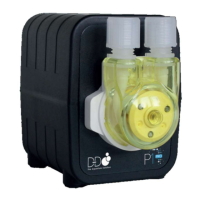
The D-D P1 PRO is a single-channel intelligent dosing pump designed for automated addition of liquid additives and elements to aquariums. It features Wi-Fi control, allowing users to manage and program the pump via a mobile app.

Function Description:

The primary function of the D-D P1 PRO is to precisely and automatically dose liquid solutions into an aquarium. This is achieved through a Kamoer patented gear-driven pump head, which ensures consistent performance without slipping or rusting. The pump can be programmed for various dosing schedules, including daily, multi-day cycles (up to 99 days), or specific days of the week. It supports up to 24 dosing plans per day. The unit also includes a real-time clock, retaining setting parameters even during power loss.

Important Technical Specifications:

  • Dimensions: Compact design, 60mm (L) x 95mm (W) x 83mm (H) including the pump head.
  • Pump Head: Kamoer patented gear-driven pump head with highly reliable threaded joints to prevent leaks.
  • Pump Tube: Utilizes Pharmed BPT pump tube for long life, heat resistance, acid/alkali resistance, and ozone/UV resistance.
  • Dosing Capacity: Up to 24 dosing plans per day, with a 1-99 day cycle or specified weekly dosing.
  • Connectivity: Requires a 2.4G Wi-Fi connection. Does not support 5G Wi-Fi or 5G Wi-Fi hotspots.
  • Power: 12V DC power adapter.
  • Daisy Chaining: Up to three units can be daisy-chained together.
  • Control: Controlled via the Kamoer Remote app, compatible with iOS 9.1 and above, and Android 4.4 and above.
  • Firmware: Firmware can be updated via the app.

Usage Features:

  • App Control: The Kamoer Remote app provides comprehensive control over the dosing pump. Users need to register a cloud account to use the app.
  • Device Connection: The pump connects to the cloud via a wireless router. The app guides users through the connection process, which involves enabling location services, ensuring the mobile device is on a 2.4G Wi-Fi network, and pressing the reset button on the pump to enter configuration mode.
  • Dosing Plan Setup:
    • Frequency: Users can choose between "By Days" (every X days, up to 99) or "Weekly" (specific days of the week).
    • Volume and Time: Dosing volume and time periods can be set. The "Quick Add" tab allows users to enter a total amount and split it into multiple smaller doses throughout the set period.
    • Anti-Chemical Interference: For multiple P1 PRO pumps, this feature allows setting a delay between doses to prevent simultaneous addition of different chemicals.
    • Container Volume Tracking: Users can set the volume of the dosing solution container, allowing the app to estimate remaining solution and dosing days.
  • Advanced Plan Adjustments:
    • Individual plan points (time and volume) within a group can be adjusted.
    • Multiple plan groups can be added to the same pump, allowing for different dosing schedules on the same day.
    • Plan groups and individual plan points can be easily deleted by swiping left in the app.
  • Manual Addition: The pump supports manual dosing. Users can enter the desired amount in the app, and the pump will dispense it. A "Start/Stop" button controls the manual dose, though for precise additions, programming is recommended over manual stopping.
  • Positioning: To prevent siphoning, the pump should be placed to ensure the height difference between the inlet and outlet is within 0.5m. The inlet tube should be as short as possible, and the outlet tube should not be submerged. A mounting bracket (DDP1BKPRO) is available as an optional extra for secure fixing.

Maintenance Features:

  • Calibration: The pump head can be calibrated to ensure accuracy. The calibration process involves priming the pump, setting a calibration time (up to 60 seconds for increased accuracy), running the pump to collect a volume of liquid in a measuring cylinder, and then entering the collected volume into the app. The pump then calculates and adjusts the flow rate.
  • Firmware Updates: The app allows for firmware updates to the device.
  • Time Setting: The unit automatically syncs to the correct time and retains it during power outages. Manual time synchronization is available if needed.
  • Factory Settings Reset: This function removes all programmed settings from the unit, returning it to its factory state. It does not remove the device from the app or cloud.
  • Remove Device: Users can remove the device from the app. The unit remains connected to the router and cloud and can be re-added from "Local Devices" in the app.

Box Contents:

  • D-D P1 Pro Dosing pump body
  • 12v DC Power adapter
  • Plastic measuring cylinder
  • Length of clear hose

D-D The Aquarium Solution P1 PRO Specifications

General IconGeneral
BrandD-D The Aquarium Solution
ModelP1 PRO
CategoryAquariums
LanguageEnglish

Related product manuals