20D-Link DCS-855L User Manual
Section 3: Monitoring
Monitoring
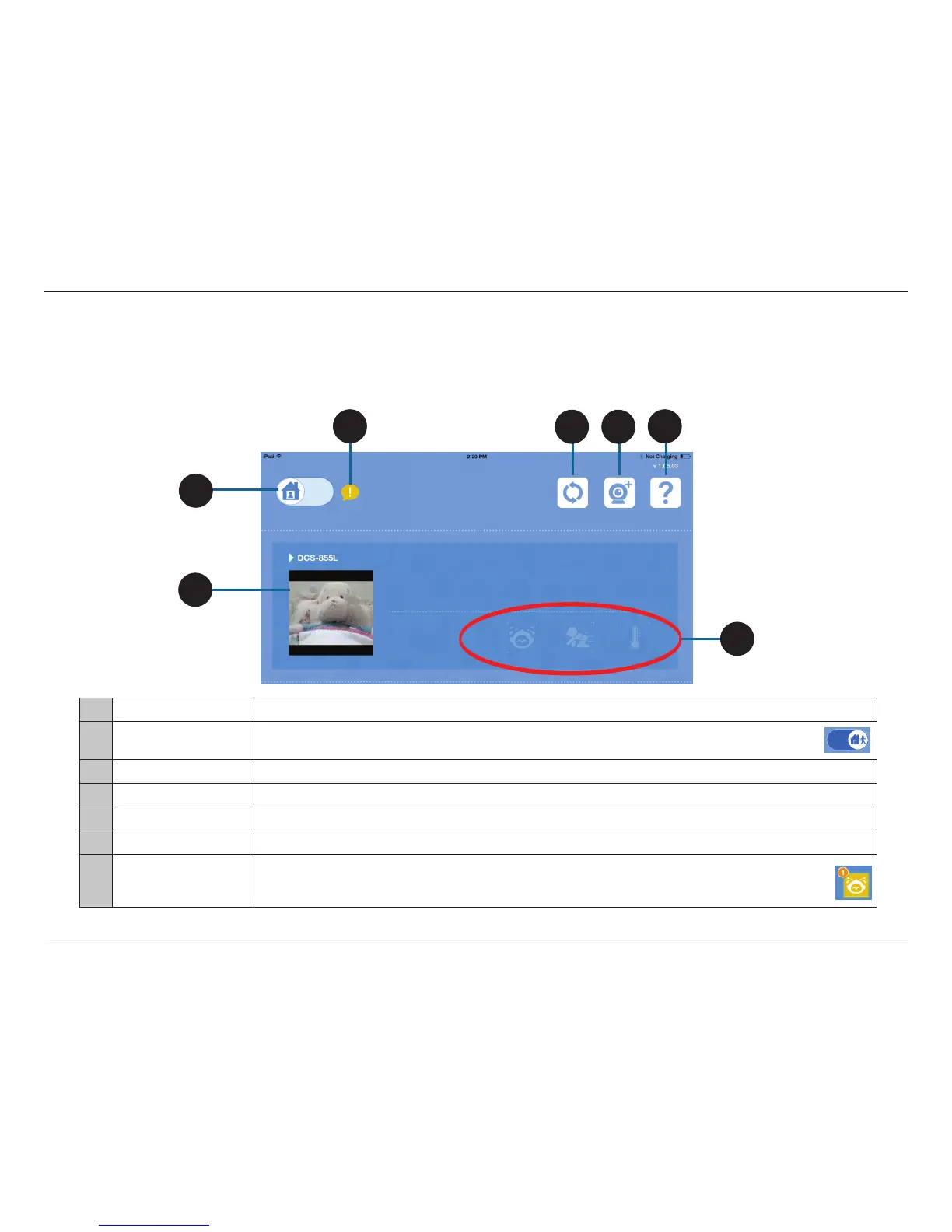
mydlink Baby App Home Screen
Once the setup process is complete, you will see the mydlink Baby app Home Screen.
7
1 DCS-855L Tap on the Camera View Snapshot to go to the Live View screen. Refer to "mydlink Baby App Live View" on page 21.
2 Local/Remote Access
Tap on the Home icon to switch from local access to remote access to your DCS-855L.
After you change to remote access, you will see the login screen.*
3 ! Tap on the Exclamation Point (!) icon for helpful hints.
4 Refresh Tap on the Refresh icon to scan for Wi-Fi Baby Cameras on your network that have not yet been added to the app.
5 Camera Setup Wizard Tap on Camera + icon to set up an additional DCS-855L.
6 ? Tap on the Question Mark (?) icon for FAQs (frequently asked questions).
7 Alert Icons
When sound or motion is initially detected, or when the temperature becomes too warm or too cold, the alert icon
changes color and a number appears. As additional detections occur, the number on the alert icon increases.
(To reset alerts, tap on the alert icon.)
*Note: When you log in, the refresh icon will change, allowing you to access the control for push notication. Refer to question 12 of "Troubleshooting" on page 33.
4
6
5
3
2
1


 To Next Page