21D-Link DCS-855L User Manual
Section 3: Monitoring
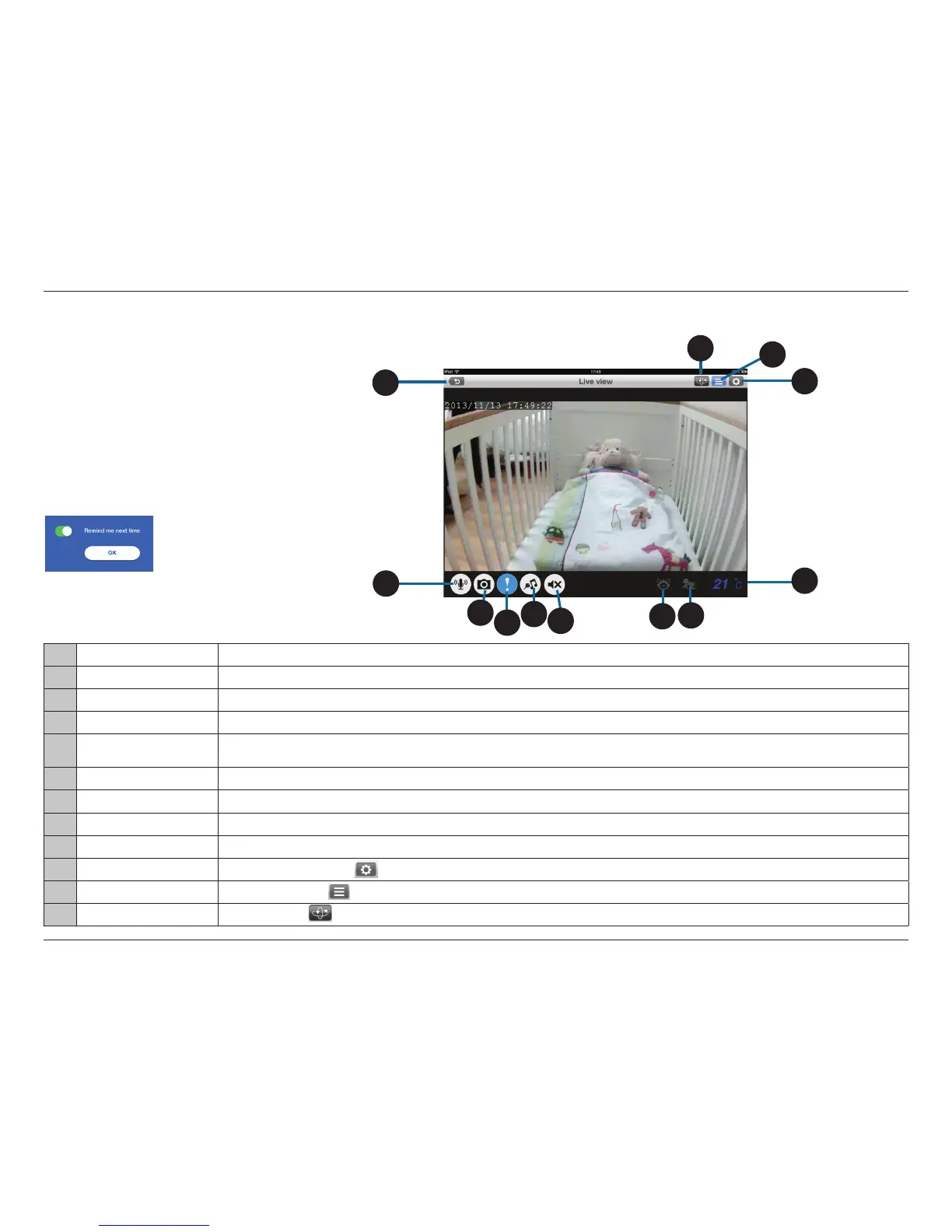
mydlink Baby App Live View
1 Return Tap on the Return icon to return to the Home screen .
2 Microphone Tap on the Microphone icon to enable or disable two-way audio.
3 Camera Tap on the Camera icon to access snapshot, video recording, and playback mode.
4 Alerts Tap on the Alerts icon (!) to enable or disable alert notication.
5 Music
Tap on the Music icon to select the music you would like to play, from the ve standard lullabies provided, or from the custom lullabies that you can store
on the microSD card. It is also used to enable or disable the music.
6 Speaker Tap on the Speaker icon to enable or disable Live View audio. Volume can be controlled by using the volume buttons on the mobile device.
7 Sound Alert Indicates when a loud sound is detected, like the sound of a baby crying.
8 Motion Alert Indicates when motion is detected, such as when the baby is moving.
9 Current Temperature Displays the current temperature.
10 Conguration Tap the Conguration icon ( ) to access the conguration menu.
11 Settings Tap the Settings icon ( ) to access settings, such as the camera's video resolution or brightness.
12 Pan Settings Tap the Pan icon ( ) to access Auto Pan and pan presets.
1
11
10
3
4
5
6
7
8
2
Note: The rst time you access your DCS-855L Live View,
you will get a reminder to adjust the focus on the camera.
This will ensure you get the best possible image. Slide or
tap the switch to turn o the reminder, and click OK.
9
At any time, tap on the Return icon (in the upper left
corner) to return to the Home screen, and to access
the Conguration menu, Settings and Pan Settings.
12


 To Next Page