14D-Link DCS-8627LH User Manual
Section 3 - mydlink
Using the mydlink App
Controlling Your Device
After setting up your DCS-8627LH Full HD Outdoor Wi-Fi Spotlight Camera
with a mydlink account in the mydlink app, you will be able to remotely
access your camera through the app. After signing into your mydlink
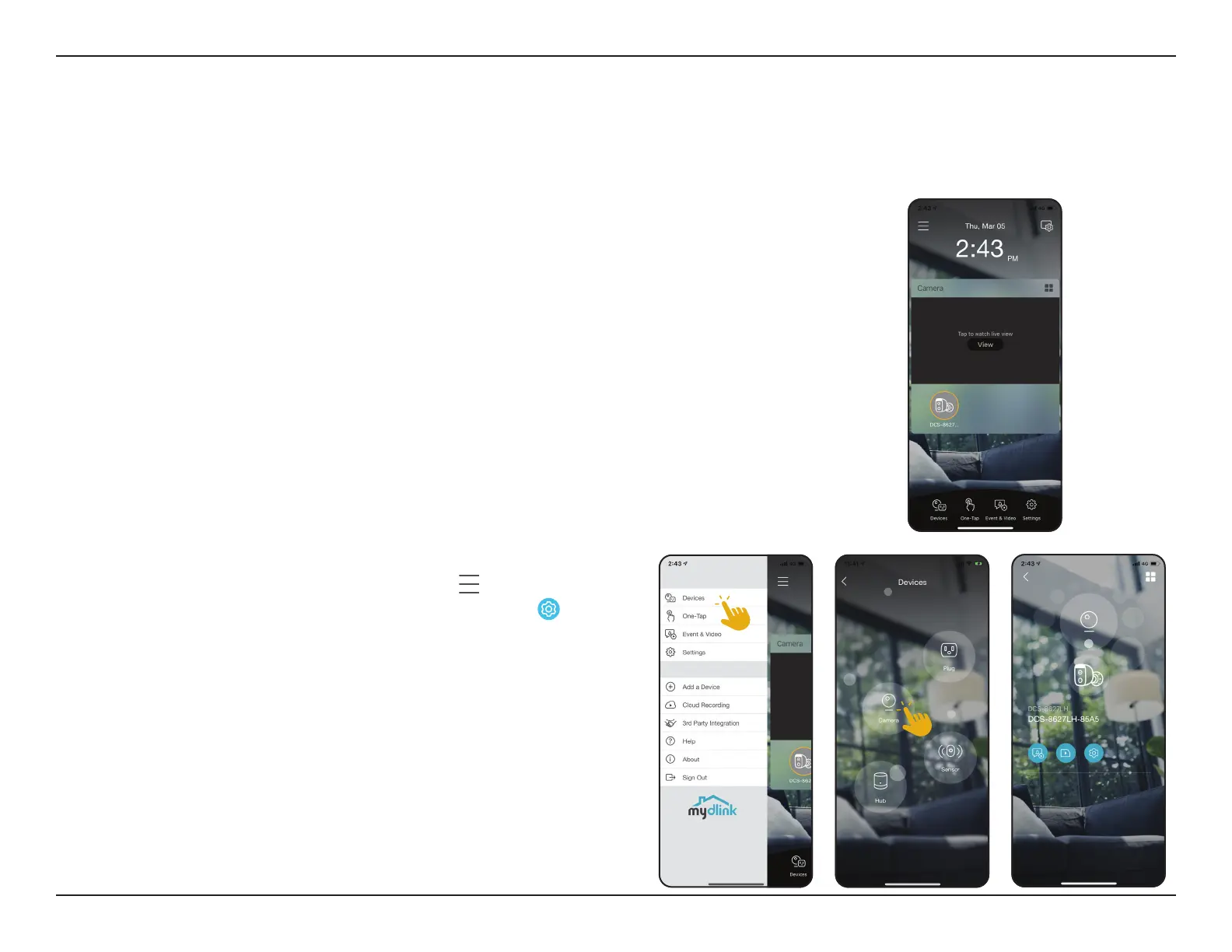
account, you will see a screen similar to the one on the right.
If you have previously checked the Add to shortcut option while installing
the camera, you will see a quick link to your camera directly on the home
screen. Tap the shortcut link to your camera on the home screen and by
default you will see a live video feed of your camera on the top half of the
app.
To access the settings for your DCS-8627LH
Full HD Outdoor Wi-Fi Spotlight Camera, tap
> Devices >
Camera > navigate to your camera on the carousel >
.
Note: Screenshots are representative only. The mydlink app is constantly being updated
and so may appear dierent.








 To Next Page