22
Use the arrow keys to highlight the first menu item on the Boot Menu, Configure
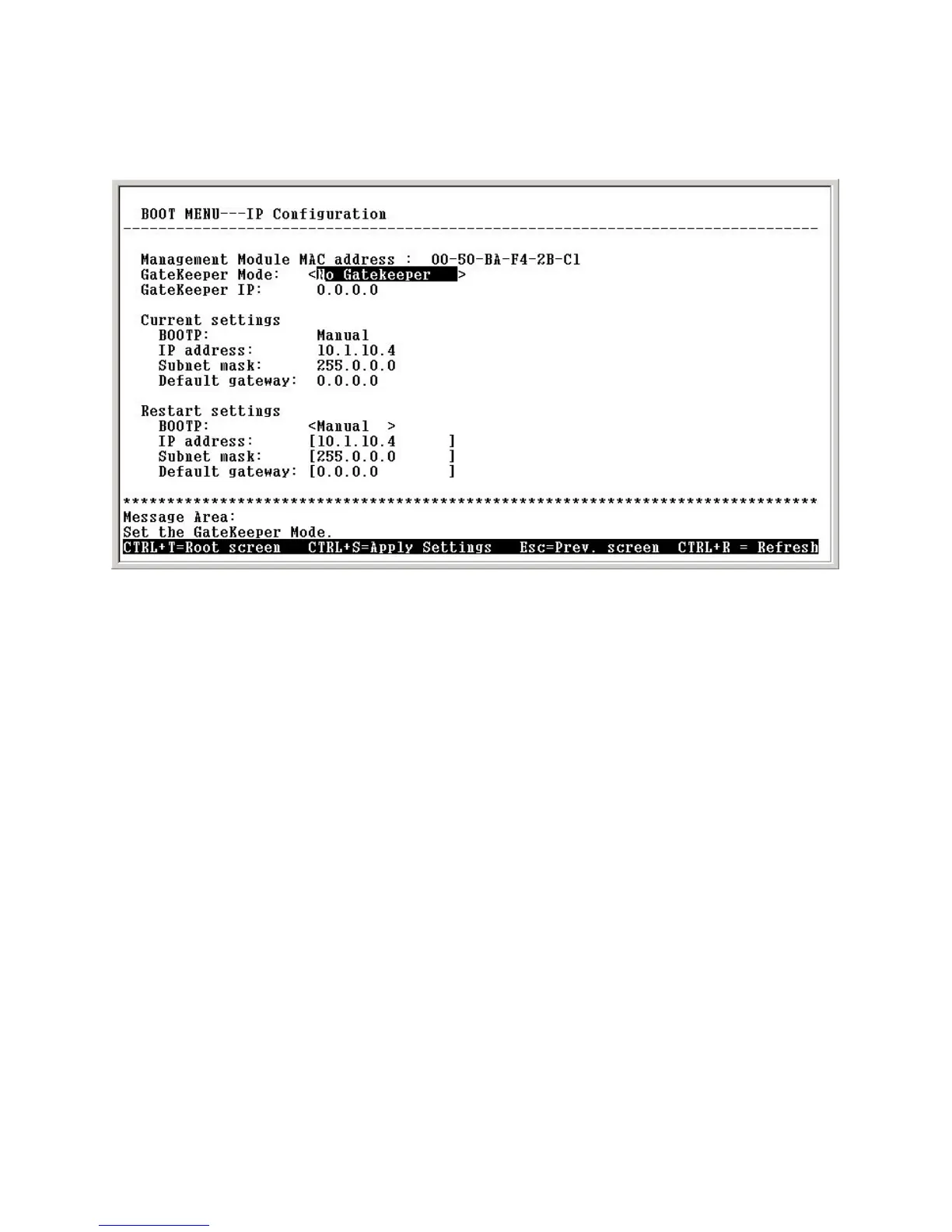
IP, and press <Enter>. The IP Configuration screen will be displayed:
Using the Boot Menu
Each item on the IP Configuration screen is described below:
BOOTP: Use the <Space> key to select the method that the VoIP gate-
way will use to obtain its IP settings once it is rebooted (restarted). Choices
include:
Boot Menu—IP Configuration screen
Configuring the IP
Gatekeeper Mode: Use the <Space> key to select the Gatekeeper mode
once the device is rebooted (restarted). Choices include:
No Gatekeeper: When No Gatekeeper is selected, the VoIP gateway
will not need Gatekeeper.
Auto Discovery: When Auto Discovery is selected, the VoIP gateway
will auto-search the Gatekeeper from your LAN or WAN.
Manual Discovery: When Manual Discovery is selected, the VoIP
gateway will attempt to obtain the Gatekeeper settings from the fields
located just below.
Gatekeeper IP: Enter an IP address for the Gatekeeper.
Manual: When Manual is selected, the VoIP gateway will obtain its IP
settings from the fields located just below.


 To Next Page