85D-Link DIR-826L User Manual
Section 3 - Conguration
Wi-Fi Protected Setup (WPS)
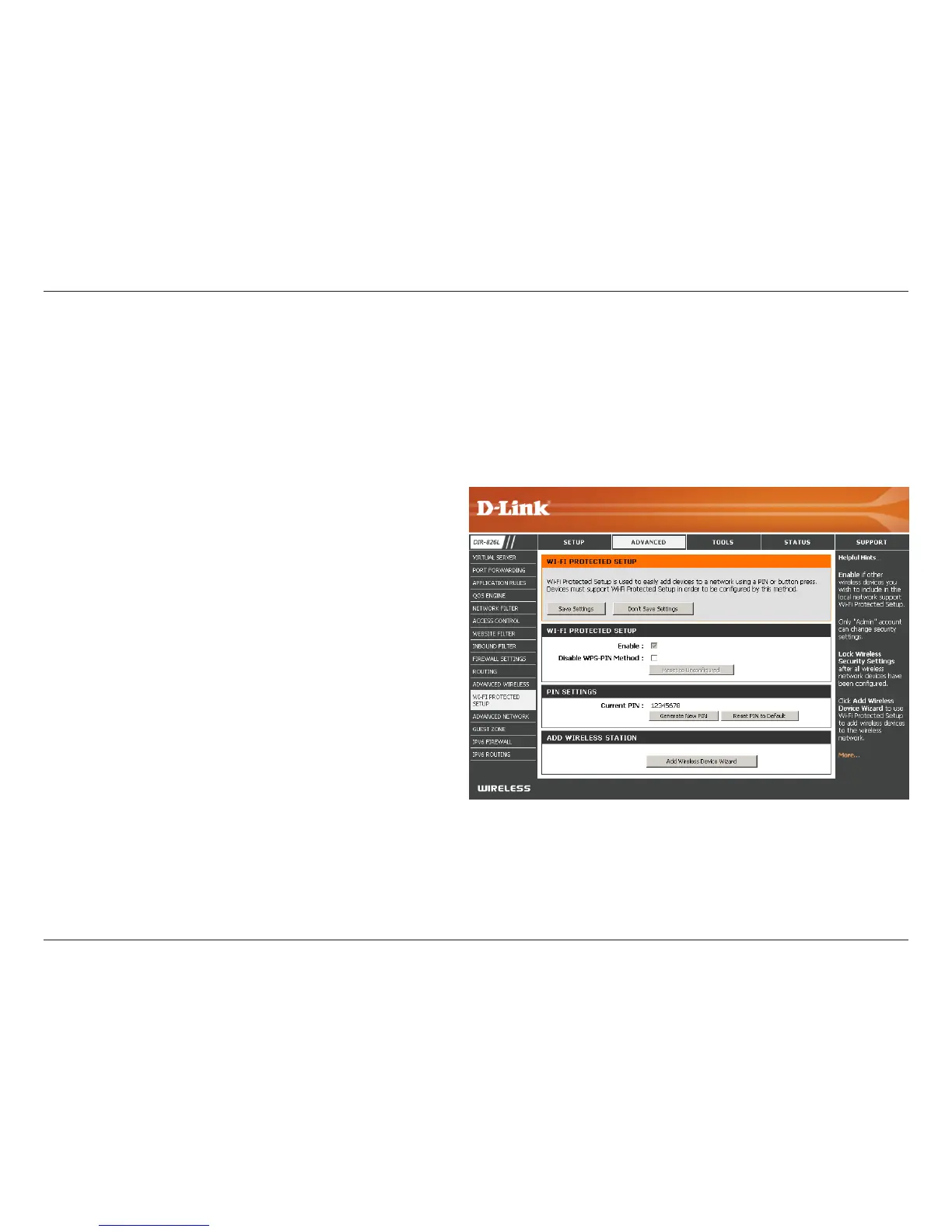
Enable the Wi-Fi Protected Setup feature.
Note: if this option is unchecked, the WPS button on the
side of the router will be disabled.
Check to disable the WPS PIN method of securing your
network. This will not aect the Push-Button method.
A PIN is a unique number that can be used to add
the router to an existing network or to create a new
network. Only the Administrator (“admin” account) can
change or reset the PIN.
Shows the current PIN.
Restore the default PIN of the router.
Create a random number that is a valid PIN. This
becomes the router’s PIN. You can then copy this PIN to
the user interface of the wireless client.
Enable:
Disable WPS-PIN
Method:
PIN Settings:
Current PIN:
Reset PIN to
Default:
Generate New
PIN:
Wi-Fi Protected Setup (WPS) System is a simplied method for securing your wireless network during the “Initial setup” as well
as the “Add New Device” processes. The Wi-Fi Alliance (WFA) has certied it across dierent products as well as manufactures.
The process is just as easy as pressing a button for the Push-Button Method or correctly entering the 8-digit code for the Pin
Code Method. The time reduction in setup and ease of use are quite benecial, while the highest wireless Security setting of
WPA2 is automatically used.



 To Next Page