
 Need help?
Do you have a question about the D-Link DUB-E100 and is the answer not in the manual?
Minimum hardware and software requirements for installing the D-Link DUB-E100 adapter.
Key functionalities and specifications of the D-Link DUB-E100 USB 2.0 Fast Ethernet Adapter.
Steps to unpack the DUB-E100 and check for included items in the package.
Instructions for physically connecting the D-Link DUB-E100 adapter to your computer's USB port.
Guide on attaching an Ethernet cable to the DUB-E100 and network switch, hub, or router.
Detailed steps for installing the D-Link DUB-E100 driver on Windows Vista operating systems.
Procedures for installing the D-Link DUB-E100 driver on Windows XP (32-bit and 64-bit).
Steps to install the D-Link DUB-E100 driver on the Windows 2000 operating system.
Guide for installing the D-Link DUB-E100 driver on the Windows ME operating system.
Instructions for installing the D-Link DUB-E100 driver on the Windows 98SE operating system.
Steps for installing the D-Link DUB-E100 driver and software on Mac OS X systems.
Instructions for compiling and installing the D-Link DUB-E100 driver on Linux kernel 2.6.14.
Steps for compiling and installing the D-Link DUB-E100 driver on Linux kernel 2.6.9.
Check if the DUB-E100 can be used on a USB 1.1 port and its speed limitations.
Understand when to use crossover or straight-through Ethernet cables for network connections.
Steps to verify D-Link DUB-E100 installation using Device Manager in Windows.
Steps to verify D-Link DUB-E100 installation using System Preferences in macOS.
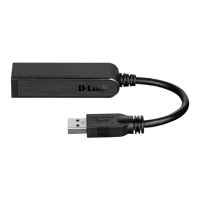
The D-Link DUB-E100 is a USB 2.0 Fast Ethernet Adapter designed to provide network connectivity to desktop and laptop PCs. This compact and versatile device allows users to connect their computers to a wired Ethernet network via an available Universal Serial Bus (USB) port, offering reliable 10/100Mbps Fast Ethernet connectivity. It's an ideal solution for systems that lack a built-in Ethernet port or for users who require an additional network interface.
The primary function of the DUB-E100 is to act as a bridge between a computer's USB port and an Ethernet network. It converts the USB data stream into an Ethernet signal and vice versa, enabling the computer to communicate with other devices on a local area network (LAN) or access the internet through a wired connection. Utilizing the Hi-Speed USB 2.0 standard, the adapter extends the transfer speed of earlier USB Fast Ethernet adapters to true 10/100Mbps connectivity, ensuring efficient data transfer rates for various network activities.
The adapter supports both 10Mbps and 100Mbps Ethernet speeds, with capabilities for both half-duplex and full-duplex operation at both speeds. This means it can send and receive data simultaneously, maximizing network throughput. The built-in RJ-45 connector is a standard Ethernet port, compatible with common Ethernet cables. The DUB-E100 also features auto-negotiation, which automatically detects and configures the highest available speed and duplex mode supported by the connected network device (e.g., switch, hub, or router), simplifying setup and ensuring optimal performance.
Power for the DUB-E100 is supplied directly by the USB bus of the host computer. This eliminates the need for an external power adapter, making the device highly portable and convenient, especially for laptop and notebook users who benefit from fewer cables and power outlets. Furthermore, the adapter supports USB's energy-saving suspend and resume functions, which help to minimize power consumption when the network connection is not actively in use, contributing to longer battery life for portable devices.
The DUB-E100 is designed for ease of use, featuring Plug-and-Play installation. This means that in many modern operating systems, the device will be recognized automatically upon connection, and drivers may be installed with minimal user intervention. The adapter is broadly compatible with a wide range of operating systems, including Microsoft Windows Vista (x64/x86), XP (x32/x64 Edition), Server 2003 (x32/x64 Edition), 2000, Me, 98SE, as well as Mac OS X (10.x and above) and various Linux kernel versions (2.6.9-13 and 2.6.14 & above). This broad compatibility ensures that a large number of users can integrate the DUB-E100 into their existing computing environments.
Installation typically involves plugging the DUB-E100's USB cable into an available USB port on the computer. The operating system will then detect new hardware and prompt for driver installation. The device comes with a CD-ROM containing the necessary drivers and a manual, guiding users through the software installation process specific to their operating system. Once the drivers are installed, an Ethernet cable can be attached to the DUB-E100's RJ-45 port and then to a network switch, hub, or router to establish network connectivity.
For visual feedback on its operational status, the DUB-E100 is equipped with two LED indicators: Link and TX/RX. The Link LED lights up solid green when a good physical connection to the network is established, indicating that the adapter is properly connected and ready for communication. The TX/RX LED flashes green when data is being transmitted or received at 100Mbps, and flashes amber when data is transmitted or received at 10Mbps. These indicators provide immediate visual confirmation of network activity and connection status, allowing users to quickly diagnose basic connectivity issues. If both LEDs are unlit, it suggests a problem with the physical connection, prompting the user to check the cables and ensure the network switch, hub, or router is powered on.
The DUB-E100 is also compliant with USB 1.1 specifications, meaning it can function on older USB 1.1 ports, although transfer speeds will be limited to the slower USB 1.1 rates. For optimal performance, connection to a USB 2.0 port is recommended.
The DUB-E100 is designed to be a low-maintenance device. As a hardware adapter, it does not require regular software updates beyond initial driver installation, which is typically provided on the included CD-ROM or through D-Link's support website. The Plug-and-Play nature of the device means that once installed, it generally operates without further user intervention.
Troubleshooting is straightforward, often involving checking the physical connections and the status LEDs. If the Link LED is not solid green, users are advised to verify that the USB cable is securely plugged into the computer and the Ethernet cable is properly connected to both the DUB-E100 and the network device. Ensuring that the network switch, hub, or router is powered on is also a basic troubleshooting step.
For software-related issues, users can verify proper installation through the Device Manager in Windows or System Preferences in Mac OS X. In Windows, the D-Link USB DUB-E100 should appear under Network Adapters without any yellow exclamation marks or red 'x' symbols, which would indicate a driver issue or device conflict. For Mac users, a new Ethernet network interface (e.g., Ethernet Adapter (en1) or (en2)) should be visible in the Network settings.
The DUB-E100's design, which draws power directly from the USB bus, eliminates the need to manage an external power supply, reducing potential points of failure and simplifying cable management. Its robust construction and compliance with industry standards (IEEE 802.3u Fast Ethernet and IEEE 802.3 Ethernet) contribute to its reliability and longevity. In cases of persistent issues, D-Link provides technical support, and users are encouraged to consult the FAQ section on D-Link's website for common solutions before contacting support. The device is also marked as recyclable, indicating an environmentally conscious design.
 Power
Power| bus power | 2.5 W |
|---|---|
| current | 0.5 A |
| voltage | 5 V DC |
 Operating Environment
| operating temperature | 0 ˚ to 40 ˚C |
|---|---|
| storage temperature | -10 ˚ to 70 ˚C |
| operating humidity | 5% to 95% (non-condensing) |
 Ports & interfaces
| usb port | USB Type A |
|---|---|
| ethernet port | RJ-45 (10/100 Mbps Dual-Speed) |
| diagnostic LEDs | Speed, Tx/Rx Traffic |
 Weight and Dimensions
| dimensions | 73 x 21.3 x 20 mm |
|---|---|
| weight | 22 g |









 To Next Page

