

 To Next PageTo Next Page
 Need help?
Do you have a question about the D-Link E15 and is the answer not in the manual?
Steps to set up the Range Extender using the D-Link Ai app and mobile device.
Addresses common issues with wireless router connection or intermittent connection drops.
Guide on modifying Wi-Fi network name (SSID) and password for the Range Extender.
Explanation of Mesh Smart Roaming and its requirements for seamless Wi-Fi experience.
Procedure to reset the Range Extender to factory default settings or recover admin password.
Instructions on how to set up the Range Extender using the Wi-Fi Protected Setup (WPS) method.
Information on creating a mesh network by pairing the extender with a D-Link Mesh-enabled router.
Details on where to find support, including live chat, tutorials, and FAQs.
Information regarding software licenses (GPL/LGPL) used in the product.
Details on how to obtain the source code for software under GPL and LGPL licenses.
Links to download the user manual and other optimized files for the Range Extender.
Links to technical support and GPL source code support resources.
List of other D-Link and TP-Link manuals for similar networking devices.
Steps to set up the Range Extender using the D-Link Ai app and mobile device.
Addresses common issues with wireless router connection or intermittent connection drops.
Guide on modifying Wi-Fi network name (SSID) and password for the Range Extender.
Explanation of Mesh Smart Roaming and its requirements for seamless Wi-Fi experience.
Procedure to reset the Range Extender to factory default settings or recover admin password.
Instructions on how to set up the Range Extender using the Wi-Fi Protected Setup (WPS) method.
Information on creating a mesh network by pairing the extender with a D-Link Mesh-enabled router.
Details on where to find support, including live chat, tutorials, and FAQs.
Information regarding software licenses (GPL/LGPL) used in the product.
Details on how to obtain the source code for software under GPL and LGPL licenses.
Links to download the user manual and other optimized files for the Range Extender.
Links to technical support and GPL source code support resources.
List of other D-Link and TP-Link manuals for similar networking devices.
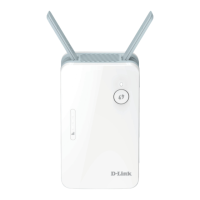
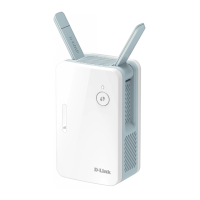
The D-Link E15 AX1500 Mesh Wi-Fi 6 Range Extender is a device designed to expand and enhance your existing Wi-Fi network, providing broader coverage and improved signal strength throughout your home. Its primary function is to eliminate dead zones and deliver a more consistent wireless experience, especially in larger homes or areas where the router's signal struggles to reach. This extender leverages Wi-Fi 6 technology, which offers faster speeds and better efficiency for multiple connected devices, making it suitable for modern households with numerous smart devices, streaming, and gaming needs.
One of the key usage features of this range extender is its ability to create a seamless mesh network when paired with a D-Link Wi-Fi Mesh-enabled router. This "Mesh Smart Roaming" capability ensures that your Wi-Fi devices, such as smartphones and tablets, automatically connect to the strongest available Wi-Fi signal as you move around your home. This eliminates the need to manually switch between your router's and extender's Wi-Fi networks, providing an uninterrupted connection. For this feature to work effectively, your Wi-Fi device must support the 802.11k/v standard, and the Wireless Network Name (SSID) and Wireless Password must be identical on both the mesh Wi-Fi range extender and your wireless router.
Installation of the D-Link E15 AX1500 is designed to be user-friendly, offering multiple setup methods. The recommended approach involves using the D-Link Ai app, which guides you through the process step-by-step. To begin, you plug the range extender into a power outlet near your router. Then, you download and launch the D-Link Ai app, tap "Install New Device," and scan the QR code found on the Quick Installation Card. The app's on-screen instructions will then lead you to complete the setup, prompting you for your current router's Wi-Fi name and password. This method is particularly helpful for users who prefer a visual and guided setup experience.
Alternatively, the device supports Wi-Fi Protected Setup (WPS) for a quick and convenient setup. To use WPS, you plug the range extender into an outlet near your router and wait for the Status LED to blink amber. Then, you press the WPS button on your wireless router for about 3 seconds, followed by pressing the WPS button on your range extender for 2-3 seconds within one minute. The Status LED on the extender will blink red/white alternatively, and once it turns solid white, it indicates a successful connection. It's important to note that WPS may be disabled on some routers or modems, in which case the D-Link Ai app setup is the alternative.
Once set up, the range extender can be unplugged and moved to a more optimal location between your wireless router and the area where you desire extended coverage. The device features a Signal Strength Indicator, which uses white bars to visually represent the signal quality: one white bar indicates a weak signal, two white bars indicate a good signal, and three white bars indicate a strong signal. This indicator helps you choose the best placement for your extender to maximize coverage and performance. If, after moving the extender, the signal strength indicator shows only one white bar or the LED does not turn solid white within three minutes, it suggests that the extender needs to be moved closer to the wireless router.
For maintenance and configuration, the D-Link E15 AX1500 allows you to change wireless settings through a web browser interface. By navigating to the URL provided on the Quick Installation Card or the back of the device (e.g., http://dlinkapXXXX.local./), you can access the login screen. After entering your Admin Password (which is "password" by default if WPS setup was used), you can go to "Settings > Extender" to modify the Wi-Fi Network Name (SSID) and security (Wi-Fi password) settings. This provides flexibility for users who wish to customize their extended network's details.
In case you forget your Admin password or need to reset the range extender to its factory default settings, a reset button is located on the bottom of the device. Pressing and holding this button with a paper clip until the Status light turns red will initiate a factory reset, erasing all custom settings. After a reset, the extender can be set up again using either the D-Link Ai app or WPS.
It's important to understand that when extending a wireless signal, devices connected to the range extender may not achieve the exact same speed or throughput as when connected directly to the router. This is a common characteristic of range extenders, as they inherently re-transmit the signal, which can introduce some latency or reduction in speed. However, the D-Link E15 AX1500 aims to minimize this impact through its Wi-Fi 6 technology and mesh capabilities, providing a robust and reliable extension of your network.
The device also comes with comprehensive technical support options, including a support website with live chat, video tutorials, frequently asked questions, and the latest user documentation and software updates. This ensures that users have access to assistance for any installation or operational queries. The product also adheres to GPL (GNU General Public License) and LGPL (GNU Lesser General Public License) terms for its software code, with information on obtaining access to the source code available through D-Link's support channels.








 General