EasyManua.ls Logo

D-Link DAP-1325 - User Manual

D-Link DAP-1325
92 pages
Print Icon
To Next Page IconTo Next Page
Loading...
User Manual
DAP-1325
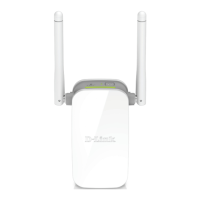
N300 Wi-Fi Range Extender
May 2018

Other manuals for D-Link DAP-1325

Questions and Answers

  • J
    jenniferrichardsJul 25, 2025
    What to do if WPS setup is not working on my D-Link Extender?
    • J
      jessicaanthonyJul 25, 2025
      If WPS setup isn't working for your D-Link Extender, it might be because WPS is disabled on your router or modem. If the WPS Status LED on your router or modem doesn't blink when you press the WPS button, try holding the button a bit longer. If it still doesn't blink, configure your Range Extender using the QRS Mobile Setup method.
  • A
    Ariel DavisAug 4, 2025
    Why does my D-Link DAP-1325 wireless connection keep dropping?
    • T
      Teresa HortonAug 5, 2025
      If your D-Link Extender's wireless connection drops, make sure the DAP-1325 is within range of your wireless router. Try moving it closer to the router and check that the Status LED is solid green. Also, when repeating a wireless signal, devices connected to the extender might experience reduced speed compared to connecting directly to the router.
  • L
    Louis FosterAug 15, 2025
    What to do if I forgot my D-Link DAP-1325 Extender password?
    • S
      Sarah BuckleyAug 15, 2025
      If you've forgotten your D-Link DAP-1325 password, or want to reset it to the factory default settings: 1. Press and hold the reset button on the bottom of the extender using a paper clip. 2. Release the button after a minimum of 10 seconds; the Status light will turn red. You may also repeat the WPS process, following the steps to connect to your router using WPS.

Summary

CHAPTER 1. INTRODUCTION

Contents and Audience

Describes the manual's purpose and intended users.

Conventions

Explains formatting and notation used in the manual.

Document Structure

Outlines the organization and content of each chapter.

CHAPTER 2. OVERVIEW

General Information

Provides a general description of the DAP-1325 device and its capabilities.

Specifications

Details the hardware and software specifications of the device.

Product Appearance

Describes the physical appearance of the device, including panels and LEDs.

Delivery Package

Lists the items included in the product packaging.

CHAPTER 3. INSTALLATION AND CONNECTION

Before You Begin

Advises users to read the manual and ensure they have necessary information and equipment.

Connecting to PC

Details the steps for connecting the extender to a PC via Ethernet or Wi-Fi.

PC with Wi-Fi Adapter

Explains how to connect the extender to a PC using a Wi-Fi adapter.

Connecting to Web-based Interface

Guides users on accessing the extender's web-based interface for configuration.

CHAPTER 4. CONFIGURING VIA WEB-BASED INTERFACE

Initial Configuration Wizard

Guides the initial setup of the extender using a wizard.

Selecting Operation Mode

Explains how to choose and configure the extender's operation mode (Access Point, Repeater, Client).

Changing LAN IPv4 Address

Details how to configure the extender's LAN IPv4 address to avoid conflicts.

Wi-Fi Client

Describes how to configure the extender to connect to a wireless network as a client.

Configuring Wireless Network

Explains how to set up the wireless network name (SSID) and password for the extender.

Changing Web-based Interface Password

Guides on changing the administrator password for the web-based interface for security.

Statistics

Displays current system status, network statistics, DHCP leases, and connected devices.

Connections Setup

Allows configuration of basic LAN parameters including IP addressing and DHCP.

Wi-Fi

Enables configuration of wireless network settings, security, and client management.

Advanced

Facilitates adding DNS name servers to the system.

Firewall

Provides options for configuring MAC address-based filtering for network access.

System

Offers functions for managing device settings, firmware, logs, and time.

CHAPTER 5. OPERATION GUIDELINES

Safety Rules and Conditions

Outlines essential safety precautions and operating conditions for the device.

Wireless Installation Considerations

Provides guidance on optimal placement and environmental factors for wireless range.

CHAPTER 6. ABBREVIATIONS AND ACRONYMS

D-Link DAP-1325 Specifications

General IconGeneral
TypeNetwork repeater
WPS push buttonYes
Ethernet LAN data rates10, 100 Mbit/s
Maximum transfer distance- m
Antenna typeExternal
Antennas quantity2
Wi-Fi standards802.11g, Wi-Fi 4 (802.11n)
Security algorithmsWPA, WPA2, WPS-PBC
Networking standardsIEEE 802.11g, IEEE 802.11n, IEEE 802.3ab, IEEE 802.3u
Wi-Fi data rate (max)300 Mbit/s
Ethernet LAN (RJ-45) ports1
CertificationFCC, IC, CE, RCM, IDA, CB, LVD, UL, WPS
Product colorGrey, White
AC input voltage110-240 V
AC input frequency50 - 60 Hz
Sustainability certificatesRoHS
Storage temperature (T-T)-20 - 65 °C
Operating temperature (T-T)0 - 40 °C
Storage relative humidity (H-H)5 - 95 %
Operating relative humidity (H-H)10 - 90 %
Weight and Dimensions IconWeight and Dimensions
Depth50.7 mm
Width97.9 mm
Height48.7 mm
Weight97 g

Related product manuals