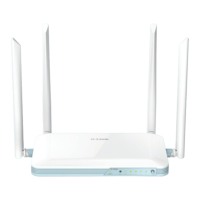
iiiD-Link COVR-X1870 User Manual
Table of Contents
Table of Contents
Product Overview ..............................................................1
Package Contents .........................................................................1
System Requirements ................................................................. 2
Features ............................................................................................3
Hardware Overview .....................................................................4
LED Indicators ........................................................................ 4
Back Panel ...............................................................................5
Installation ......................................................................... 6
Before you Begin ...........................................................................6
Wireless Installation Considerations ......................................7
Setup ................................................................................................. 8
D-Link Wi-Fi App Setup ....................................................... 9
Hardware Setup ..................................................................11
Setup Wizard ........................................................................14
Conguration ...................................................................22
Home ..............................................................................................23
Internet ................................................................................... 24
COVR-X1870..........................................................................25
Connected Clients ..............................................................26
Extenders ...............................................................................28
Settings ..........................................................................................29
Wizard .....................................................................................29
Internet - IPv4 .......................................................................30
IPv4 - Dynamic IP (DHCP) ............................................31
IPv4 - Static IP ..................................................................32
IPv4 - PPPoE .....................................................................33
IPv4 - PPTP ........................................................................35
IPv4 - L2TP ........................................................................37
IPv4 - DS-Lite ...................................................................39
Internet - IPv6 .......................................................................40
IPv6 - Auto Detection ...................................................41
IPv6 - Static IPv6 .............................................................43
IPv6 - Auto Conguration (SLAAC/DHCPv6) ........45
IPv6 - PPPoE .....................................................................48
IPv6 - 6rd ...........................................................................52
IPv6 - Local Connectivity Only ..................................54
Internet - VLAN ....................................................................55
Wireless ..................................................................................57
Guest Zone .......................................................................63
Network .................................................................................. 64
D-Link Cloud .........................................................................66
Operation Mode ..................................................................67
Features ..........................................................................................68
QoS Engine............................................................................68
Firewall Settings - Advanced ..........................................70
Firewall Settings - IPv4/IPv6 Rules ................................72
Port Forwarding ..................................................................74
Port Forwarding - Virtual Server ....................................76
Static Route - IPv4 ...............................................................78
Static Route - IPv6 ...............................................................79
Dynamic DNS .......................................................................80
Quick VPN ..............................................................................82
Management ................................................................................ 83


 To Next Page
 Loading...