Dacor Renaissance Wall Oven Service Guide
Page 16
Section 6 – Temperature Offset Calibration Instructions
Entering Calibration Mode
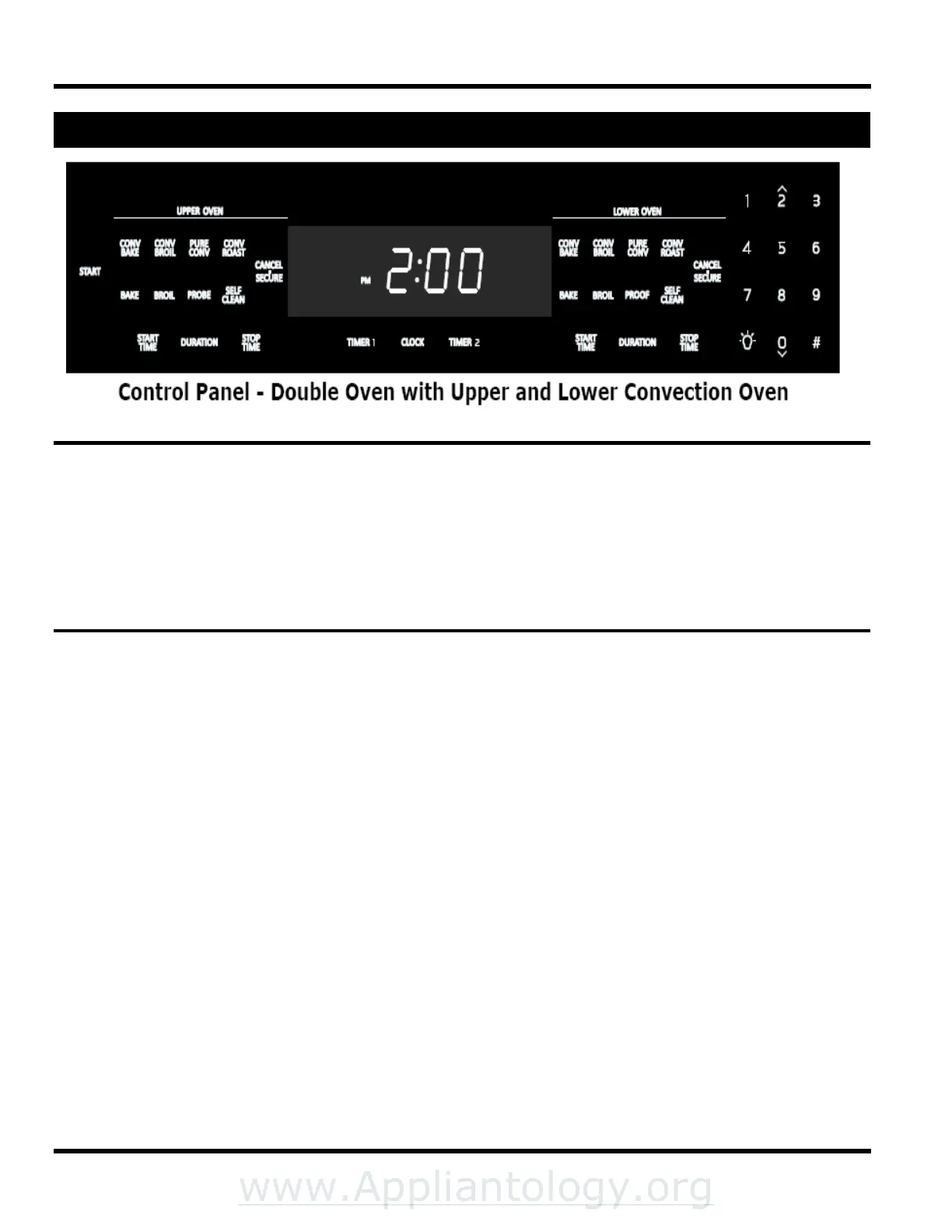
1) Press and hold the “0” and “#” keys. The display will show the word “PASS”.
2) Using the number keypad enter 6428 then press the Start key.
3) The display will change and read “SLCE” “00”. Quickly move to step 4.
4) Select the cooking mode that needs to be calibrated for example “BAKE“. Using the number keypad enter the
new calibration offset for example “25”. Using the number keypad press “#” to toggle between + and –. Press
the START key. This will lock the calibration. Press the CANCEL - SECURE key to complete procedure.
Calibrating Additional Modes
5) Without pressing CANCEL - SECURE to complete: repeat step 4 and select new mode for example “PURE
CONV”.
6) Using the number keypad enter the new calibration offset for example “20”.
7) Using the number keypad press “#” to toggle between + and -.
8) Press the START key. This will lock the calibration.
9) Press the CANCEL - SECURE key to complete procedure.


 To Next Page