11
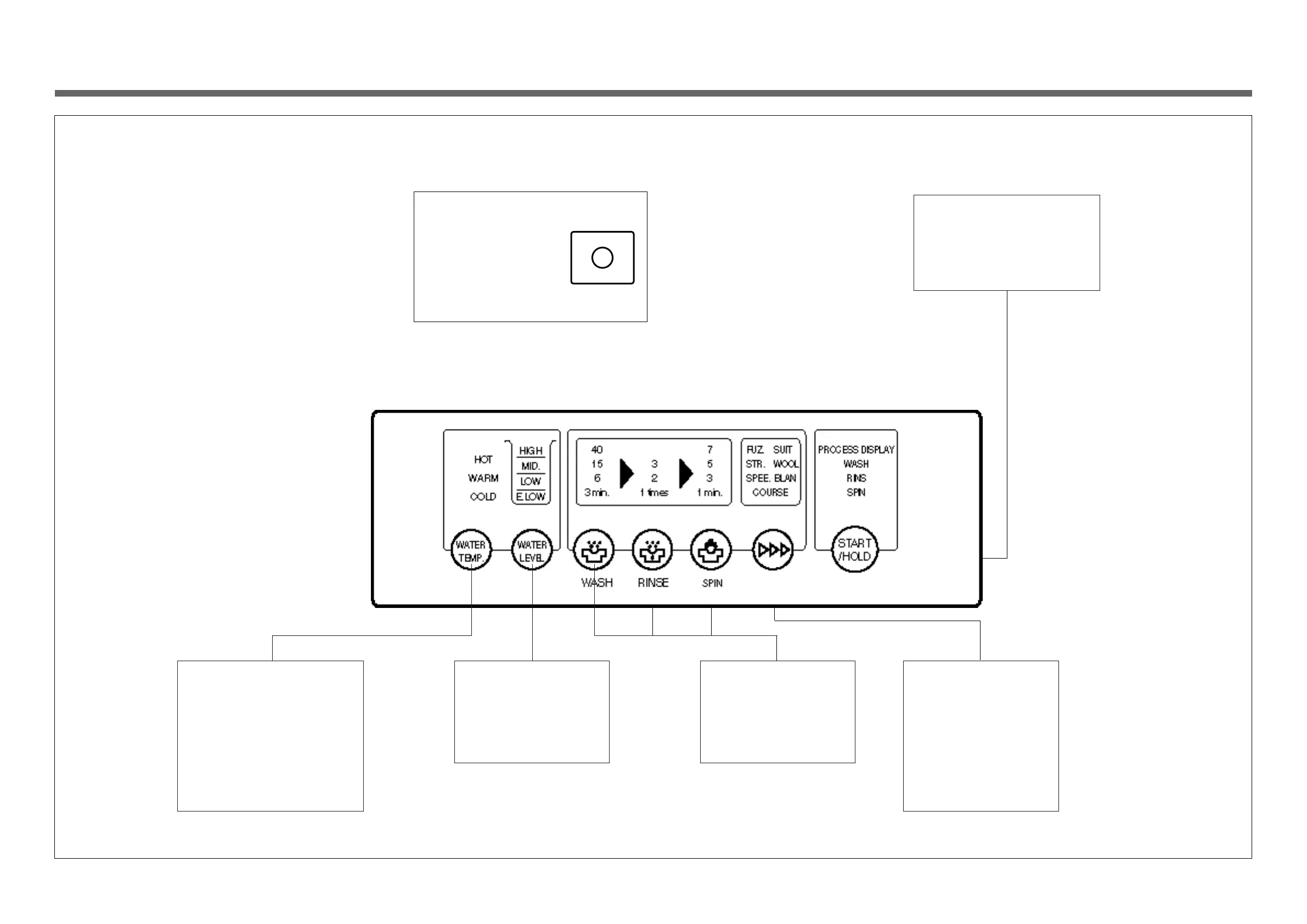
4. FUNCTION OF THE CONTROL PANEL
CONTROL PANEL
It has micom sensor.
As the buttons are pressed, the lamps indicating
the selection of you desired washing program will light up.
Power Switch
• Press this switch to turn the
power ON or OFF.
• After turning off the power,
wait for more than 3
seconds and then turn it on
again.
POWER
Temperature Selection Button
• This button is used to select the
water temperature according to the
clothes being washed.
• Press this button until your desired
temperature indicato light comes
on.
• Warm means the mixed inlet of
cold and hot water.
Water Level Selection
Button
• This button is used to select
the washing water level
according to the size of the
wash load.
Water Selector
• This above three buttons can
be used to bring the three
washing stages under
control.
Start/Hold Button
• Press this button to begin operation
or to stop operation temporarily.
• Operation and temporary stop are
repeated as it is pressed.
Course Selection Button
• This button is used to select
the washing course
according to the type of the
clothes being washed.
• You can choose one of the
eight courses by pressing
this button until your desired
course indicator light comes
on.



 To Previous Page