37
Change the Main Fuse
(In the left side of
machine compartment)
Start
Power cord or Fuse
is disconnected ?
1’st power of SMPS
is on?
Main PCB Fuse is
disconnected?
Voltage
(DC12V/14.5V/5V) on
Main PCB is OK?
Wire connection
of F-PCB is OK?
Check power Cord connection
from machine compartment and
to CN1 of M-PCB.
Change F-PCB AS.
Change Main PCB
Change the Fuse
(on the Main PCB)
Y
N
N
Y
N
Y
Y
N
Y
N
Checkup and connect
F-PCB wires.
6-1. Faulty Start (F/R lights OFF , F-PCB Power OFF)
6. TROUBLE DIAGNOSIS
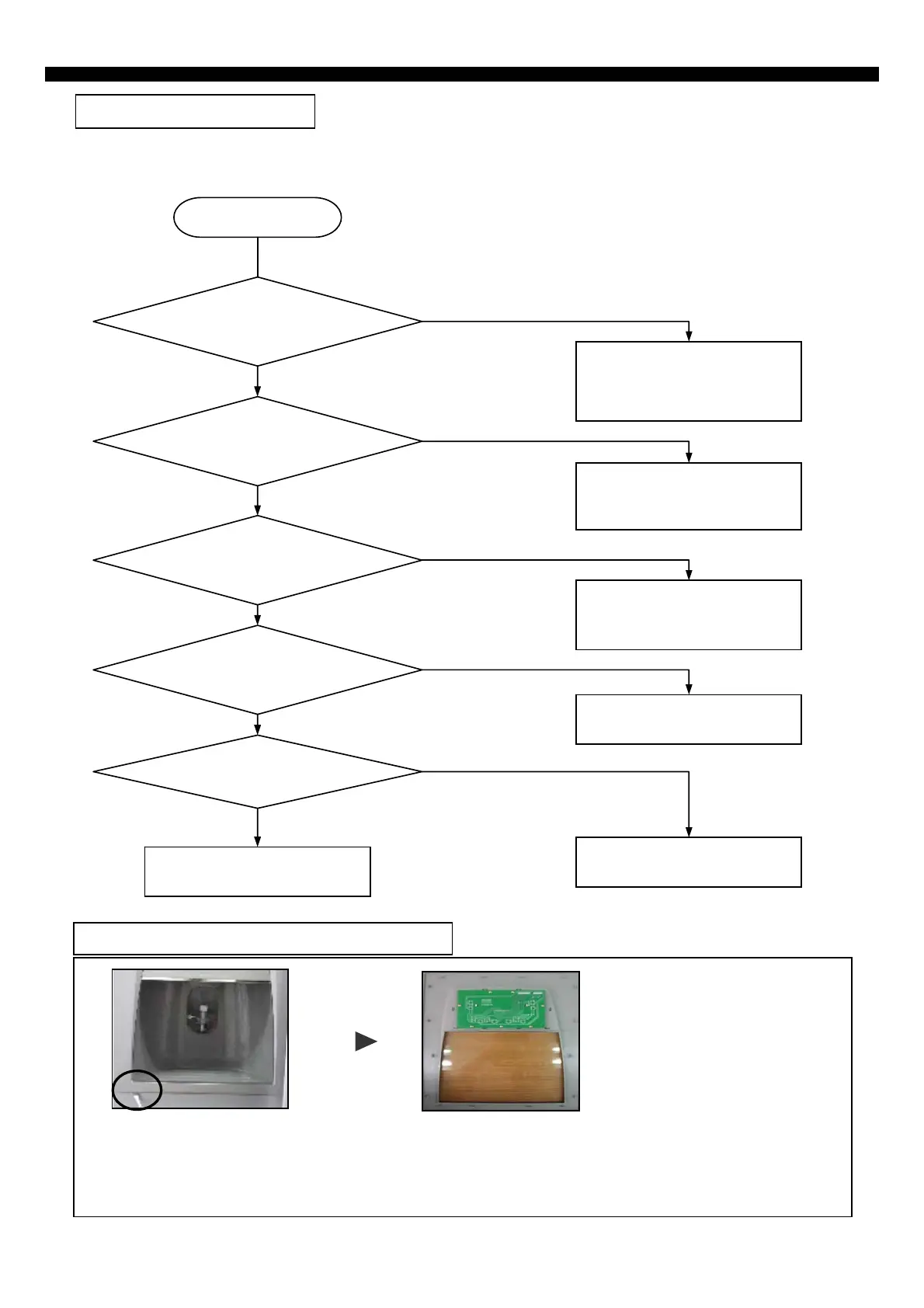
1) Insert a flat tip driver into the left down groove of panel frame and snap it out smoothly.
2) Separate 2 housings of 10P / 7P from Front PCB. (Do not hold only wires to pull out.)
3) Unscrew (7 points) to remove Front PCB.
* Follow the reverse order when assembling.
※ How to replace Front PCB (Dispenser Model)



 To Next Page