9
BEFORE OPERATION
When the oven is first plugged in , the display will show nothing.
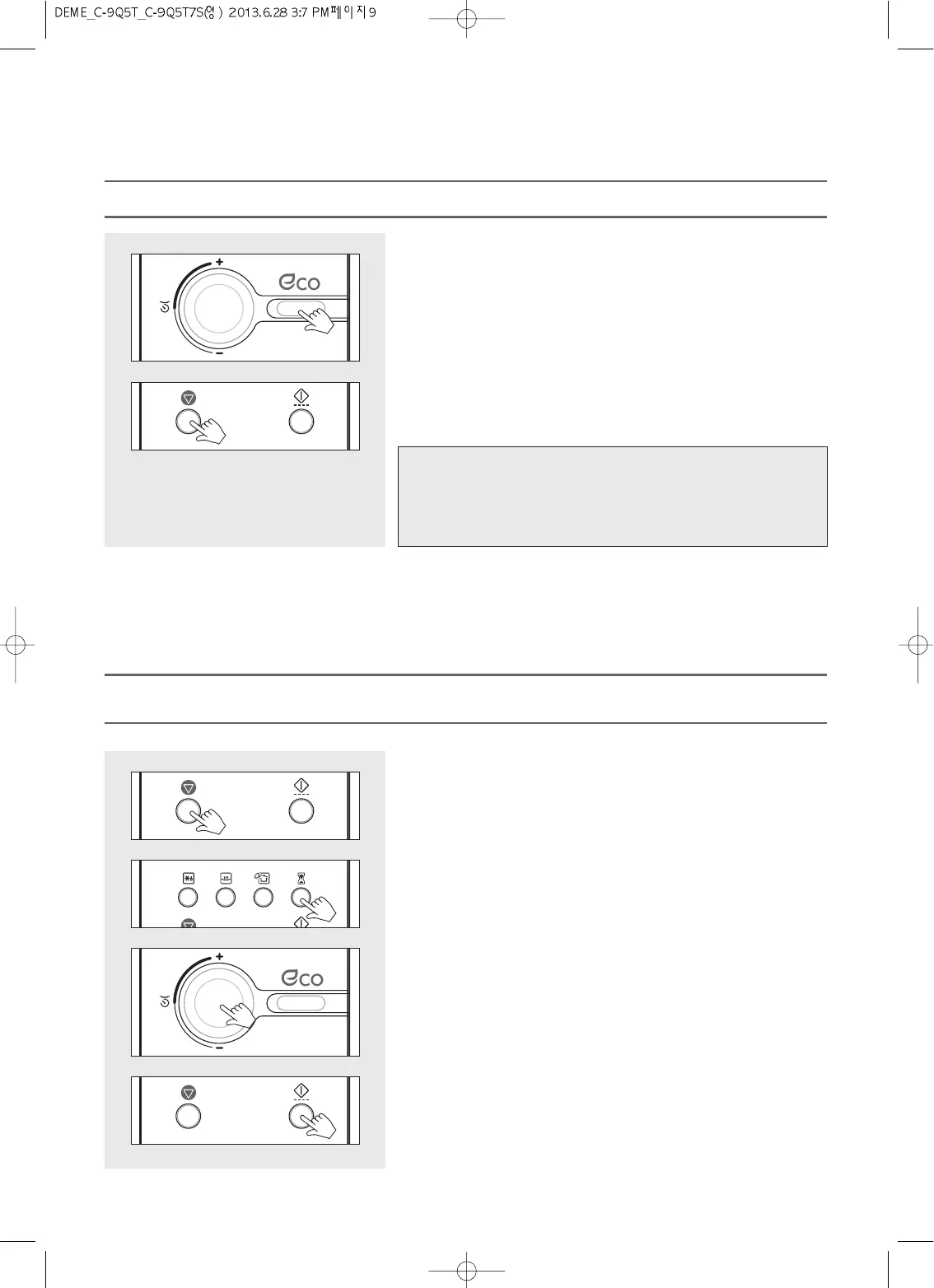
1. Pres
s and hold the ECO button until display is turned on and beep
sounds.
The oven is turned AC power on.
2. Press and hold the STOP/CLEAR button until display is turned off.
The oven is turned AC power off.
TURNING AC POWER ON & OFF THE OVEN
Note :
If the AC power ever goes off, the display is disappeared until the power
comes back on to press and hold the ECO button until display is
turned on and beep sounds.
The oven is turned power off automatically after 10 minutes without using.
KITCHEN TIMER operates as a minute timer.
KITCHEN TIMER operates without microwave energy.
1. Press the STOP/CLEAR button.
“: 0” appears in the display.
2. Press the Kitchen timer button once.
3. Turn the dial knob to set the amount of time you want to count down.
For a kitchen time of 11 minutes, turn the dial knob to set 11:00.
(up to 60 minutes can be set)
“11:00” shows in display.
4. Press the START/SPEEDY COOK button.
The display counts down the time remaining in Kitchen timer mode.
When Kitchen timer mode ends, you will hear 3 beeps.
KITCHEN TIMER MODE



 To Next Page