11
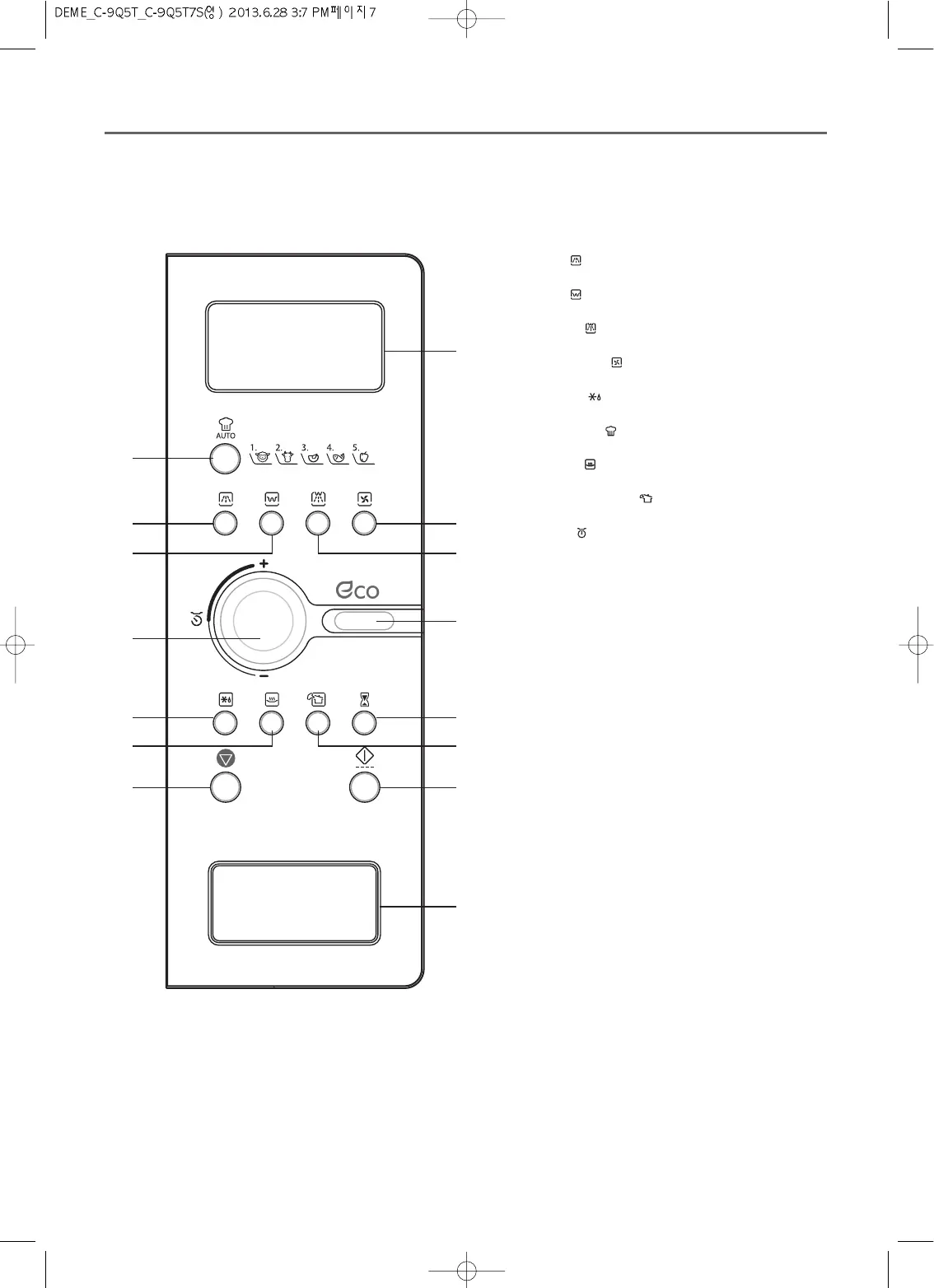
Display : Cooking time, power level, program
indicators and present time are displayed.
MW ( ): When blinking, the oven is operating in
MICROWAVE COOK mode.
Grill ( ): When blinking, the oven is operating in
GRILL mode.
Combi ( ): When blinking, the oven is operating
in COMBI mode.
Convection ( ): When blinking, the oven is
operating in CONVECTION mode.
Defrost ( ): When blinking, the oven is operating
in DEFROST mode.
Auto-cook ( ): When blinking, the oven is
operating in AUTO COOK mode.
Warm ( ): When blinking, the oven is operating
in WARM mode.
Steam Cleaning ( ): When blinking, the oven is
operating in STEAM CLEANING mode.
gram ( ): When blinking, the oven is operating in
weight input mode.
22
Auto cook : Used to cook or reheat.
33
Combi : Used to select combi mode.
44
Convection : Used to select convection mode and
selected temp.
55
Grill : Used to select grill mode.
66
MW : Used to set power level of the microwave.
88
Dial knob : Used to set time, weight and quantity.
99
Kitchen timer : Used as a minute timer.
00
STEAM CLEANING : Used to clean the inside of
the oven.
qq
Defrost : Used to defrost foods.
ww
Warm : Used to keep the food warm.
ee
START/SPEEDY COOK : Used to start a program
or a speedy start(each press adds 30 seconds of
microwave cooking time).
rr
STOP/CLEAR : Used to stop the oven operation or
to delete the cooking data.
tt
DOOR OPEN BUTTON : To open the door push
the door open button.



 To Next Page