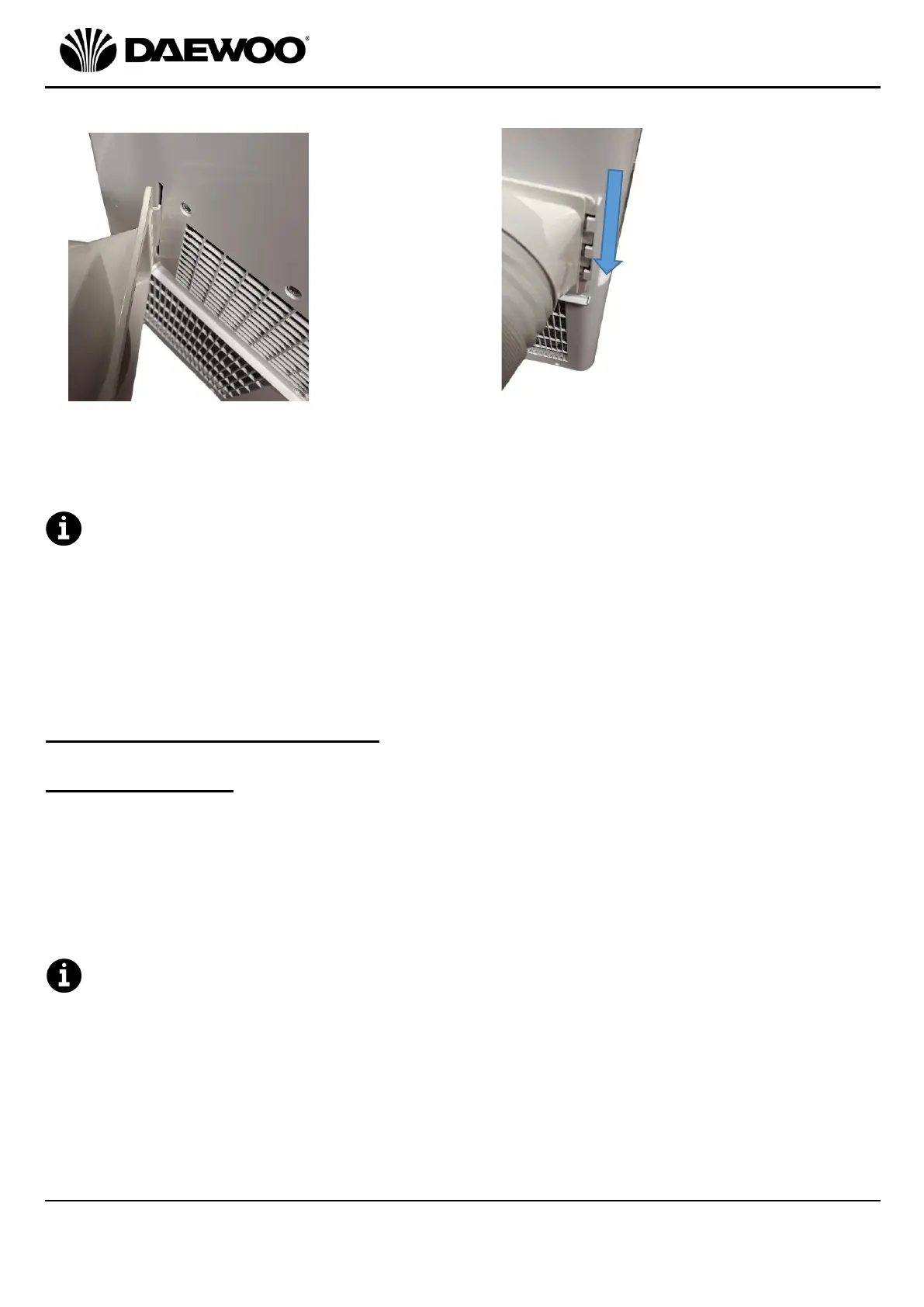
3. Finally, attach the Hose Connector (21) to the rear outlet of the unit as follows:
4. Place the exit end of the Flexible Hose (20) through a suitable outlet such as an
open window, door, etc.
The unit must be positioned a minimum of 1 Metre away from any wall or
obstruction on all sides.
• Before use, check the Flexible Hose (20) is properly fitted.
• Ensure the unit is on a solid, level, dry surface.
• Ensure the unit is plugged directly into the mains socket and does not share
sockets with other appliances via a mains adaptor or an extension lead, etc.
Using Your Air Conditioning Unit
Cooling Operation
1. Power the unit up by pressing the POWER ON/OFF Button (13).
2. Press the Mode Button (17) until the ‘COOL’ Indicator (12) illuminates.
3. Press the Temperature/Time + (14) and Temperature/Time – (15) Buttons to
select the desired room temperature (16˚C - 31˚C) on the LED Display (11).
4. Press the Fan Speed Button (18) to choose either low or high fan speeds, the
selected speed will be shown by the Fan Speed Indicators (9).
To create a circulatory effect, the cooled air exits the unit at an angle and
slightly to one side. This is to make space cooling more efficient and is quite
normal.


 To Next Page