The Internal Water Tank and Draining
During normal use, most of the moisture collected will be evaporated internally by
the unit and expelled through the Exhaust (4).
However, the internal water tank will eventually fill to its maximum capacity and
the Water Full Indicator (20) will illuminate on the Control Panel (1) to show the
tank is full.
Drain the tanks as follows:
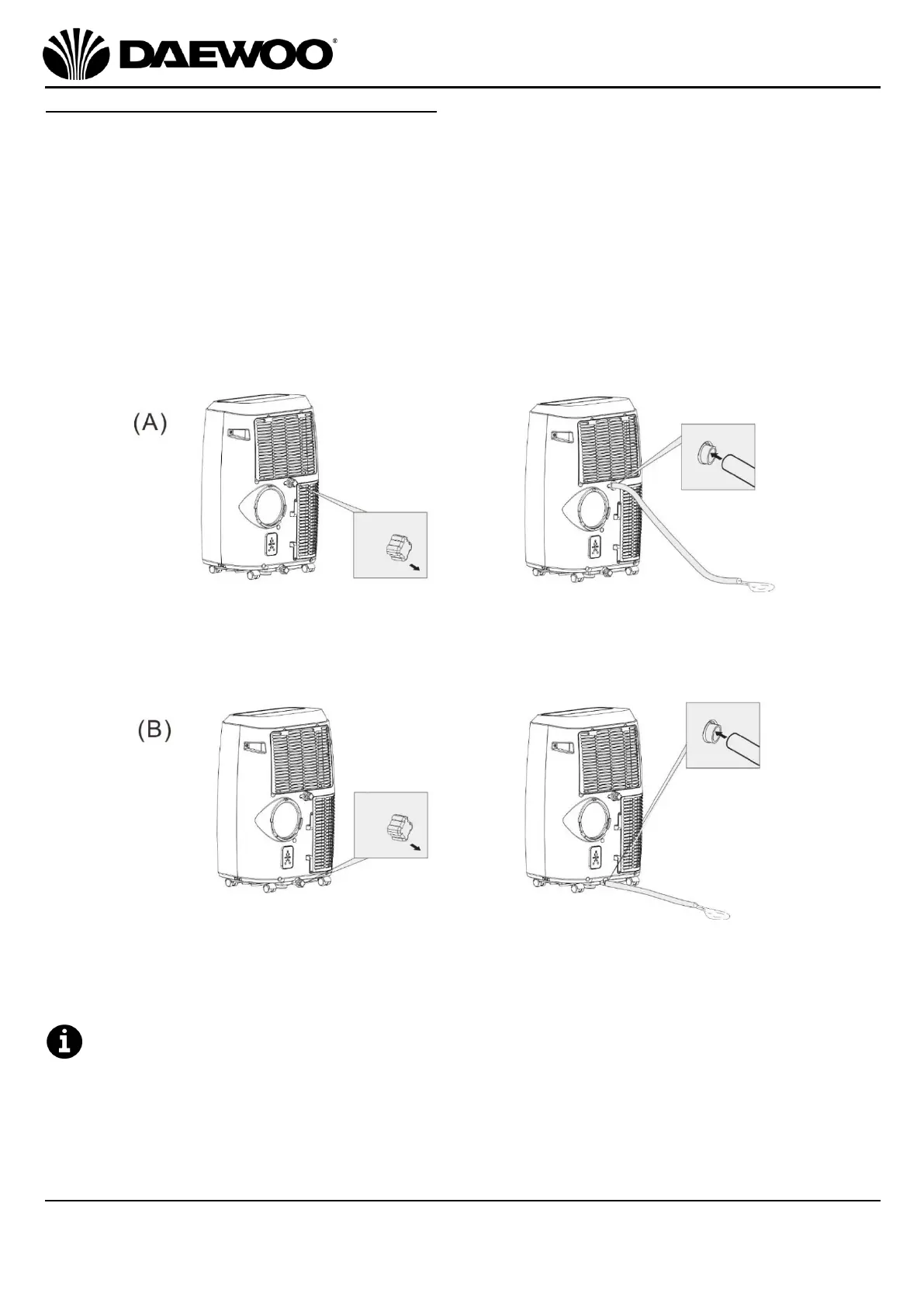
A. To empty the upper water tank, take the unit outside, unscrew and remove the
Upper Tank Drain Cover (6) at the rear of the unit and allow the tank to drain. If
desired attach the Drain Hose (38) to the outlet to allow for easier draining.
B. To empty the lower water tank, take the unit outside, unscrew and remove the
Lower Tank Drain Cover (9) and allow the tank to drain. If desired attach the
Drain Hose (38) to the outlet to allow for easier draining.
Alternatively connect the Drain Hose (38) to the lower tank drain and lead it
outside to the drain the tank(s) continuously. (The upper tank will drain into the
lower tank).
Ensure that the Upper Tank Drain Cover (6) and Lower Tank Drain Cover (9)
are replaced before using the unit again.
The amount of water collected by the tank and the frequency of draining is
caused by the relative humidity levels which will vary and will depend on several
factors:


 To Next Page