EasyManua.ls Logo

Daewoo DSB-070L - Remote Controller Display

Daewoo DSB-070L
73 pages
Print Icon
To Next Page IconTo Next Page
To Previous Page IconTo Previous Page
Loading...
16
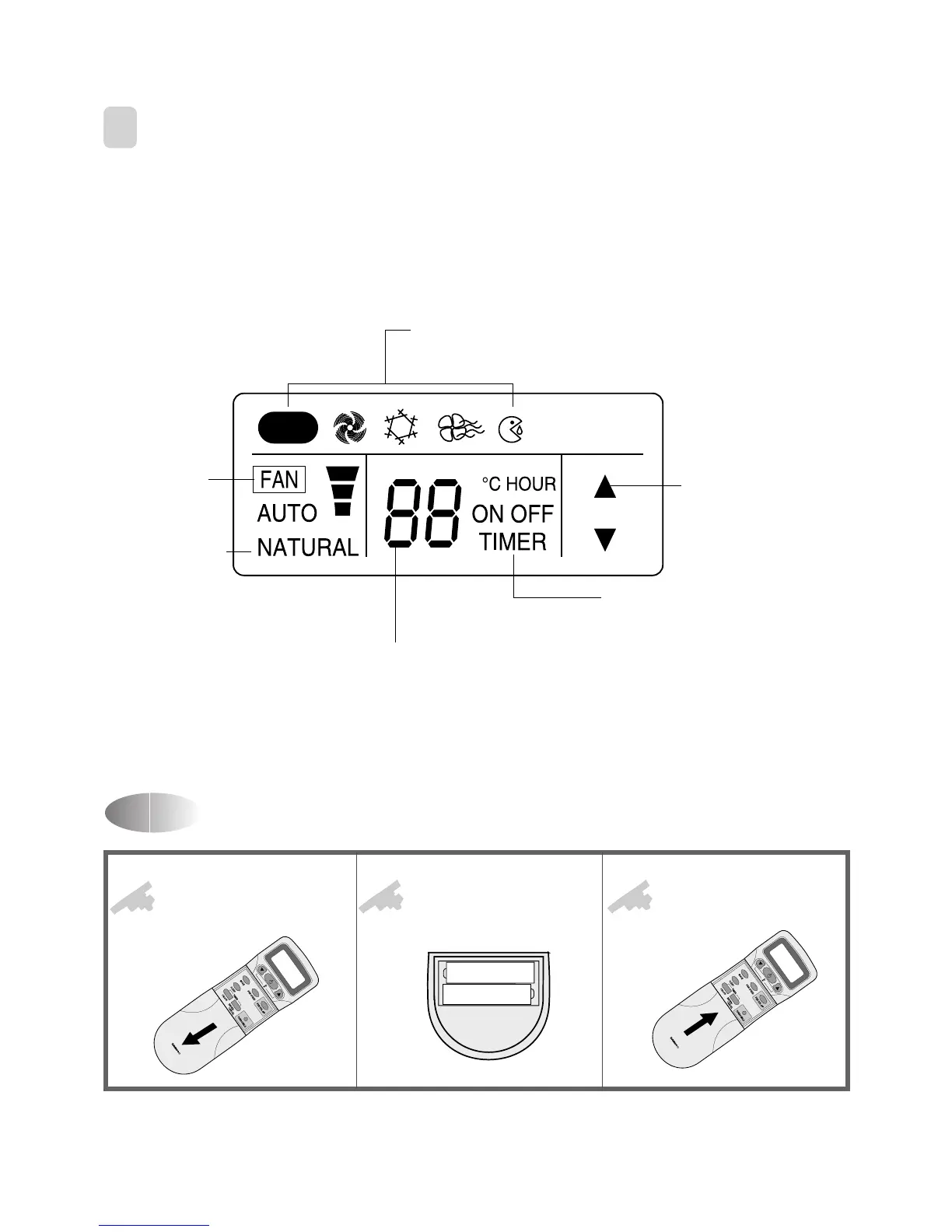
Replacing Batteries
3
REMOTE CONTROLLER DISPLAY
Open the cover after
pressing the arrow
direction and pulling out.
Put the drycell by
+
-
direction.
Close the cover after
pushing into arrow
direction.
1
2
3
REMOTE CONTROLLER
+
+
REMOTE CONTROLLER
¡ DSB-070L/DSB-091L/DSB-121L
MODE Indicators (Auto/Quick/Cool/Fan/Dehumidifier)
Lights to indicate the mode selected.
TIMER Indicators (Include sleep)
Lights to indicate the timer function mode.
TEMPERATURE & RESERVATION TIME lndicator
Lights to indicate the temperature or time.
FAN DIRECTION Indicators
Lights to indicate the
fan direction.
NATURAL Indicator
Lights to indicate the
speeds simulating a loreeze.
FAN Indicators
Lights to indicate
the fan speed.
AUTO


Related product manuals