77
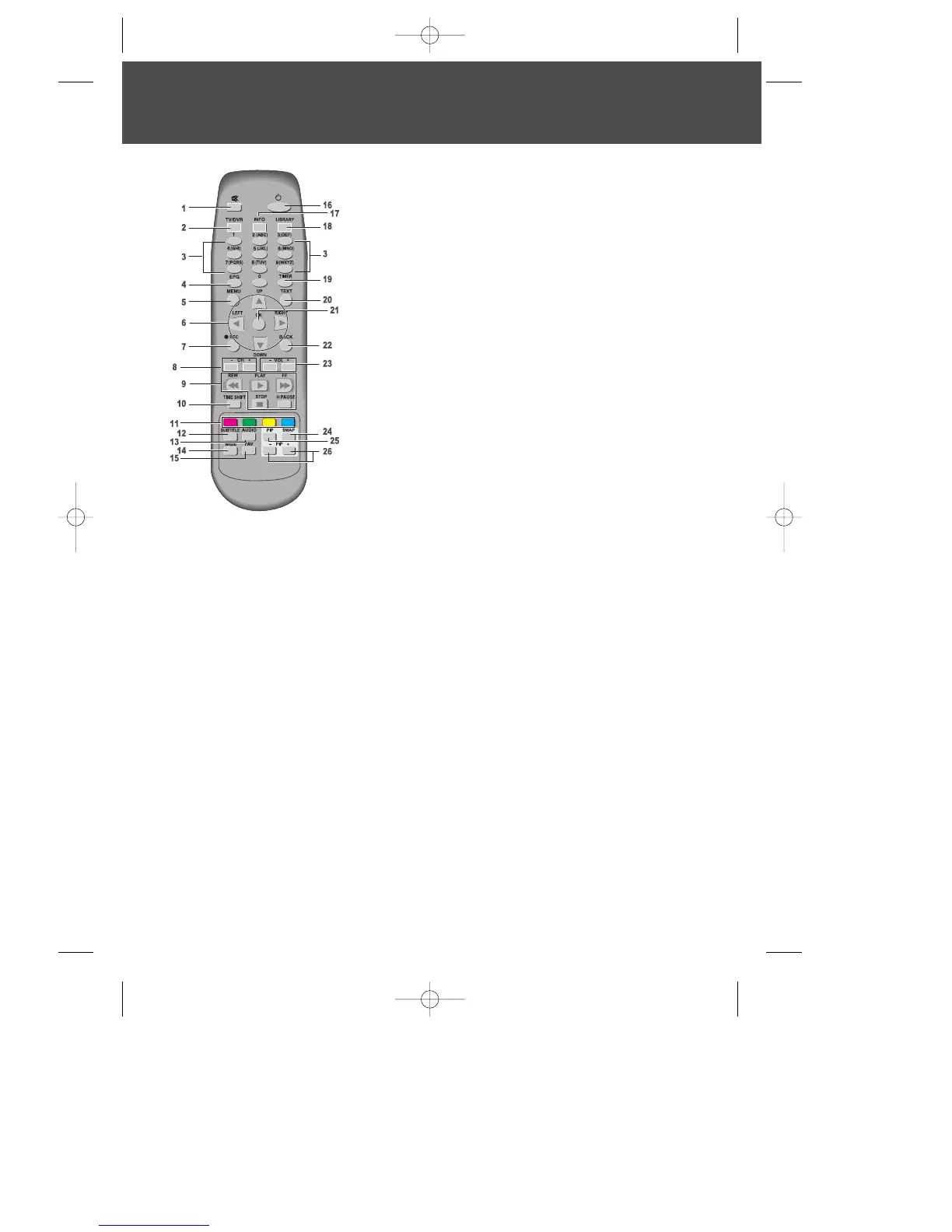
1 Mute
; pauses the audio temporarily.
2 TV/DVR
; switches between DVR and TV.
3 Number buttons
4 EPG
; Electronic Programme Guide
5 Menu
; choose and change a wide range of PVR’s
features. Or exit the menu.
6 Arrow buttons
; allows you to move through
menu’s. Or navigates in playback mode.
7 Record
; initialises the record - see relevant section
in this manual.
8 Channel +/-
; allows you to change channel.
9 Playback control buttons
; Includes Play, Fast
Forward, Rewind, Pause and Stop.
10 Time Shift
; activates time shift function -see
relevant section in this manual)
11 Colour buttons
; used for selecting interactive
applications.
12 Subtitle
; switch ON/OFF programme subtitles.
13 Audio
; displays audio language menu.
14 Wide
; sets display format.
15 FAV
; moves to favourite TV channels. (List 1 - List 2...)
16 Standby
; switches between operation and standby modes.
17 Info
; displays information on the current and next programs on the channel.
18 Library
; displays Recordings library menu.
19 Timer
; accesses the timer programming channels.
20 TEXT
; enters TeleText service.
21 OK
; selects channel list or confirms the selected operation.
22 BACK
; exits from TeleText service.
23 Volume +/-
; allows volume control.
24 Swap
; swaps the TV image between the main and the PIP screen.
25 PIP
; displays the picture in picture (PIP) screen.
26 PIP+/-
; changes the PIP Channel.
Remote Control
DWBP-B3L1KA-AGN 2007.10.1 4:58 PM ˘ ` 7 mac001 1200DPI 90LPI


 To Next Page