4
Chapter 1 :
Overview of Your Equipment
CHAPTER
1
Overview of Your Equipment
Your TV comes with a remote control. The section below summarizes the buttons,
controls, and terminals that you will use with your TV.
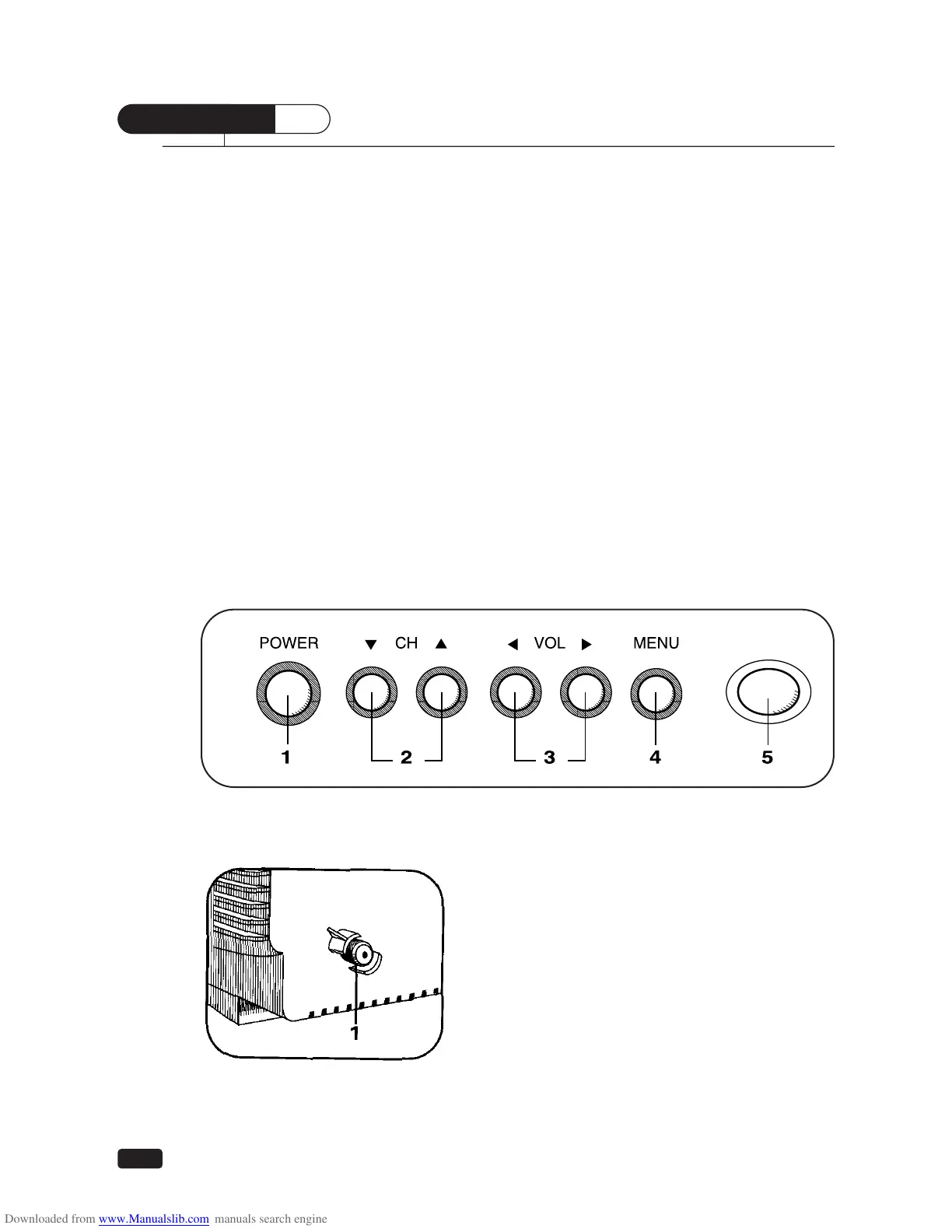
Your TV's Front Panel
1 POWER
Use this button to turn your TV on or off.
2 ▼CH▲
Use these buttons to change channels on your TV, or to select items in the menu
system.
3 CVOLB
Use these buttons to change your TV's volume, to activate selections in the menu
system, or to change audio and video settings.
4 MENU
Use this button to turn the TV's menu system on and off.
5 Remote control receiver
This receiver receives a signal from your remote control. Do not block it.
Your TV's Back Panel
1 Antenna terminal
Use this terminal to attach an antenna or cable
system to your TV.





 To Next Page