8
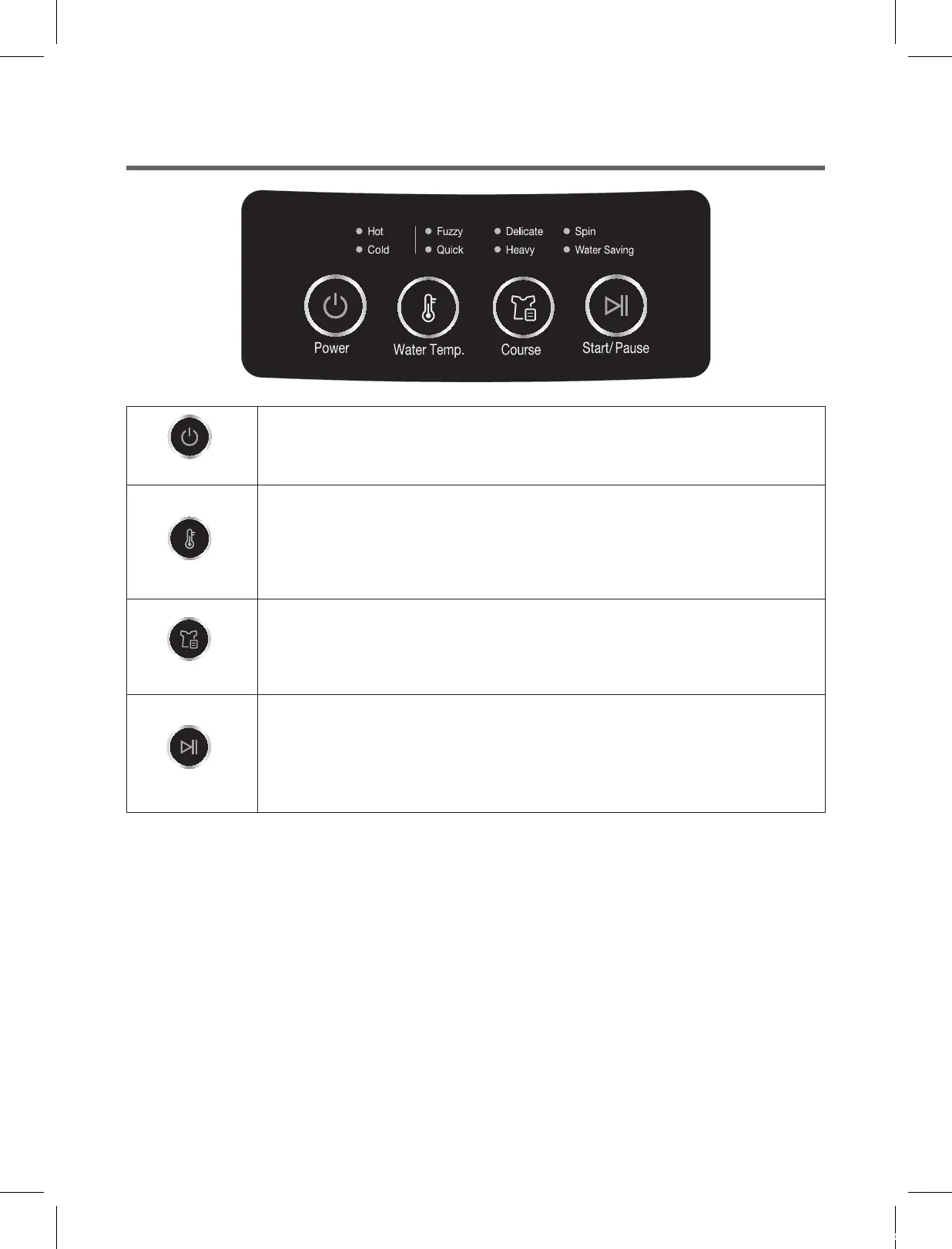
• Press this button to turn the power 'ON' or 'OFF'.
• This button can be used to add water level by 1 level and add rinse by 1
level.
• As the button is pressed, the program will be repeated.
rinse+
→
water+
• It can be used to select the full-automatic program.
• As the button is prassed, program will be selected by following order:
Fuzzy
→
Quick
→
Delicate
→
Heavy
→
Spin
→
Water Saving
• Operation and temporary stop is repeated as it is pressed.
• When you want change program in operating;
press the "START/PAUSE" button
→
select the program that you want to
change
→
press the "START/PAUSE" button again.
THE FUNCTIONS OF THE CONTROL PANEL
Power
Start/Pause
Course
Water Temp.
Water Temp.
Course
Start/Pause
DWF-ELC55BGN,DWF-ELC55GPN(영)_호주향.indd 8 16. 7. 8. 오후 12:08


 To Next Page