8
CONTENTS REMARKS
- The actual inner temperature varies depending on the food status, as the indicated setting
temperature is a target temperature, not actual temperature within refrigerator.
- Refrigeration function is weak in the initial time.
Please adjust temperature as above after using refrigerator for minimum2~3 days.
REFERENCE : Please wait
for 2-3 seconds in order
to take final ice or drops
of water when taking out
cup from the pressing
switches after taking ice
or water.
4. “Super Freezer” button
When this button is pressed, the “QUICK” icon of freezer compartment is ON.
(Yon can stop this function manually by pressing the button one more time.)
5. “Super Refrigerator” button
When this button is pressed, the “QUICK” icon of refrigerator compartment is ON.
(Yon can stop this function manually by pressing the button one more time.)
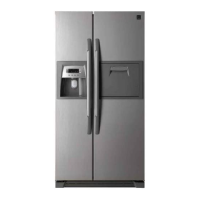
6. “Dispenser” button
1) Dispenser select function
You can select water, crushed ice or cubed ice by pressing the “Dispenser” button
2) Ice maker lock function
If you don’t want to produce ice cubes, press the “Dispenser” button till the “ICE MAKER
LOCK” icon is turn on.
- Every time you press the “Dispenser” button, the icon changes in a circulating order of
WATER - CRUSHED ICE - CUBED ICE - ICE MAKER LOCK - WATER
- The dispenser doesn’t operate while door is open.
3) Filter reset function
- After 6-months from the power is connected to the refrigerator, the “FILTER CHANGE”
icon is light up.
- If you have changed the filter after 6-months of use or want to reset the filter display,
press and hold the “Dispenser (Filter Reset)” button 3 seconds or more and the “FILTER
CHANGE” icon will be turn off.
6. “Lock” button
1) If you want to lock other buttons, press the “Lock” button and “LOCK” icon will be turn on.
No buttons other than “Lock” button will be work.
2) To disable the lock function, press and hold the “Lock” button for 3 seconds or more.



 To Next Page