EasyManua.ls Logo

Daewoo KOR-804M - Page 38

Daewoo KOR-804M
57 pages
Print Icon
To Next Page IconTo Next Page
To Previous Page IconTo Previous Page
Loading...
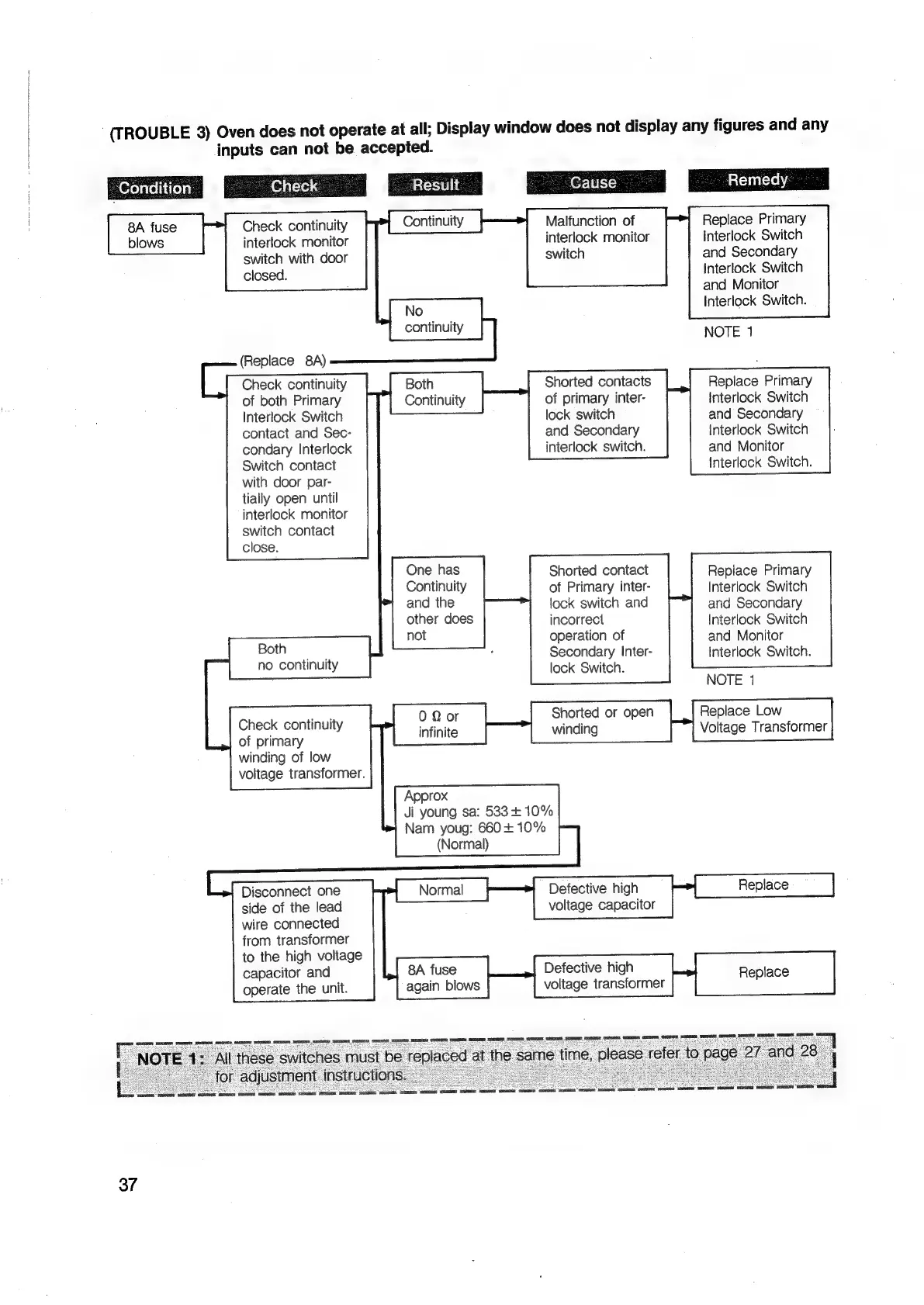
‘(TROUBLE
3)
Oven
does
not
operate
at
all;
Display
window
does
not
display
any
figures
and
any
inputs
can
not
be
accepted.
x
cc
cc
No
continuity
Both
Continuity
_
Condition
Malfunction
of
interlock
monitor
switch
Replace
Primary
Interlock
Switch
and
Secondary
Interlock
Switch
and
Monitor
Interlock
Switch.
Check
continuity
interlock
monitor
switch
with
door
closed.
(Replace
8A)
Check
continuity
of
both
Primary
Interlock
Switch
contact
and
Sec-
condary
Interlock
Switch
contact
with
door
par-
tially
open
until
interlock
monitor
switch
contact
close.
Replace
Primary
interlock
Switch
and
Secondary
Interlock
Switch
and
Monitor
Interlock
Switch.
Shorted
contacts
of
primary
inter-
lock
switch
and
Secondary
interlock
switch.
One
has
Continuity
and
the
Shorted
contact
of
Primary
inter-
lock
switch
and
other
does
incorrect
not
operation
of
Both
:
Secondary
Inter-
RO
COnOUNy
lock
Switch.
NOTE
1
0
Qor
Shorted
or
open
Replace
Low
infinite
winding
Voltage
Transformer
Approx
Ji
young
sa:
533+
10%
Replace
Primary
Interlock
Switch
and
Secondary
Interlock
Switch
and
Monitor
Interlock
Switch.
Check
continuity
of
primary
winding
of
low
voltage
transformer.
Nam
youg:
660
+
10%
(Normal)
voltage
capacitor
8A
fuse
Defective
high
Replace
again
blows
voltage
transformer
Disconnect
one
side
of
the
lead
wire
connected
from
transformer
to
the
high
voltage
capacitor
and
operate
the
unit.
37

Related product manuals