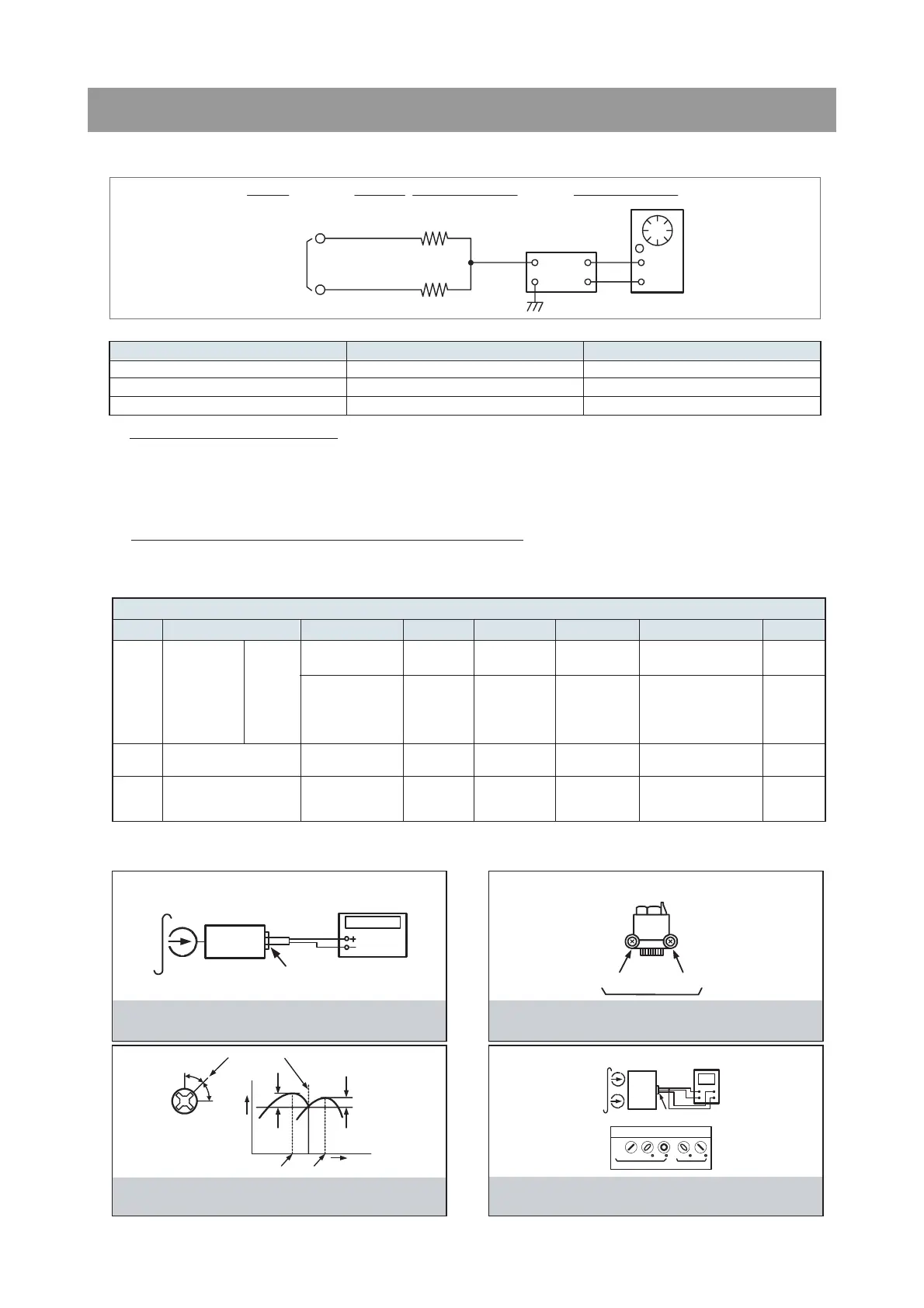
1. TAPE SECTION
Test Tape be used
HEAD ADJUSTMENT (AZIMUTH)
1. 10KHz test tape(example: MTT-114N) must be used for this adjustment.
2. Connect to VTVM or oscilloscope to the headphone jack or speaker terminal.
3. Press the play button.
4. Adjust the azimuth by using a screw driver to maintain the max. L&R output voltage.
5. Adjust tape A(1), tape B(2) respectively, Please secure the azimuth position by using locking paint.
RECORDING BIAS OSCILLATOR FREQUENCY ADJUSTMENT
1. Connect the frequency counter to TP603, GND.
2. Press the REC button.
3. Adjust L603 to obtain 80 KHz
±
100Hz
Tape Contents Use
MTT-111N 3 KHz Tape Speed Adjustment
MTT-114N 10 KHz Head Azimuth Adjustment
MTT-5511 Blank Record Frequency Property
VTVM
Scope
R-CH
L-CH
47 kohm
47 kohm
Input Level
Measurement
Point
Input Point
Output Level
Measurement
Point
FIG. 1 : Tape Speed & Record Bias Oscillator
Frequency Adjust Circuit
Test Tape : MTT-111N(3kHz)
MTT-5511(Blank)
Frequency Counter
Output Level
Measurement Point
Set
FIG. 2 : Tape Azimuth Adjust Location
(Record/Playback Head)
FIG. 3 : Tape Azimuth Adjust Head Screw & Waveform
FIG. 4 : Tape Azimuth Adjust Circuit & Waveform
Forward
Side
Reverse
Side
Adjust with Frequency
Counter Connected
L-CH
Peak
R-CH
Peak
Screw
Angle
Output Level
within
1 dB
within
1 dB
L-CH
Peak
R-CH
Peak
Screw Angle
VH
Oscilloscope
L-CH
Output Level
Measurement Point
Set
Test Tape
MTT-114N
(10kHz)
Screen Pattern
In Phase 45 90 135 180
Good Wrong
counter connected.



 To Next Page