How to Charge the Battery
Charging Time
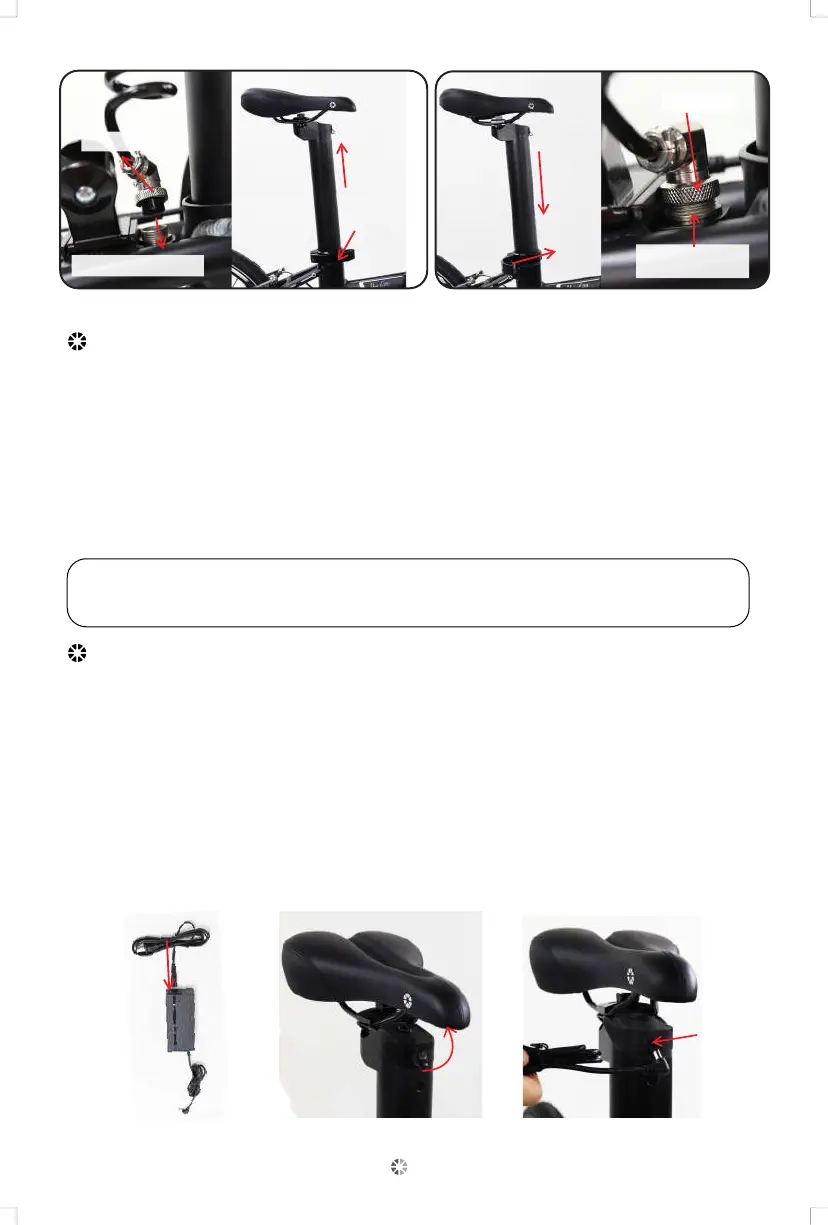
1.Unscrew
2. Then pull down
3. Remove
seatpost
4. Pull up
slowly
1.Slowly
pull down
2. Lock
3. Press tightly
upward
4. Tighten
Remove A ssembl e
Only use the battery charger that was supplied with the Unio E20. Use of any
other battery charger voids your warranty and may result in severe damage
to the battery and electrical system of the bicycle, and may cause a fire hazard.
Make sure the voltage specification of the changer matches your local voltage.
Remove the cover of the connector and connect the battery charger. Fully
charge the battery for at least 12 hours at the first time of purchase.
Charger LCD Indication: The Red light indicates that the battery is charging.
The Green light indicates that the battery is fully charged.
Remove the charger as shown in figure
1. Press the battery switch and turn off the power.
2. Connect the charger directly to the sub-line (both positive and negative
can plug in) as shown in figure.
3. Pull the protective cap off the battery charging port under the rear tube of
the pedelec frame as shown in figure.
4. Insert the charging port into the battery charging port, then insert the power
plug into an electric outlet for charging. (A red indicator light means charging is
in progress. A green indicator light means that it has been fully charged, or
abnormal charging.)
Figure 1 Figure 2 Figure 3
NOTE: While the seatpost battery is removed for charging,
do not fold the Pedelec and use the kickstand to support it.
11


 To Next Page