
 Need help?
Do you have a question about the Dahua Technology ARA12-W2 and is the answer not in the manual?
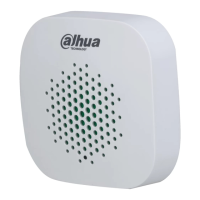
The Wireless Siren is an indoor siren designed to provide loud alarms during alarm events, serving as a danger warning and intrusion deterrent. This manual outlines its functions, usage, and maintenance features to ensure proper application and longevity.
The primary function of the Wireless Siren is to emit a loud alarm when an alarm event occurs, providing an immediate and audible warning. It integrates with a central hub system, allowing for remote configuration and status monitoring. The siren features an On/Off button for manual control, a tamper button that reacts to the detachment of the body, and an indicator light that communicates various operational statuses.
The siren's alarm sound duration can be configured from 3 to 180 seconds, and its volume level can be set to low, medium, or high, offering flexibility to suit different environments and preferences. When enabled, the siren can also flash green every three seconds in arming mode, indicating that the detector is armed. In the event of an alarm, the indicator light will show solid green.
The device supports pairing with a hub, which involves scanning a QR code and following on-screen instructions through the DMSS App. Once connected, the siren's parameters can be configured, including its device name, assigned area, and control permissions. It also supports signal strength detection to ensure optimal placement and reliable communication with the hub. A speaker test function is available to verify the alarm's volume level.
For power management, the siren relies on batteries, and it is crucial to use the specified type to prevent fire or explosion risks. The device also supports cloud updates, ensuring that its firmware remains current with the latest security patches and features.
To use the Wireless Siren effectively, it is essential to follow the installation and connection procedures outlined in the manual. Before installation, the siren must be connected to the hub, and the signal level at the intended installation location should be checked. A signal strength of at least two bars is recommended for reliable operation. The siren is designed for indoor use and should be installed in a well-ventilated area, away from direct sunlight, heat-generating devices, and humid, dusty, or fuliginous environments.
When connecting the siren to the hub, users need to install the DMSS App on their phone and ensure they have the latest version. An account must be created, and the hub added to the application. The hub should have a stable internet connection and be disarmed before pairing the siren. The pairing process involves scanning the QR code on the siren, switching it on as prompted by the app, and waiting for the pairing to complete. After successful pairing, users can customize the siren's name and assign it to a specific area.
The siren's operational status can be viewed through the DMSS App, providing information such as battery level, anti-tampering status, online status, alarm volume level, alarm duration, and program version. The indicator light on the siren itself provides visual cues: flashing green quickly for pairing mode, solid green for an alarm event, and showing green every three seconds for arming mode. The tamper button acts as a security feature, reacting if the siren's body is detached, which helps prevent unauthorized removal or tampering.
Maintaining the Wireless Siren involves several key aspects to ensure its continued functionality and security. Regular checks of the device's status through the DMSS App are recommended, particularly monitoring the battery level. The manual specifies different indicator states for battery level: fully charged, sufficient, moderate, and insufficient, guiding users on when to replace batteries. It is crucial to replace batteries with the same type as specified to avoid potential hazards.
Firmware updates are an important maintenance feature. The siren supports cloud updates, allowing users to keep the device's software up-to-date. This ensures that the siren benefits from the latest security patches, bug fixes, and performance enhancements. Users are encouraged to enable "auto-check for updates" if available or regularly check for new firmware releases from the manufacturer.
Physical protection of the device is also a maintenance consideration. The siren should be installed in a stable location to prevent it from falling and should not be exposed to liquids. The tamper button serves as a built-in maintenance feature, alerting users if the device has been physically interfered with.
From a cybersecurity perspective, the manual emphasizes several recommendations that contribute to the overall maintenance and security of the device. These include using strong, unique passwords for the system, regularly changing passwords, and setting up password reset information. Keeping the client software updated is also crucial. Enabling account lock features, changing default HTTP and other service ports, and enabling HTTPS for secure communication are additional steps to maintain a secure network environment for the siren and associated devices. Regularly checking online users and device logs can help identify unauthorized access or suspicious activities, contributing to the long-term security and reliability of the system.
 General
| Model | ARA12-W2 |
|---|---|
| Category | Security System |
| Wireless Frequency | 433 MHz |
| Operating Frequency | 433 MHz |
| Tamper Protection | Yes |
| Dimensions | 90.0 mm × 32.0 mm × 21.0 mm (3.54" × 1.26" × 0.83") |
| Weight | 31 g (0.07 lb) |
| Detection Range | 12 m (39.37 ft) |
| Detection Angle | 110° |
| Operating Temperature | -10°C to +55°C |
| Operating Humidity | 10%–90% (RH), non-condensing |
| Wireless Protocol | Dahua RF |
| Power Supply | 3V CR123A Lithium Battery |

 To Next Page